
Install and Configure Gainsight CS SSO Managed Package
This article explains how admins can install the CS SSO Managed Package from Salesforce AppExchange to enable Salesforce-based authentication for supported Gainsight plugins and mobile applications.
Overview
The Gainsight CS SSO Managed Package contains an External Client App (ECA) that enables secure access to Gainsight Customer Success within supported Gainsight plugins and mobile application using Salesforce authentication.
After installing the package, Salesforce authentication becomes available automatically for supported Gainsight plugins and mobile application, allowing users to sign in with their Salesforce credentials.
This package enables Salesforce authentication for Gainsight plugins and mobile applications. It does not replace the Gainsight Customer Success managed package or the Gainsight CS Data Connector, which are used for data integration between Gainsight Customer Success and Salesforce.
When to Install the CS SSO Managed Package
Install the CS SSO Managed Package if the users access the Gainsight Customer Success application through Gainsight plugins and mobile application.
If none of the above apply, you do not need to install this package. Users who access Gainsight only through the Gainsight NXT web application are not impacted by the CS SSO Managed Package.
Installing this package when it is not required does not affect core Gainsight functionality, but it does not provide any additional benefit.
How the CS SSO Managed Package Fits into Gainsight
Gainsight provides multiple Salesforce AppExchange packages, each serving a specific purpose. The CS SSO Managed Package is installed in addition to other required Gainsight packages and focuses only on authentication for extended experiences.
This package:
- Works alongside the Gainsight Customer Success managed package.
- Does not replace the Gainsight CS Data Connector, which is used for Salesforce data synchronization.
- Is installed only when Salesforce-based login is required for Gainsight plugins or mobile applications.
Installing the CS SSO Managed Package does not change how users access the Gainsight NXT web application or how Salesforce data syncs to Gainsight.
Prerequisites
Before installing the CS SSO Managed Package, ensure that the user installing the package has permission to install AppExchange packages in Salesforce. This package is typically used after setting up the Salesforce Connector using the Gainsight CS Data Connector package. To install Gainsight CS Data Connector Package, refer to the Install Gainsight CS Data Connector Package article.
If your environment already uses Salesforce-based authentication for Gainsight plugins or mobile apps, confirm that the required Salesforce configuration and user access are already configured.
If the Salesforce user profile has Login IP Ranges configured, Gainsight's trusted IPs must be added to those ranges. This ensures that users can successfully access Gainsight plugins such as Zoom, Chrome, and Outlook using Salesforce credentials. To add the IPs, navigate to Setup > Users > Profiles > [Profile Name] > Login IP Ranges in Salesforce. For the list of Gainsight IPs to be added, refer to the Gainsight IPs Allow Listing article.
The CS SSO Managed Package does not configure Salesforce data synchronization. If your environment requires Salesforce-to-Gainsight data sync, the Gainsight CS Data Connector must be configured separately.
Install the CS SSO Managed Package
Salesforce requires the Connected App to be installed before users can authenticate to Gainsight plugins or mobile applications. To enable Salesforce-based authentication for Gainsight plugins and mobile applications, install the CS SSO Managed Package using one of the methods below.
Option 1: Install Using Direct Installation Link (Recommended)
Using the installation link takes you directly to the installation page in Salesforce.
CS SSO Managed Package (All Regions)
Install this package if your users access Gainsight through Gainsight plugins (such as Email or Zoom integrations) or the Gainsight mobile application and authenticate using Salesforce credentials.
Installation link: Gainsight CS SSO Managed Package
After opening the link, continue with the installation steps below.
Option 2: Install via Salesforce AppExchange
- Log in to your Salesforce org with administrator credentials.
- From the App Launcher, search for AppExchange Marketplace and select it.

- In the AppExchange search bar, search for Gainsight CS SSO. The Salesforce AppExchange opens.
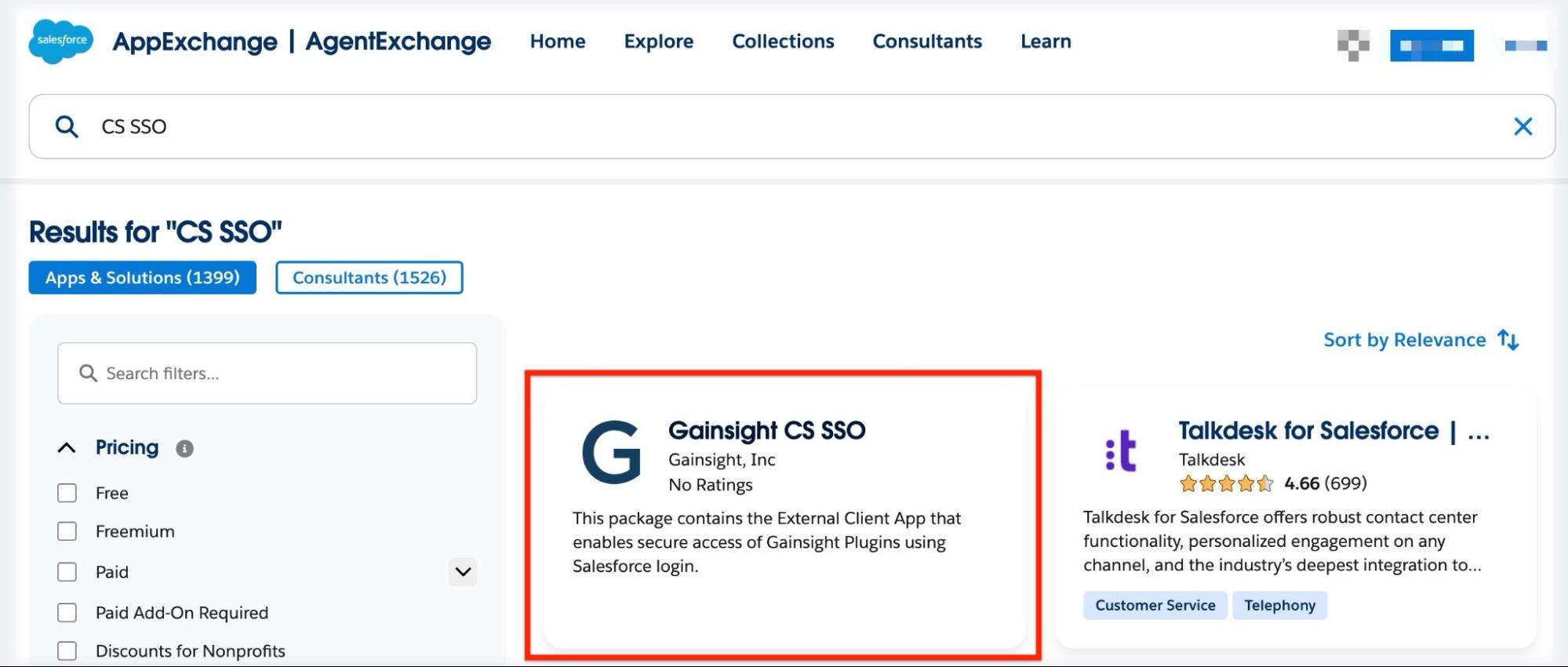
- Select the package published by Gainsight and select Get It Now.

After choosing one of the installation methods above, follow the steps below to complete the installation.
Complete the Installation
- On the installation page, select one of the following installation access levels:
- Install for Admins Only – Grants access only to Salesforce Administrators.
- Install for All Users – Grants access to all users.
- Install for Specific Profiles – Grants access only to selected profiles.
- Review the package details and click Install.

- Complete the installation.

After installation completes, confirm that the package appears under Setup > Installed Packages in your Salesforce org.
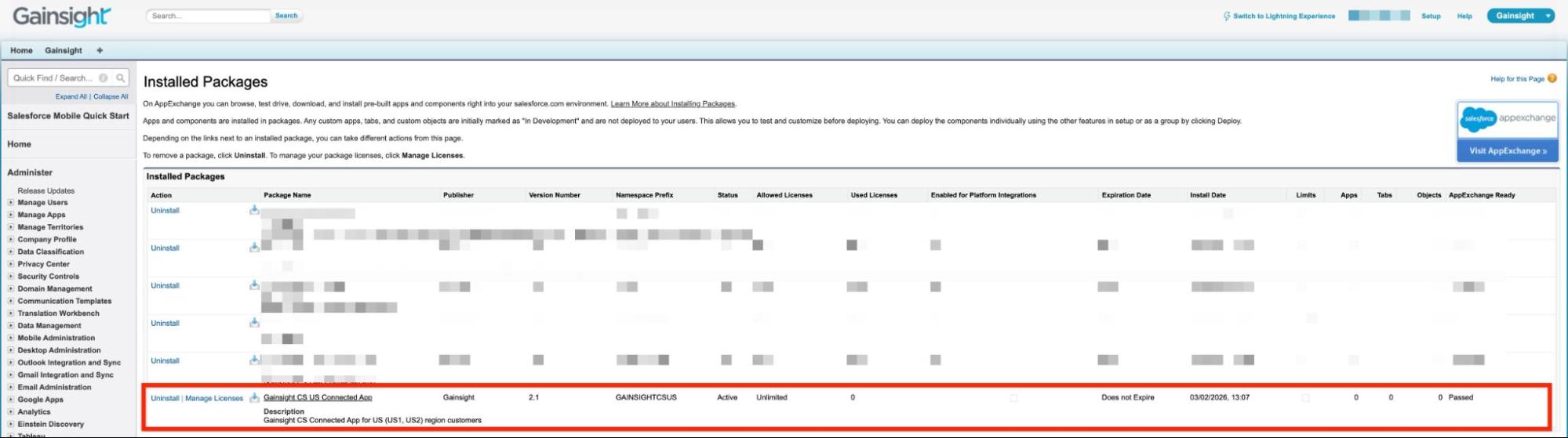
- If you select Install for Specific Profiles, ensure that the appropriate Salesforce users or profiles are later granted access to the Connected App within Salesforce.
- Failure to grant access to the required users may prevent successful authentication when accessing Gainsight plugins or mobile applications.
Verify CS SSO Managed Package Installation
After installation, verify that the Salesforce-based authentication is available for supported Gainsight experiences.
Follow these steps to verify the installation:
- In Salesforce, navigate to Setup > Installed Packages.
- Confirm that the CS SSO Managed Package appears in the list of installed packages.
- Access a supported Gainsight plugin or mobile application.
- Verify that the authentication flow prompts users to sign in using their Salesforce credentials.
If the package appears under Installed Packages but Salesforce-based authentication does not occur as expected, review your Salesforce authentication configuration or contact Gainsight Support for assistance.
Uninstall and Rollback
If you uninstall the CS SSO Managed Package, users can no longer authenticate to supported Gainsight plugins and mobile applications using Salesforce credentials.
Before uninstalling the package, ensure that:
- Users have an alternative supported authentication method available for accessing Gainsight plugins or mobile apps.
- You understand the potential impact on active users who rely on Salesforce-based authentication.
Uninstalling the CS SSO Managed Package does not affect:
- Access to the Gainsight NXT web application
- Salesforce-to-Gainsight data synchronization
If you are unsure about the impact of uninstalling this package in your environment, contact Gainsight Support before proceeding.
Additional Resources
For more information about installing and configuring Gainsight Customer Success in Salesforce, refer to Install and Configure Gainsight Customer Success in Salesforce.