
Q2 2026 Release Notes for Staircase AI
Release Date: Jun 11, 2026
Enhancements
Configure Health Score Event Modifiers for Renewal, Churn Notification, and Churn Risk
Staircase AI now lets admins modify the impact that renewal, churn risk, and churn notification events have on a customer's health score. Previously, these modifiers were fixed at system defaults, boosting or decreasing the overall Staircase AI account health score by +40 for renewal, -30 for churn risk, and -100 for churn events. A 90-day time decay period applied uniformly across all event types. Due to this, the boost or decrease lessens over time and finally drops off from the health score calculation 90 days from the event.
With this enhancement, you can tune the overall account health score change for renewal, churn risk, and churn notification events so the health score reflects how your organization evaluates customer health.
This setting is optional and our best practice recommendation is to keep these at the default settings.
Key Enhancements
- Custom Modifier Values: Replace fixed system defaults with custom modifier values for renewal, churn risk, and churn events.
- Segment-Level Configuration: Apply tailored modifier settings for specific account segments to reflect different customer tiers.

Key Benefits
- Provides additional health scoring customization.
- Apply distinct criteria for enterprise, mid-market, and other account tiers.
Existing health scores retain previous default values until updated. Navigate to the Health Score configuration page to review and update the Modifiers section. Changes typically reflect in the UI within one hour.
For more information on score modifiers, refer to the Staircase AI Health Score article.
Query Child Accounts Directly from Ask Staircase
Ask Staircase now supports child account querying, allowing you to include data from all child accounts when analyzing a parent account. For organizations with complex account hierarchies, this eliminates the need to query each subsidiary individually and provides a consolidated view of insights across the entire account structure.
Key Enhancements
- Child Account Icon in Ask Staircase: Ask Staircase now includes an icon button inside the input box on parent account pages.
- When turned on: Ask Staircase includes data from the parent account and all its child accounts in the response.
- When turned off: Ask Staircase includes data only from the parent account.

- This icon button is available only on accounts that have child accounts configured.
- Child account pages and accounts without a hierarchy are not affected.
For more information, refer to the Ask Staircase article.
Configure Custom Prompts for AI Analysis
Staircase AI now lets you customize how AI analyzes and interprets your organizational data. With Custom Prompts, you can provide specific instructions that guide AI-generated insights to reflect your unique business context and priorities. This gives your team greater control over AI outputs, without requiring technical expertise or complex configuration.
Key Enhancements
- Custom Prompt Configuration: Admins can now define and manage their own instructions directly within Staircase AI, allowing them to guide how the AI processes and interprets data.
- AI Preference Settings: A dedicated Custom Prompts section is now available under Settings > Configurations > AI Preferences, providing a centralized location to manage prompt configurations.

- Expansion Analysis Support: Custom Prompts are applied to Expansion analysis, enabling teams to tailor AI-driven expansion insights to their organizational needs.
We will gradually add more areas where users will be allowed to add their custom prompts.
Key Benefits
- Teams can fine-tune AI analysis to reflect their unique business priorities, reducing reliance on generic interpretations.
- Teams can align AI-generated insights with how their organization defines and measures success.
- Teams can reduce the need for manual review and correction by guiding the AI with context-specific prompts.
For more information, refer to the Define Custom Prompts article.
Release Date: May 13, 2026
New Feature
Create Automations Using the Staircase AI MCP Server
Users can generate personal OAuth 2.0 credentials (Client ID and Client Secret) to authenticate LLM clients with the Staircase AI MCP server. This enables secure, programmatic access to Staircase AI data without a browser login, making it easier to integrate automated clients and LLM tools like Claude.
This capability supports system-to-system connections, allowing customers to automate processes and enable machines, not just users, to interact with Staircase AI.

What’s New
- OAuth 2.0 Client Credentials Flow: Generate a Client ID and Client Secret from Profile settings and use them to obtain a short-lived JWT access token.
- Programmatic Access to MCP Server: Authenticate LLM clients to interact with the Staircase AI MCP server without manual login.
- Access to MCP Tools: Retrieve real-time customer insights using MCP tools, including account health summaries, risk signals, and stakeholder changes.
- User-Scoped Credentials: Credentials are tied to the user who creates them, ensuring controlled and traceable access.
- Credential Management: Revoke unused credentials at any time from the MCP credentials screen.

Key Benefits
- Connect AI tools and automated workflows to Staircase AI data without browser-based authentication.
- Maintain secure access with short-lived tokens, user-scoped credentials, and easy revocation
- Enable real-time querying of customer data for smarter, data-driven decisions
- Simplify setup for programmatic use cases, reducing friction for teams building AI-powered workflows
- The Client Secret is displayed only once at creation. Store it securely. If lost, you must delete and recreate the credential.
- If MCP is deactivated at the organization level, all existing credentials will stop working immediately.
For more information, refer to the Create Automations Using the Staircase AI MCP Server article.
Enhancement
Detect Events with Greater Accuracy Using the Upgraded AI Engine
Staircase AI has rebuilt the underlying language model and prompt architecture that powers Lifecycle Events. The upgraded engine detects events with greater precision, reduces false positives, and improves reliability across all event types. It now sources signals from all communication types for all events.
What’s New
- Control Event Detection with Sub-Signal Tuning: Admins can now view and manage the individual sub-signals that make up each event type, giving them granular control over what triggers an event. Additionally, they can use the checkbox in the Included Signals section of each event type, to turn on or turn off sub-signals as needed.

All sub-signals are turned on by default. Changes apply to new events only and do not affect existing events on the timeline.
- Rename Event Types to Match Your Organization's Terminology: Admins can now rename any out-of-the-box event type to align with the language their team uses from Label field. Event names appear on the account timeline, in reports, and in notifications. Renaming events to familiar terms helps teams recognize and respond to signals faster.

- Review Signal Details and AI Explanations on Timeline: When users open a Lifecycle Event, the slide-out panel now displays the signal types that fired, an AI-generated explanation (when an explanation is available) of why the event was triggered, and the exact customer quote that caused it. This helps teams validate events and understand root cause without reading the full communication thread.
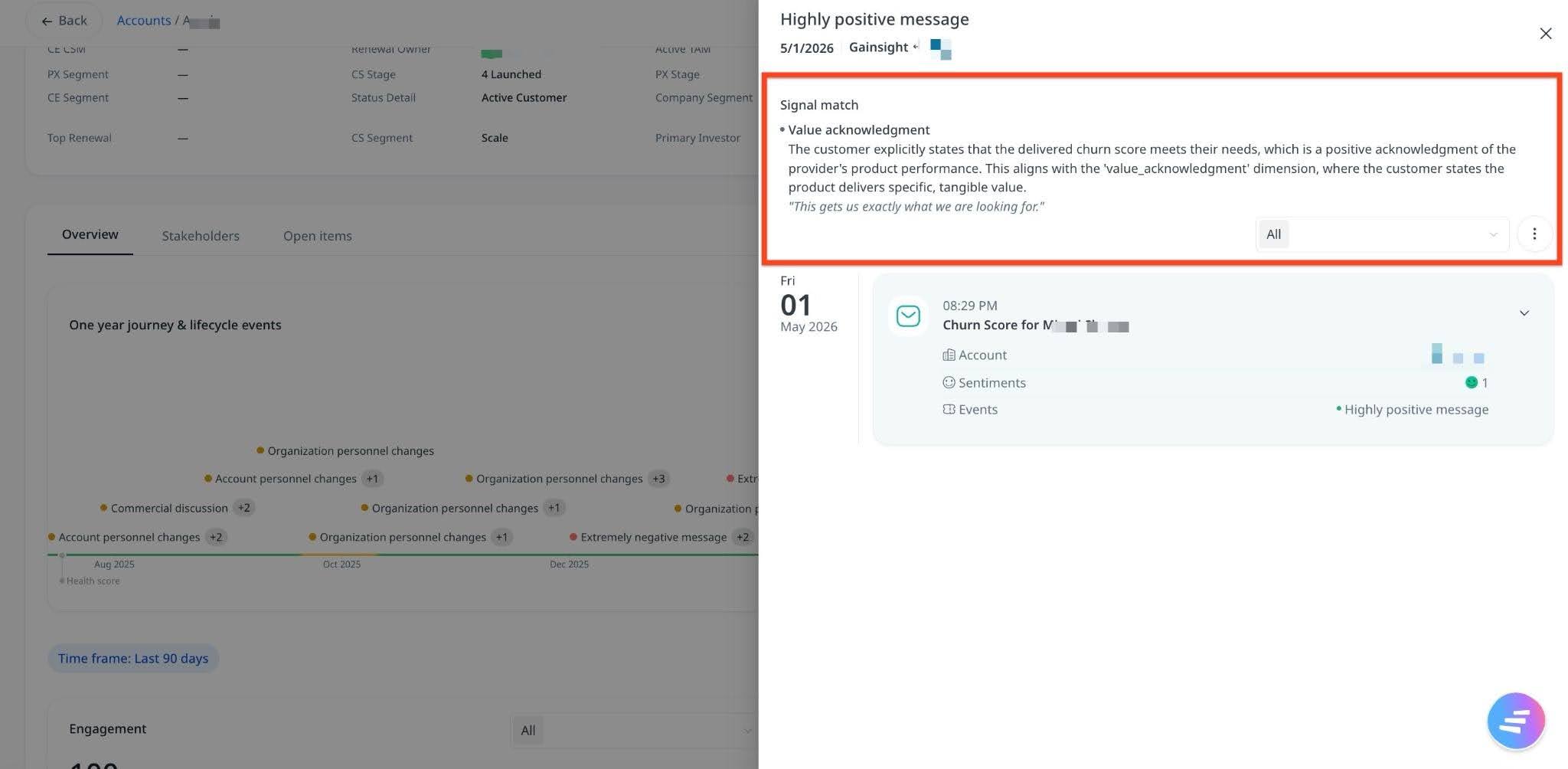
Signals are not generated for every event and do not apply to existing events.
- Analyze Signal Details Across Accounts in Lifecycle Events Report: The Lifecycle Events report includes two new columns—Signals and Direct quotes to identify patterns across your portfolio without opening individual accounts.

For more information, refer to the Lifecycle Events and Lifecycle Events Report articles.