Gainsight Release Notes Version 6.37 contains the following subsections:
Announcements: Describes important changes to the application that are implemented now or will be in the near future.
New: Introductions to new features in the release.
Enhancements (per module): Describes improvements made in the existing product capabilities.
Notes:
The modules in the Release Notes are categorized based on the following four product areas: Customer Success (CS), Customer Experience (CX), Revenue Optimization (RO), and Platform. The modules in each category are in alphabetical order. This is to ensure that the information in the release notes is more organized and easily searchable/consumable by our customers.
 : This symbol indicates that an enhancement originated as a customer suggestion from Gainsight Community.
 : This symbol indicates that the enhancement was made as part of the Horizon Experience (H) project.
 : Admin Controlled: Enhancement can be viewed only after the admin configures it in the product and makes it available for end users.
 : Automatic Update: End users have access to the enhancement without Admin configuration.
Summary List/Quick View
Type | List of Enhancements/New Features |
|---|---|
Announcements | |
Admin Controlled |
|
Automatic Update |
|
Announcements
SFDC LightWeight Package
SFDC LightWeight Package for NXT (with SFDC Connector) Customers
Gainsight introduces the new lightweight SFDC Package tailored for NXT customers:
In SFDC Edition, the majority of functionality was developed on the force.com platform, utilizing 12 Apex Triggers, 99 Custom Objects, 213 Visualforce Pages, and 267 Apex Classes.
In Gainsight NXT, all functionality is developed and delivered via the NXT platform. However, customers accessing Gainsight NXT through SFDC still had to install the Gainsight NXT package. Along with the installation of the old package, many irrelevant SFDC components were also getting installed, resulting in bloatware.
To address this issue, Gainsight has introduced a lightweight package. This package includes zero Apex Triggers, one Custom Object, five Viusalforce Pages, two Visualforce Components, and 24 Apex Classes, all while retaining the full range of functionalities offered by NXT.
For detailed instructions on how to install this package or upgrade from the old package to the new lightweight version, please refer to the Install and Configure Gainsight CS in Salesforce article.
Improved Navigation Menu
Improved Navigation Menu for Enhanced User Experience
We are thrilled to introduce an exciting update to our NXT navigation menu, designed to enhance your user experience. The menu has been carefully shuffled to provide a more intuitive and streamlined navigation flow, making it easier for you to access the features and functionalities you need.
This update aims to improve your overall navigation experience, allowing you to effortlessly find and navigate through different sections of our platform. Whether you are a new user or an experienced Gainsight application user, the restructured navigation menu will help you quickly locate the modules or feature areas you require, saving you valuable time and effort. For more information, refer to the Change Document - Left Navigation Menu Grouping Improvements article.
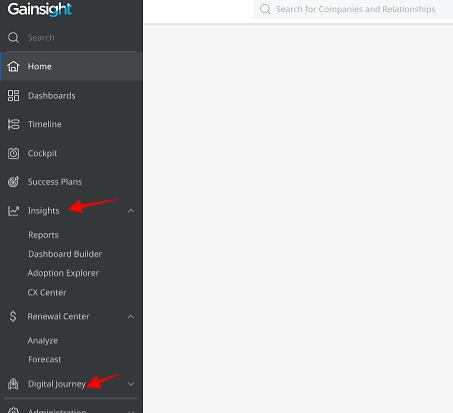
DISCLAIMER: Please note that as a result of the changes made to the navigation menu, there will be updates required in the documentation. Gainsight’s Technical Communication team anticipates these updates to be implemented over the next 1-2 quarters. During this period, there may be instances where the documentation does not accurately reflect the new navigation structure or menu grouping. Our team will be working diligently to ensure that the impacted documents align with the revised navigation structure and provide accurate information.
CSQL
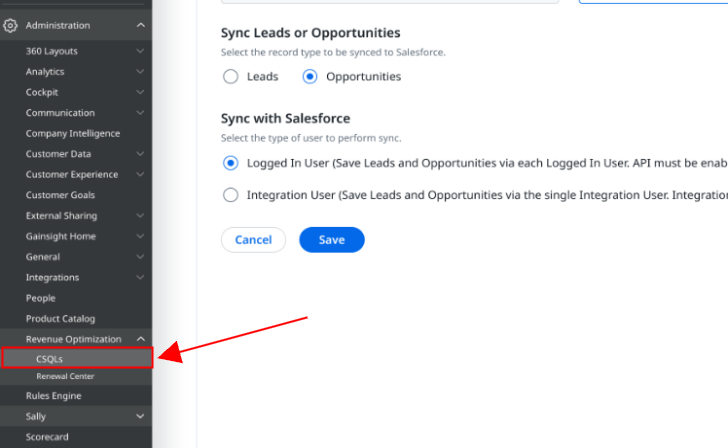
Leads Renamed to CSQLs in Revenue Optimization
In Administration > Revenue Optimization, the Leads feature is renamed to CSQLs. This enhancement aims to streamline the admin navigation flow and maintain consistency with the feature title and functionalities. It is particularly helpful for Gainsight users who create qualified leads as opportunities in Salesforce. By aligning the terminology, Gainsight attempts to eliminate confusion and enhance the usability of the CSQL feature.
The updated name appears in various product areas such as the C/R360 and Gainsight Home pages for end users, and the C/R360 Layouts and CSQL pages for admins.
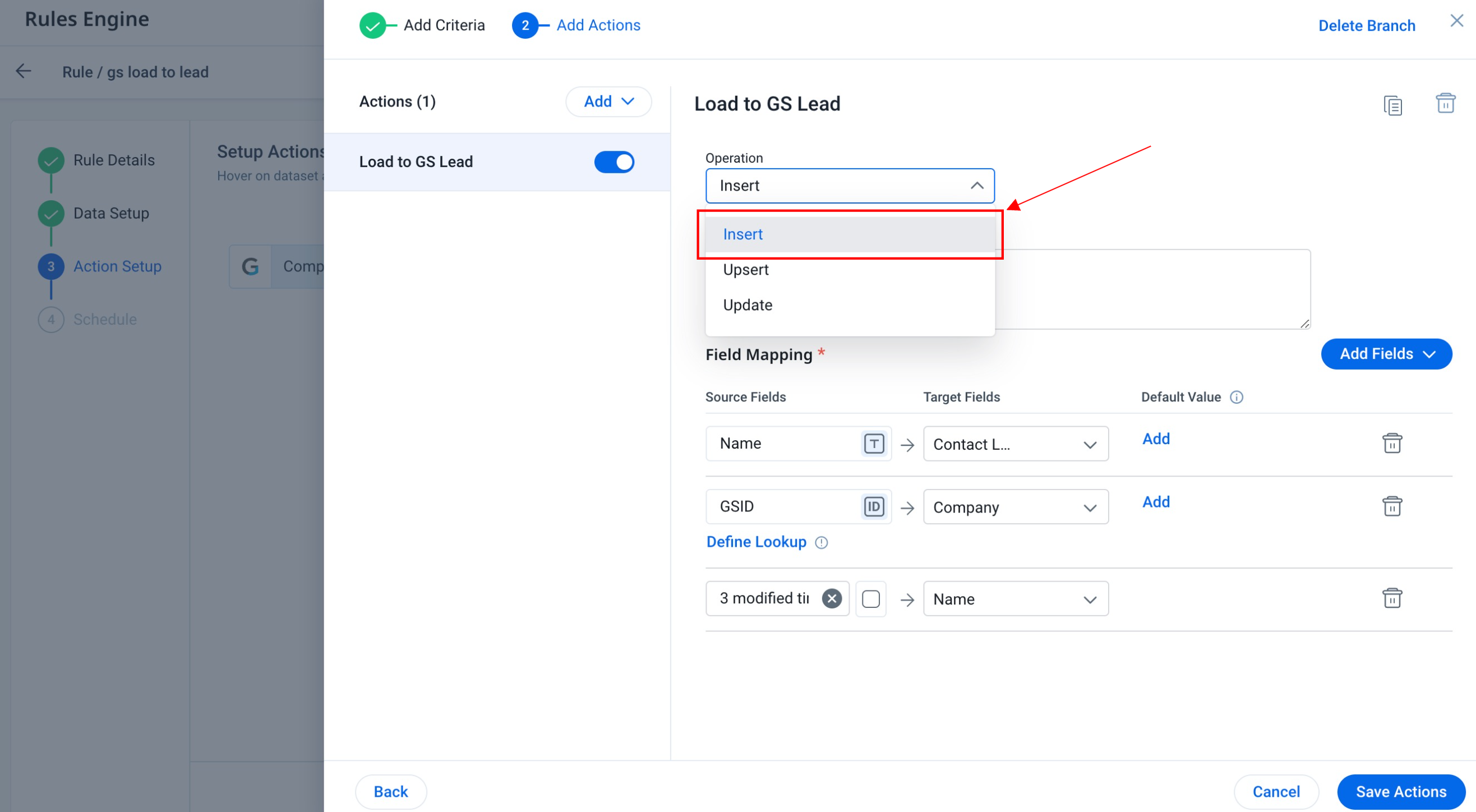
Insert Operation in the Load to GS Lead Rule Action
Administrators can now use the Insert operation in the Load to GS Lead rule action of Horizon Rules. This operation helps admins to populate the latest qualified leads data, every time the rule is run.
For more information on the insert operations, refer to the Load to GS Lead Action Type article.
Text Analytics [FKA CX Center]
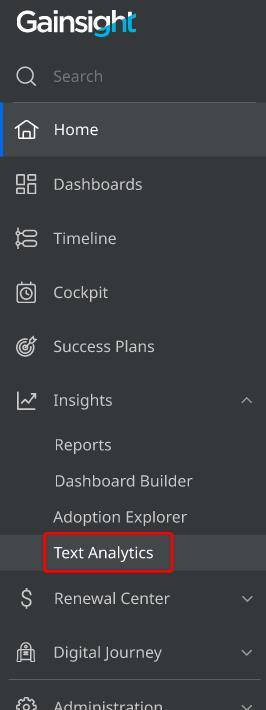
Introducing Text Analytics - Our Rebranded CX Center
Gainsight has rebranded CX Center to better reflect its enhanced capabilities and to align with Gainsight's vision of providing advanced analytics solutions. From now on, CX Center will be known as Text Analytics and available under Insights.
Text Analytics is more than just a name change; it represents our commitment to delivering powerful analytical tools and insights to enhance customer experience. With Text Analytics, the analysis and reporting capabilities will be taken to new heights, enabling users to uncover valuable insights from customer feedback and drive data-informed decision-making.
For End Users:
For Admins:
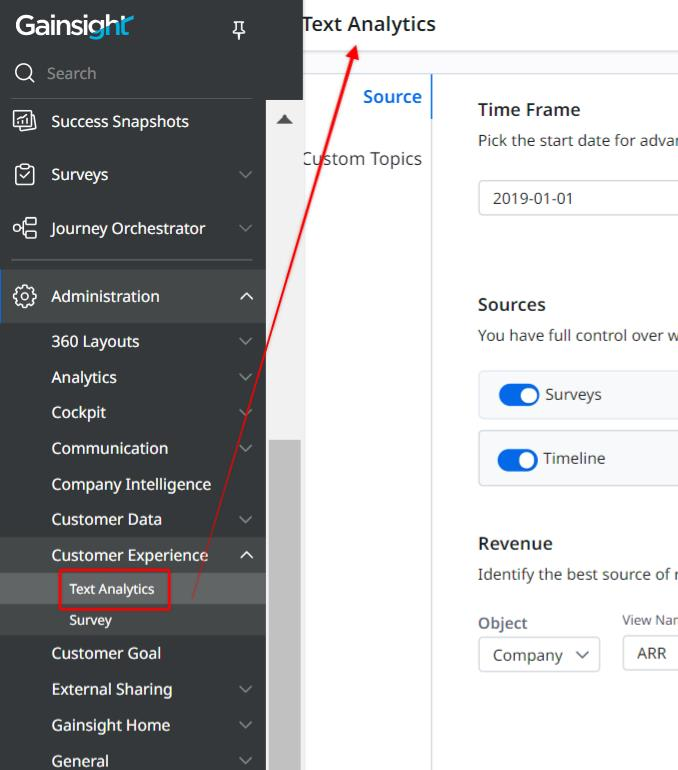
IMPORTANT: Please note that due to the recent changes made to the feature name, updates will be required in the documentation. Gainsight's Technical Communication team acknowledges the need for these updates, which are expected to be implemented in the next quarter.
Renewals [FKA Renewal Center]
Renewal Center Renamed to Renewals
In alignment with Gainsight's navigation menu update, we are thrilled to announce that Renewal Center is renamed to Renewals in the end-user navigation menu. The new naming convention is an apt definition of the functionality of tracking upcoming customer renewals. The feature title Renewals is now visible in all the end-user areas of the product.

IMPORTANT: Please note that while the name change will be reflected for end users in this release, the feature remains as Renewal Center under the Administration section.
Rules Engine
Migrational Phases from Bionic Rules to Horizon Rules
The following table describes the upcoming milestones related to the migration of Bionic rules to Horizon rules:
Date | Milestone |
|---|---|
January 2024 Release | Marks the conclusion of creating any new Bionic rules. Bionic rules will remain operational and can still be modified. |
From April 2024 | Gainsight will begin auto-migration of remaining Bionic to Horizon rules post the April release beginning in May 2024. More details to come leading up to the April 2024 Release date. Please note bionic rules will no longer exist after the auto-migration. |
July 2023 Release | New tenants will only be provisioned with Horizon Rules Engine. (Note: Exceptions can be allowed for existing customers with a new Sandbox provisioning use case.) |
For more information on the migration phases, refer to the Rules Engine Horizon Experience - FAQs article.
Data Management Dependencies and Analyzer now include Horizon Rules
Gainsight has now added Horizon Rules in Data Management Dependencies to track the dependency of a specific Horizon Rule and its fields.
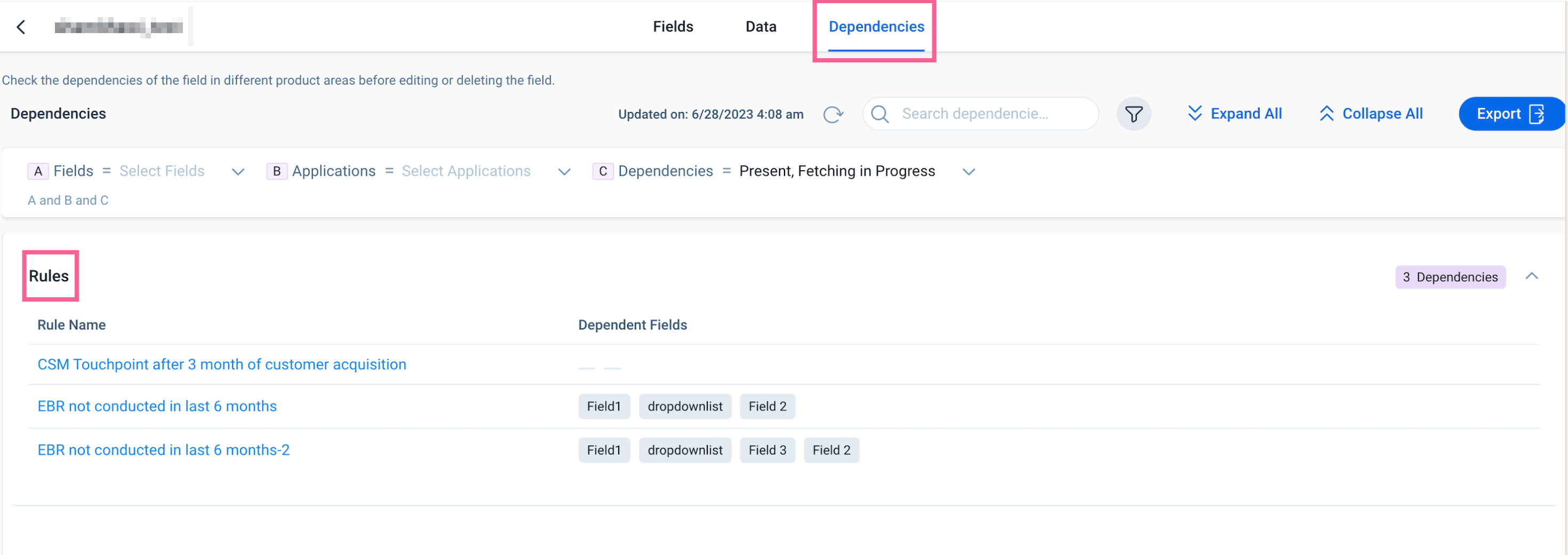
The Gainsight Analyzer now includes Horizon Rules. The analyzer enables Gainsight Admins to identify the rules that cause failures or identify inefficiencies in performance. It also includes recommended actions to improve performance. This helps Gainsight Admins to analyze which rules are broken and need debugging.

Cockpit and Playbooks
Playbook Redesign
Gainsight introduces a redesigned Playbook with Horizon Experience to simplify and improve the overall user experience. For more information, refer to the Cockpit and Playbooks section.
Connectors 2.0
Connector Jobs Enhancements
Gainsight introduces the Data Preview feature to see sample data for an object during job creation and Data Download during job execution, to empower implementation teams and reduce dependency on external stakeholders. For more information, refer to the Connectors 2.0 section.
HubSpot Integration Enhancements
The HubSpot bi-directional integration with Gainsight brings enhanced visibility between sales and customer success teams. With this release Gainsight addresses the challenge of silos within the organization, ensuring a seamless flow of information and empowering teams to deliver consistent customer experiences. For more information, refer to the Connectors 2.0 section.
X-Org
Information Regarding No X-org 1.0 Bug Fixes from October Release Onwards
Gainsight has no plans to deprecate X-org 1.0 anytime soon, but starting from the October release, Gainsight will no longer be fixing bugs specifically for X-org 1.0. Currently, the focus is on the advancements and capabilities of X-org 2.0. However, if there are any critical use cases that cannot be solved with X-org 2.0, those issues will be addressed accordingly.

Browser Compatibility for Gainsight Surveys
Switch to the Supported Browsers for Optimal Survey Experience
Effective Gainsight v6.37, the Survey landing page will no longer be supported on any Internet Explorer (IE) browsers. It is strongly recommended that survey participants use a supported browser such as Chrome, Firefox, Safari or Edge to ensure a seamless and optimal experience while submitting their responses. This change is aligned with Microsoft's official announcement of the end of life (EOL) for IE. For more information on this, check out the Internet Explorer 11 desktop app retirement plan page.

New Features
Enhanced Email Template Builder
Important:
This feature will be available on August 04, 2023.
Gainsight is excited to announce the newly revamped Email Template Builder that revolutionizes the way you engage with your customers. This dynamic and powerful tool helps you to create and design impactful email communications in ways you've never experienced before.
The following are the key benefits of Email Template Builder:
Intuitive Drag-and-Drop Interface: The Email Template Builder provides a user-friendly interface with drag-and-drop functionality. This empowers admins to create visually appealing and actionable emails for various communication purposes.
Flexible Configuration: The Email Template Builder allows admins to add various elements such as videos, social media links, text, images, buttons, and more to email templates. Admins can easily customize the layout, and format the content of emails to align with the specific campaign needs. Additionally, pre-built layouts and customizable elements ensure a streamlined email template creation process.
Real-time Preview: The new Preview option in the Email Template Builder enables admins to visualize how email templates will appear on desktop, tablet, and mobile devices. This valuable feature allows for a preview during the design phase, ensuring a clear understanding of the final email presentation to recipients.
Multiple Test Email: Email Template Builder enables admins to send test emails to multiple recipients. This ensures that the email template appears correctly across different devices, email clients, and browsers. This helps to quickly identify any formatting or rendering issues that need to be addressed before sending the email to a larger audience.
Real-time Auto-Save: The auto-save functionality in Email Template Builder eliminates the need to manually save the real-time progress and in turn enhances the admin efficiency.
Using the new Email Template Builder, admins can save time and effort in designing visually appealing and engaging emails for customer communication, marketing campaigns, surveys, and more. It helps create professional and personalized emails that resonate with the audience and drive desired outcomes.
Notes:
Existing customers can access both old and new Email Template Builder whereas new customers who are onboarded after August 04, 2023 can access the new Email Template Builder only.
The old template builder experience is planned to be deprecated with the January, 2024 release.
Templates created using the old template builder are fully compatible with the new experience and hence, no migration is required.
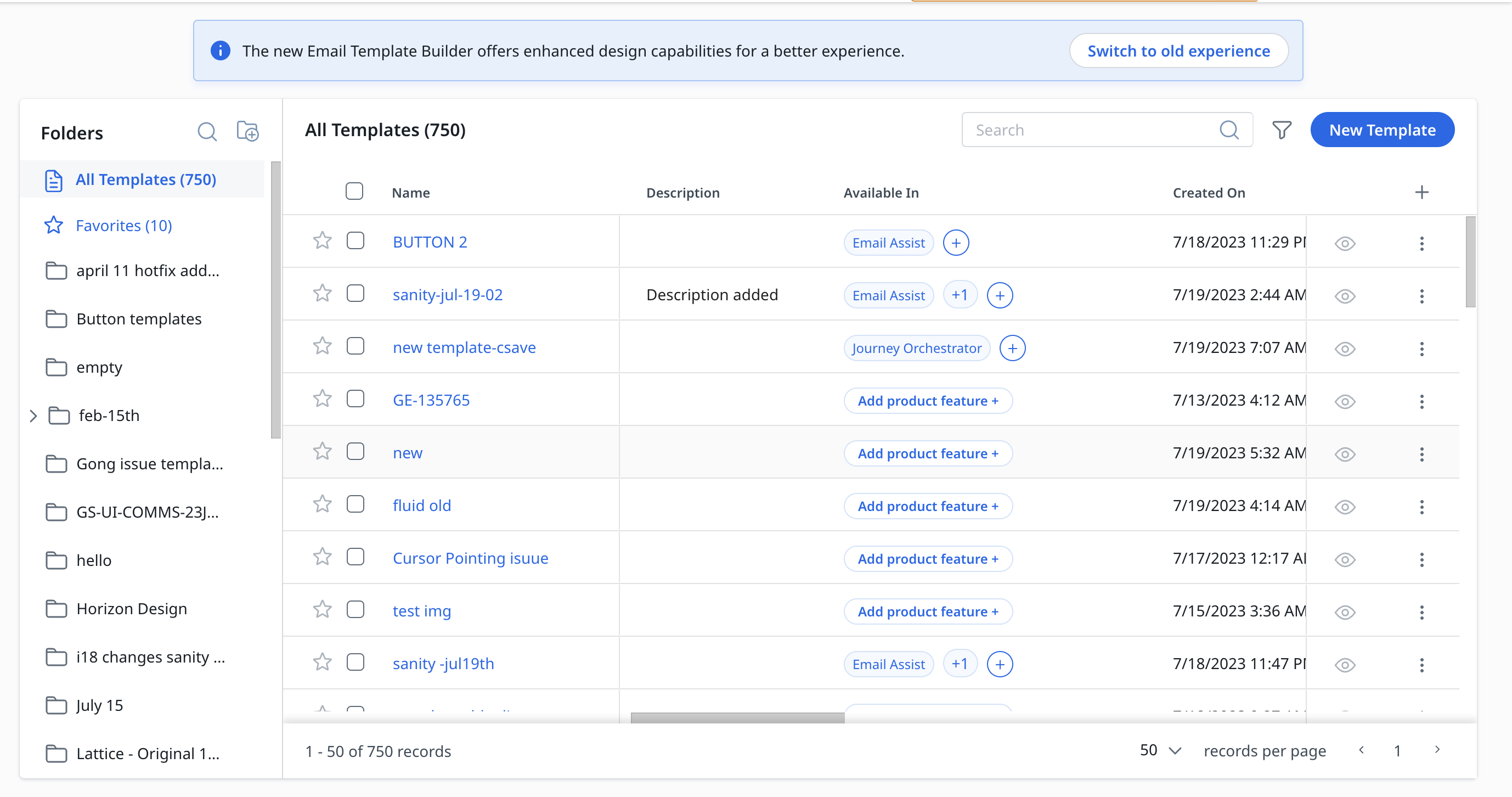
For more information on the enhanced Email Template Builder, refer to the Email Template Builder article.
New Email Template Builder will also improve the email building experience for the end users in Email Assist (Cockpit), Playbook, Timeline.
Users would continue to add new text, links, or attachments just like before. However, for other elements such as images, buttons, tokens, social elements, and videos, users can only edit or delete them. Additionally, users have the option to delete any layout element, such as a block or container.
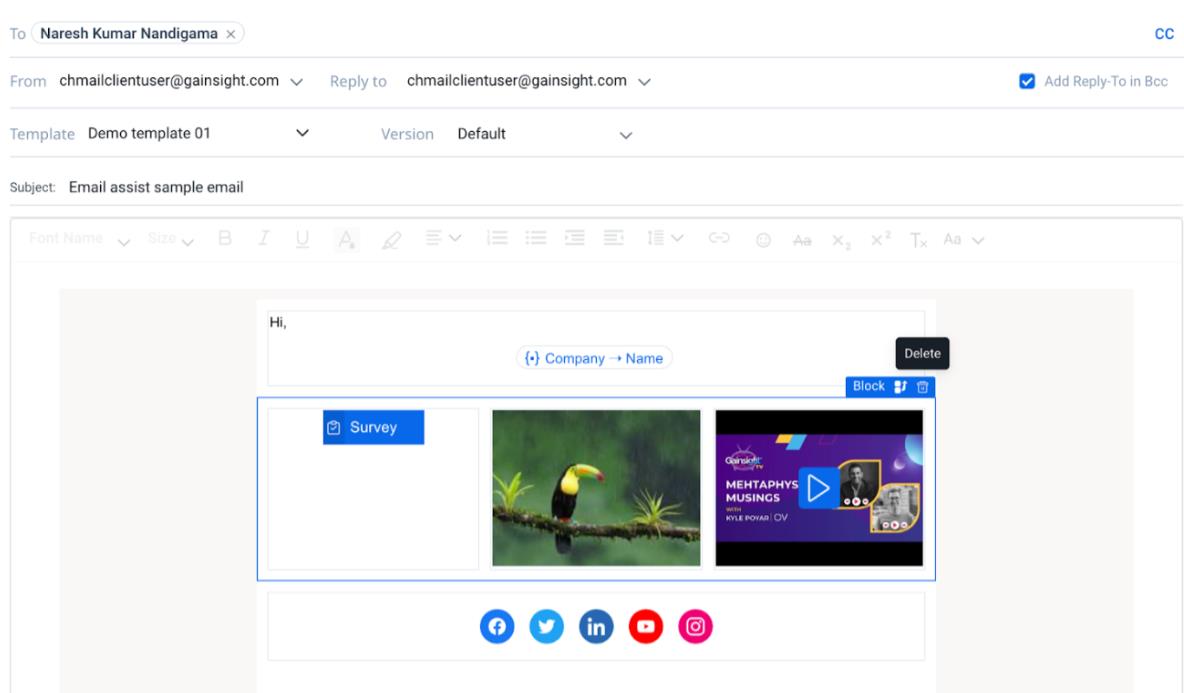
Note: Users cannot insert any new inline image in the email experience. However, they can replace or delete an inline image if there is already an image element in the email template. Also no button formatting (width,height,font size) will be allowed. This functionality helps to maintain the layout of the template
Enhancements
Customer Success (CS)
General Administration
Single Sign-On (SSO) capability between PX (Product Experience), CS (Customer Success), and DH (Digital Hub)
Gainsight implements a global authentication mechanism to enhance user experience, security, and efficiency by enabling seamless authentication and access across multiple products or product instances. Single Sign-On (SSO) enables users to log in once and access all three Gainsight products (CS, PX and DH) without the need for multiple login credentials. This eliminates the hassle of remembering and managing multiple usernames and passwords, improving user productivity and reducing the risk of security breaches.

The SSO capability between PX, CS, and DH is a strategic initiative that enhances security, simplifies user management, and improves collaboration and productivity across multiple platforms.
Migration Plan
Gainsight will be migrating the CS Production/Sandbox instances to SSO starting from the first week of August (in a phased rollout manner) for the existing customers. However, for the new customers SSO will be enabled by default, Admins who have multiple instances enabled in their org will receive a system-generated email as soon as their production instance is migrated. When a sandbox environment is refreshed, the SSO experience is enabled and all the users will then move to Inactive state, Admins need to update their status to Active and initiate a welcome email for the users.
For more information on how to implement SSO between PX, CS, and DH, refer to the Single Sign-On for Gainsight Applications article.
Customer Goals
Click here to expand for more information on Customer Goals
The new Customer Goals simplifies the product and improves the customer experience by adding new enhancements and enhancing existing functionalities.
Enhanced Customer Goal Management and Collaboration in Horizon Rules Engine
The Horizon Rules Engine offers users the ability to efficiently manage customer goals and foster collaboration by providing key functionalities. Admins can create customer goals from the goals library or while configuring the action type allowing for comprehensive goal planning. Additionally, admins have the flexibility to update existing customer goals ensuring goal alignment with evolving customer requirements.
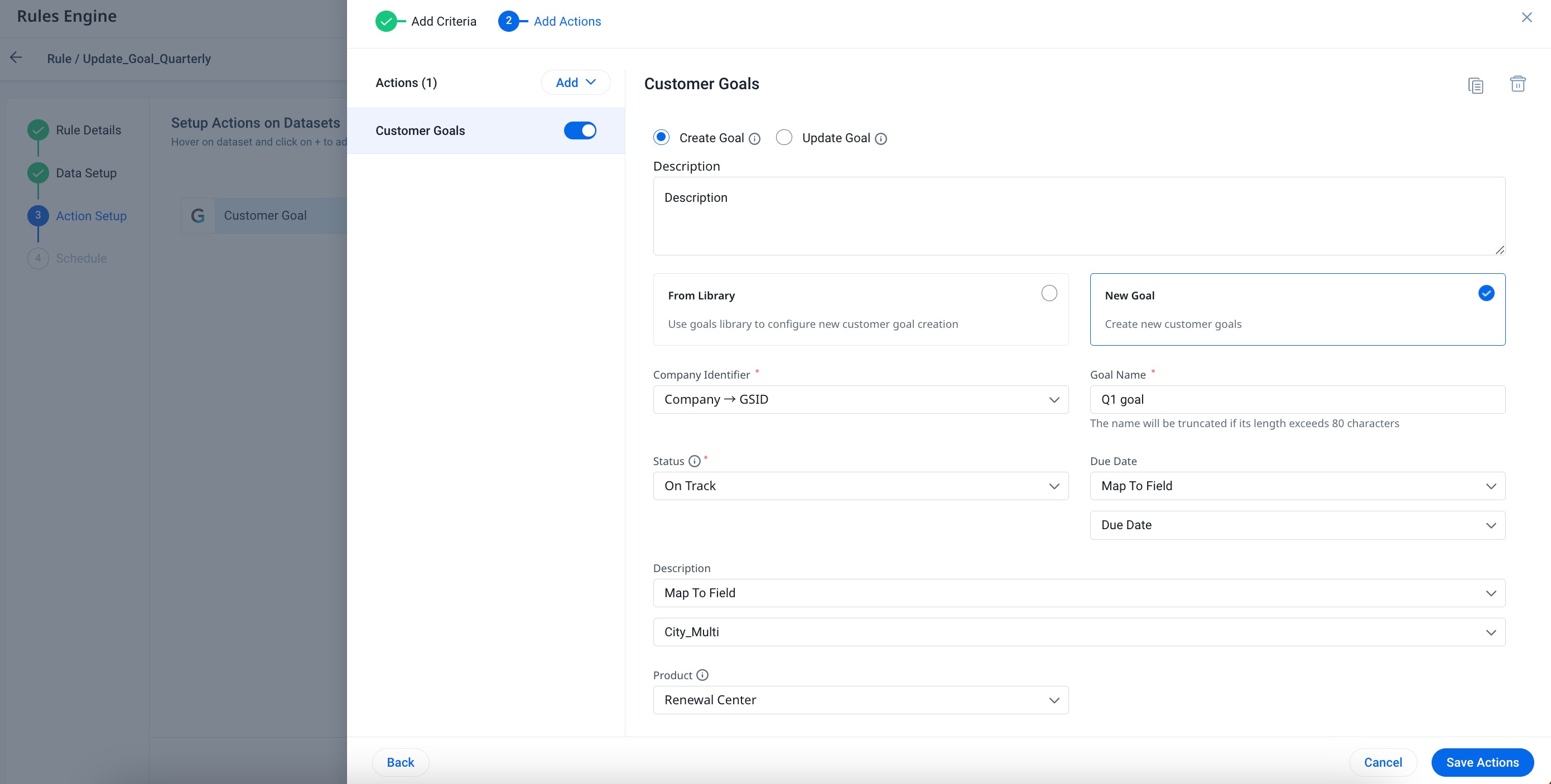
With these capabilities, the Horizon Rules Engine empowers users to streamline and optimize their customer goal management processes. The Customer Goals rule action type helps admins to create and update goals. This capability enables teams to effectively track and manage customer objectives, fostering better collaboration and improving overall customer success outcomes.
For more information on how to create or update goals from Rules Engine, refer to the Customer Goals Rule Action Type article.
Cockpit and Playbook
Click here to expand for more information on Cockpit and Playbook
Cockpit is the CSM/AM team's home base for viewing and managing key customer activities. The backbone of Cockpit are Gainsight system alerts called Calls to Action (CTA). Call-to-action types, their associated tasks, and the Cockpit view can be customized by Admins to suit your business needs.
Playbook Redesign
Gainsight introduces the redesigned Playbook that enables admins to efficiently create and discover Playbooks, Tasks, and Call-To-Actions (CTA), resulting in a simplified and expedited setup process for admins.
The enhanced Playbook offers the following benefits to admins:
Simplified Access: Admins can easily access all the created Playbooks, allowing them to have a complete overview of the Playbook library.
Enhanced Search and Filtering Capabilities: Admins can easily search, filter, and sort Playbooks, Tasks, and CTAs for quick identification and access to specific records.
Seamless Playbook and Task Management: Admins can effortlessly add new Playbooks, edit existing ones, and delete Playbooks as needed, ensuring they have full control and flexibility in managing Playbooks. Admins have the capability to add, edit, and delete tasks within Playbooks, allowing them to customize and fine-tune the steps and actions within each Playbook.
SFDC Integration: Admins can sync playbooks or individual tasks to SFDC objects, facilitating seamless integration and data synchronization between NXT and SFDC systems.
Multi-level and Multi-CTA Playbooks: Admins can create Playbooks that support multiple levels and various Call-To-Action (CTA) types, accommodating a diverse business scenario.
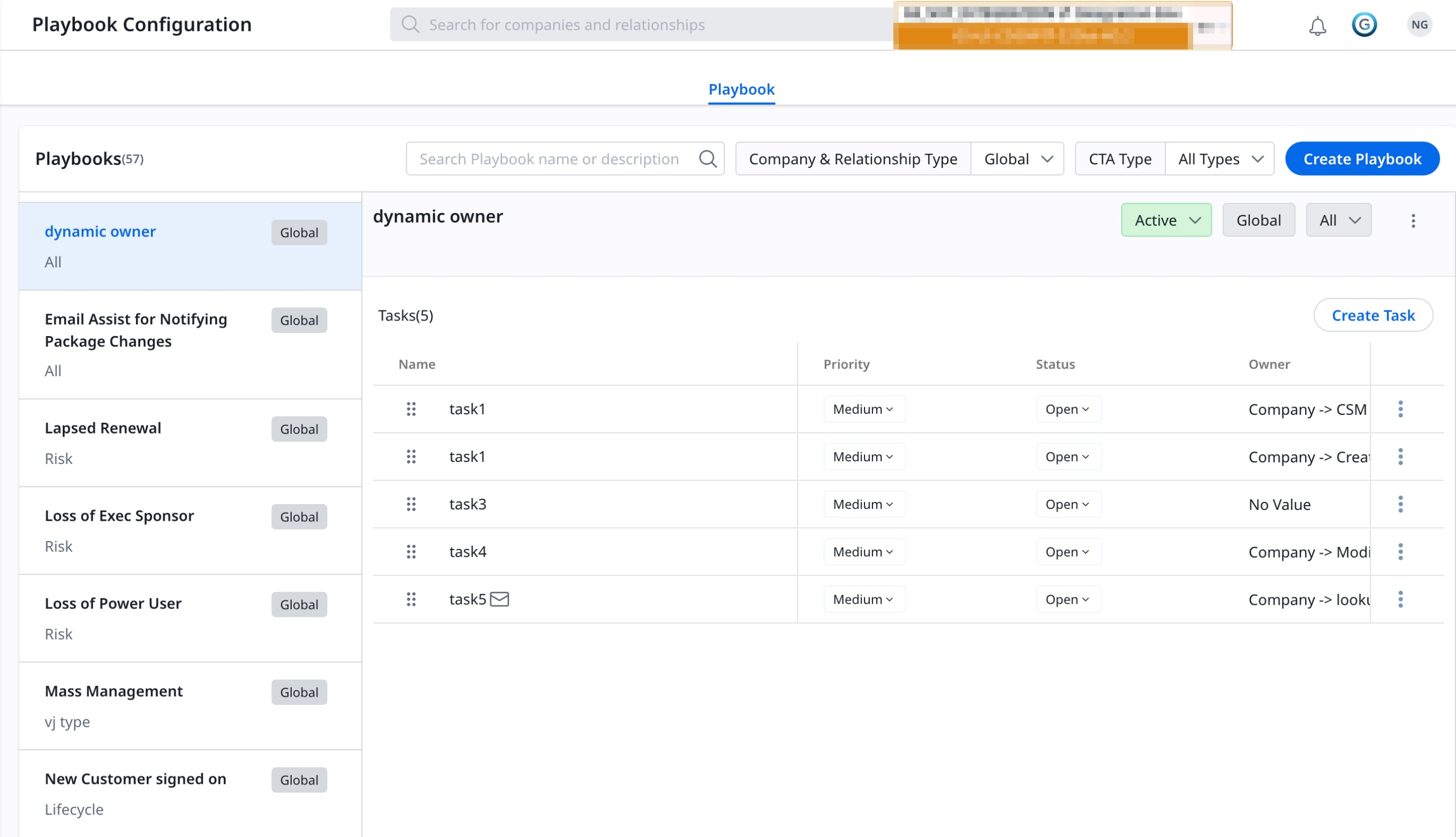
For more information on how to create Playbooks, refer to the How to Create Playbooks article.
Pooled Work Assignment
Admins can now automate the distribution of CTAs by assigning the ownership to predefined User Groups. Whenever a CTA is triggered, the ownership is allocated to one of the CSMs from the assigned User Group. The CTAs are distributed equally among the CSMs (using the Round Robin algorithm) that are part of the selected User Group.
Admins can select the User Group that needs to own the CTAs from Administration > General > Mass Edit. They can also select the User Group in the Owner field while creating a rule from Rules Engine.
The Rules Engine triggers a new CTA to be created for a company if the average NPS drops below a predefined limit. For this CTA to be created, the admin needs to pre-determine the owner. There could be challenges such as the owner not being available or the owner being unable to accommodate the task. Automating the distribution of ownership helps solve this problem and ensures that the necessary steps are implemented on time.
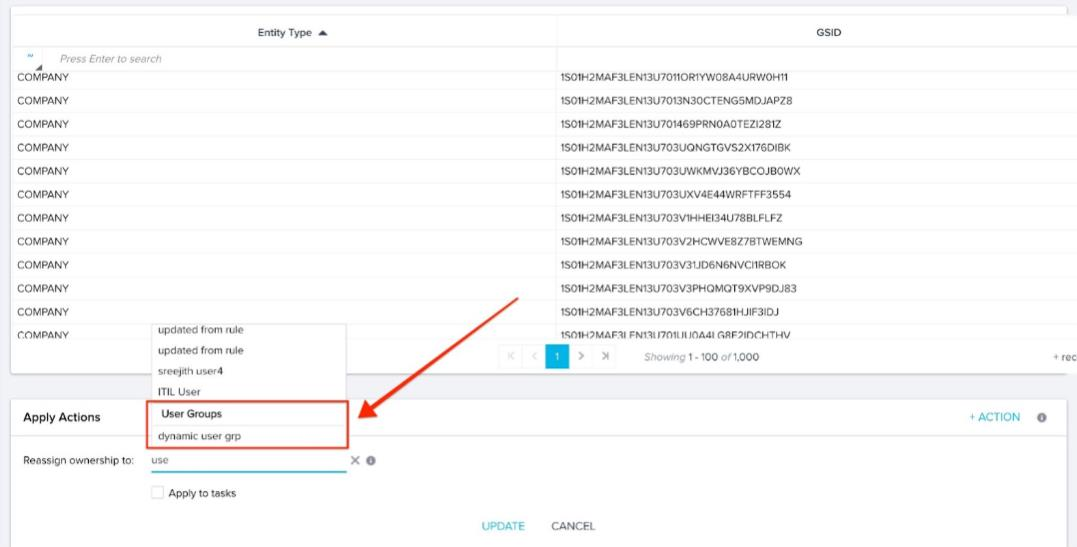
For more information on User Groups, refer to the Create User Group article.
For more information on creating CTAs from Rules Engine, refer to the Creating and Closing CTAs from Rules Engine article.
Dashboards
Click here to expand for more information on Dashboards
A Dashboard is a collection of reports and widgets, which helps users track and analyze the data. Different dashboards can be configured for different users and purposes. For example, managers can review dashboards in executive or team meetings, or users can review their book of business using a dashboard. Optionally, the dashboards can be exported via email to internal users as live links or as PPTs.
Automated Dashboard Share Permissions
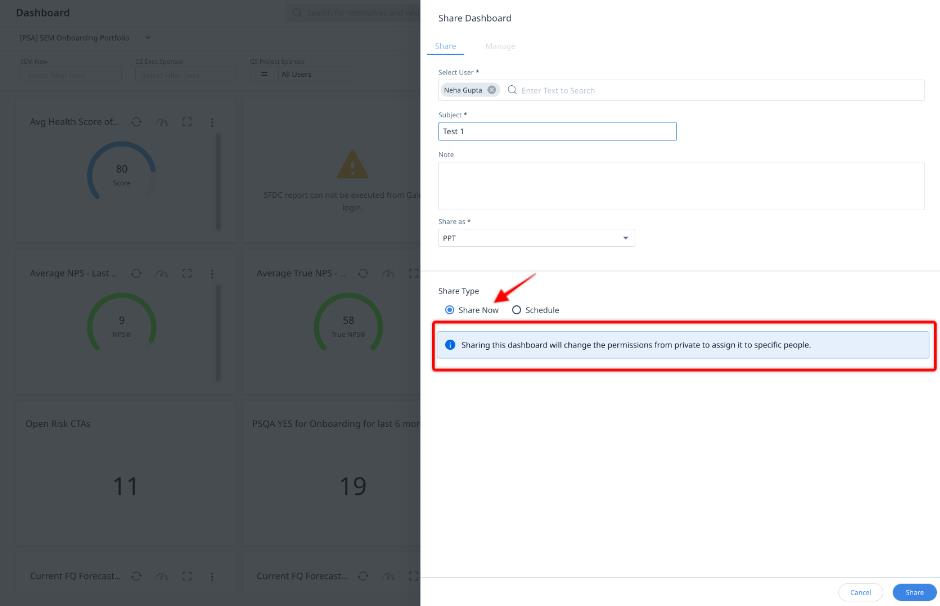
Dashboard permissions are now automated for the seamless experience of sharing them with the intended audience. This enhancement eliminated the need for manually adding users from the Manage Permissions section to share a dashboard with them. The permissions are automatically updated when the dashboard is shared.
Prior to this release, if a user or a group of users is not added to the Manage Permissions section, they were unable to access the dashboard.
Note: When the dashboard is shared using this enhancement, users are added to the Give access to a specific people group with the View permission.
Horizon Analytics
Click here to expand for more information on Horizon Analytics
As a company, you have plenty of customer data available, but meaningful insights on these may be hard to find. You may have many teams that touch a customer, but no means to coordinate their actions.
Gainsight accumulates and turns disparate customer data from multiple sources into a single source of truth. Review the Customer data-driven insights and deploy actions that drive business outcomes for your clients.
Gainsight’s Horizon Analytics [Reports and Dashboards] are the reporting tools that power your business intelligence. They comprise several features that allow you to make the most of your data to generate business insights for your organization.
Enhanced Reporting Capabilities
Important:
The reporting enhancements will be available from August 7, 2023.
The ever-changing business dynamics call for advanced reporting capabilities that can help multiple stakeholders quickly make informed decisions. The improvements in reporting empower users like business leaders, customer-facing teams, and administrators to:
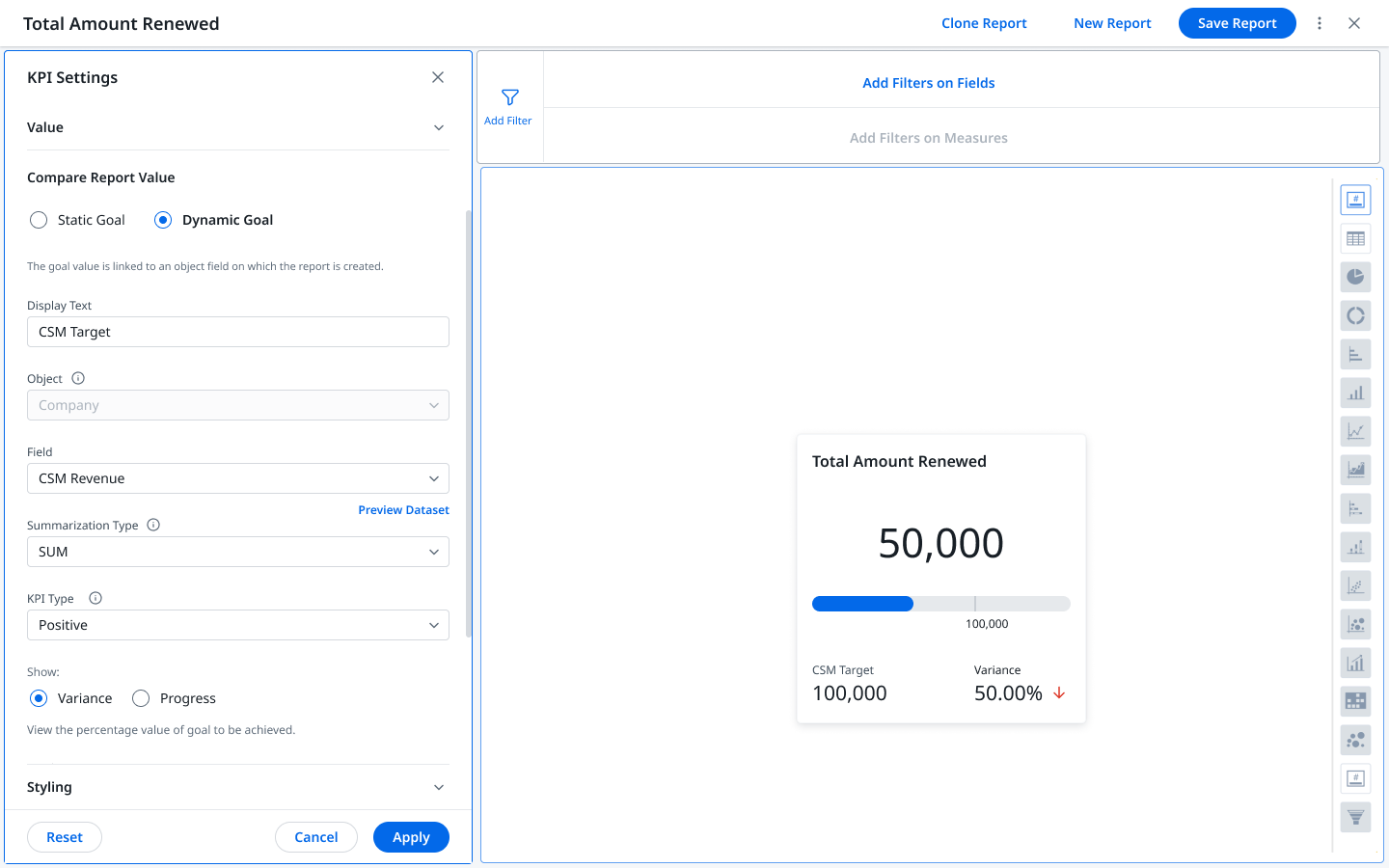
Create KPI Reports with Dynamic Goals. This provides users with a dynamic reference point to compare their current progress. Users can link the goal value to any field of the object on which the report is created. Any change in the field value is reflected in the goal value. They can further select between Progress or Variance to view the percentage value of the goal achieved or to be achieved, respectively.
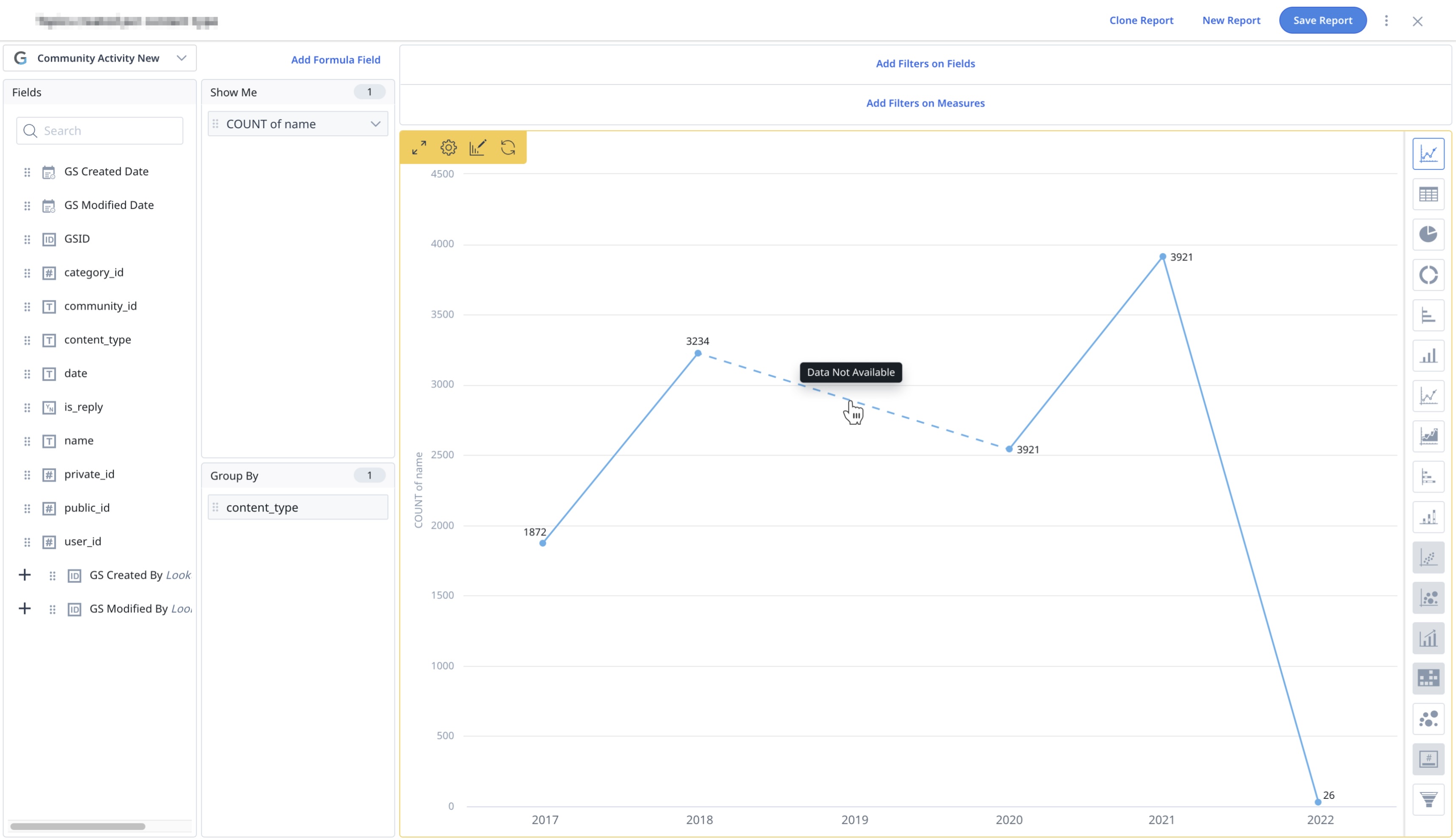
View the missing data points in reports as Data Not Available. This helps users identify gaps in the report due to a lack of data availability, and take the necessary actions.
For more information on how to configure the Static Goal and Dynamic Goal configurations, refer to the KPI Widget section of the Chart Settings and Chart Editor article.
Formula Builder Horizonization
The formula fields in Horizon Reports help users create custom formulas to meet their reporting requirements. The horizonized formula builder introduces separate Functions and Fields tabs to make the process of creating custom formulas more user-friendly. In addition to the simplified user interface, visual cues are introduced to help while editing the formulas, allowing users to seamlessly make last-minute changes.
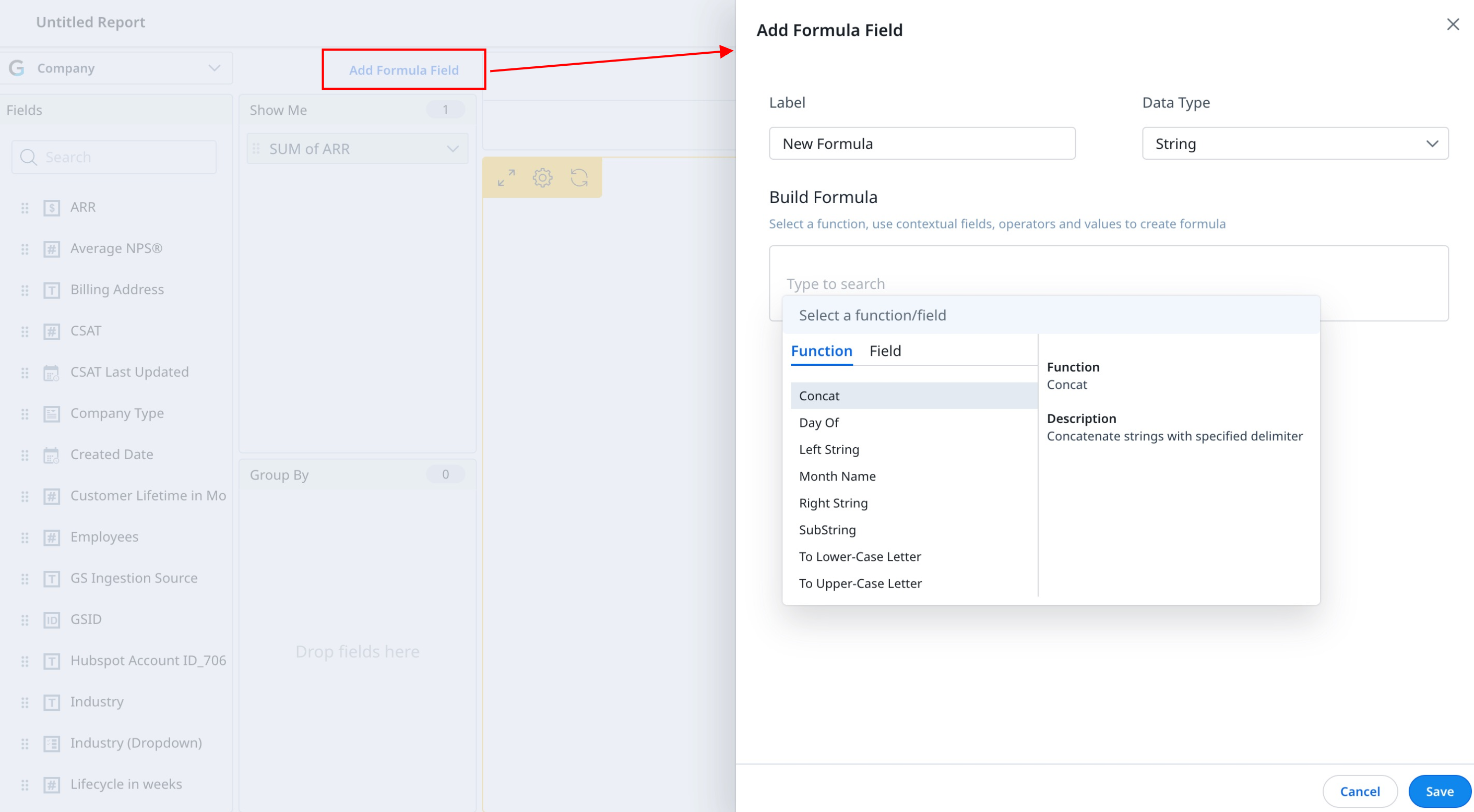
For more information on how to create a custom formula, refer to the Formula Fields in Reporting article.
Sally
Click to expand for more information on Sally
Powered by AI, Sally makes rich Gainsight data easily accessible through simple conversation. Not only can Sally provide answers to a diverse set of questions about your customers, Sally can also update customer data, provide information on health scoring, current risks, and opportunities. Your company can quickly collaborate on the latest customer intelligence to more rapidly deliver customer outcomes across all parts of your organization.
Improved Security for Sally Bot in Slack Channels
Important:
This enhancement will be available from July 29, 2023.
Gainsight has made an enhancement to the Sally bot within Slack channels to address a potential security gap. Previously, invoking Sally in any Slack channel made the information visible to all users, which posed a risk in channels with external users.
This enhancement introduces the following important functional improvements:
Admin Control: Gainsight has introduced an admin control to govern how Sally is accessed or blocked across customer Slack channels.A new Settings icon has been introduced in the Sally Admin page.
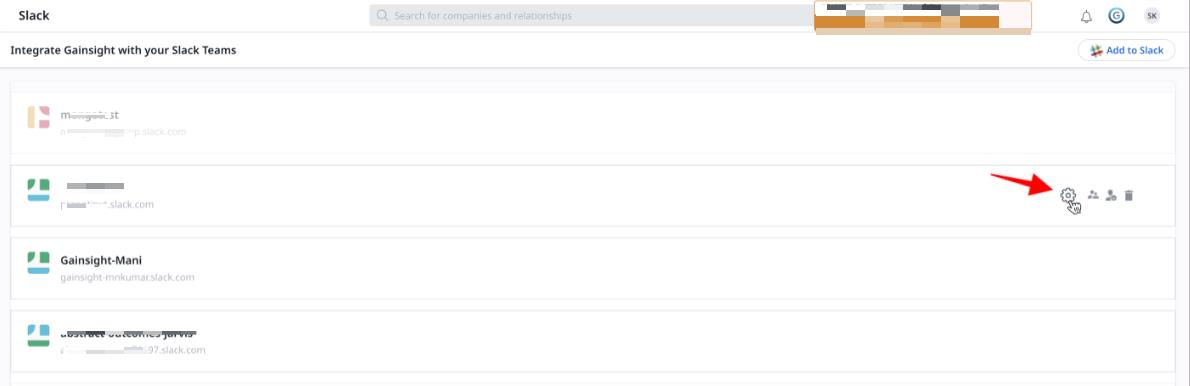
The Admin user will be able to view and access the new enhancement settings by clicking this icon. This allows admins to ensure the appropriate visibility of information.By default, unblock Sally or allow Sally to operate in all channels.
By default, do not show the warning message.
IMPORTANT: Admin users need to re-authorize their Sally workspace access from the Admin Settings page to view in order to activate the Settings icon. The icon remains inactive if the re-authorization process is not complete.
Warning Message: When invoking Sally, users now receive an warning message informing them that the query responses will be visible to everyone in the channel. Users have the option to either send the information to themselves through direct message or post it in the channel.
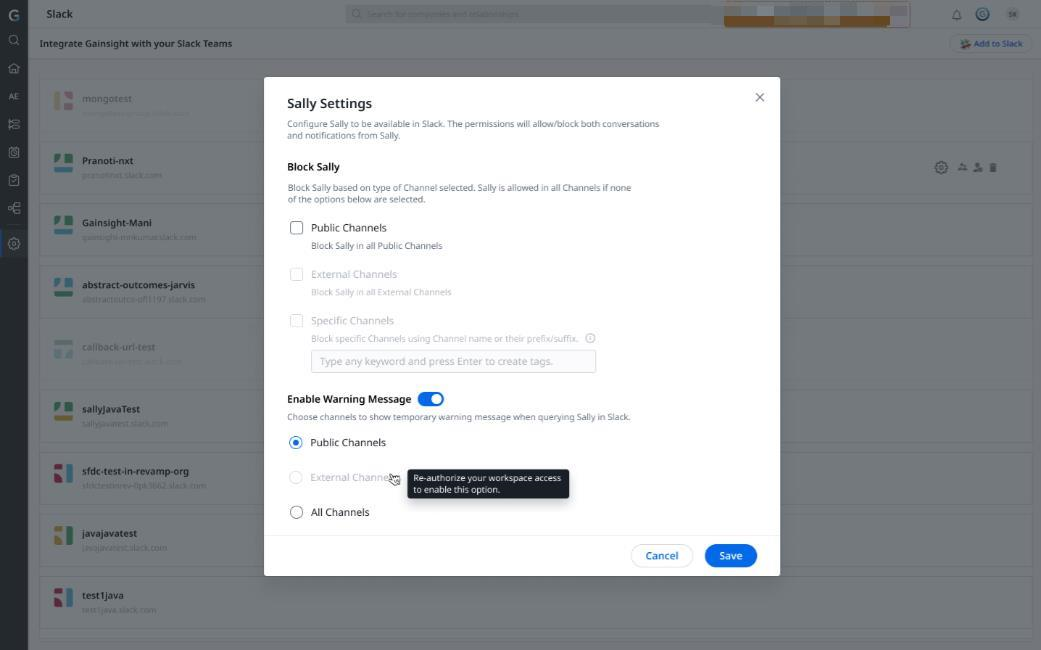
By addressing this gap, Gainsight is committed to ensuring a secure and reliable experience for all our customers. For more information on how to configure the admin controls for Sally in Slack, refer to the Admin Configuration for Sally article. Please note that the article will be available on or before 29 July, 2023.
Timeline
Click here to expand for more information on Timeline
Timeline is the official record of your customers. It allows you to log information regarding customer interactions in a way that enables you to quickly gather insights and drive action. The Timeline View in the Customer or Relationship 360 allows you to log and view activities that help you track customer interactions over the course of a customer’s life cycle. You can share the updated 10-min. training on Timeline with your Gainsight end users!
Integration of Chorus.ai with Timeline
The Chorus.ai integration with Gainsight helps to automatically log meetings from Chorus.ai to Gainsight Timeline. The configuration for this integration is managed within Chorus.ai, and it leverages external Timeline APIs to transfer data to Gainsight.
This integration enables seamless management of calls and meetings. All Meetings, including audio and video recordings, are displayed in the Timeline after the successful integration. The meeting recording links are provided in Timeline to navigate to Chorus.ai for easy access. The integration automates the process of importing meetings, thus streamlining meeting access in Gainsight Timeline. For more information on the Chorus.ai integration with Timeline, refer to the Chorus Integration FAQs article.
IMPORTANT: The recorded meeting videos from Chorus.ai can be accessed in the Gainsight Timeline only when the user is logged into the Chorus.ai application and has view access simultaneously.
Revenue Optimization (RO)
Gainsight’s RO provides the tools to optimize revenue within your customer base, enabling your team with the insights and workflows needed to take a more programmatic approach to renewal and expansion opportunities.
People Management
Click here to expand for more information on People Management
Capture your contacts in an organizational chart to understand the roles and relationships of the people you do business with across your customer base. Explore the org chart to understand who influences whom within a company and know more about a person for deeper insights.
Integrating Sponsor Tracking into People Admin
Gainsight has streamlined the admin section of Sponsor Tracking by integrating it seamlessly into the People Admin screen. All People Management-related features are available under the comprehensive umbrella of People Admin. With the absorption of Sponsor Tracking configuration into the People Admin screen, all the feature configurations related to People Management can be performed from one location..
A new tab called Sponsor Tracking Configuration is added in the People Admin section. Admins can perform the social profile field mapping from this section. This configuration option is available at both the Company and Relationship levels.

For more information, refer to the People Management article.
Introducing People APIs - Bulk
Gainsight introduces People APIs - Bulk, which helps ingest multiple records in an API call. This API has significant improvements in the number of records it can accept per call.
For more information on the People APIs - Bulk, refer to the People API documentation article.
Renewals [FKA Renewal Center]
Click here to expand for more information on Renewals
Renewals help Sales and Customer Success teams reduce churn, identify late renewals, and upsell existing accounts. By enriching Sales opportunities with Customer Success insights, Renewals enables teams to run their forecast reviews more effectively. The data science-based renewal likelihood score helps identify renewals most likely to churn based on customer health and engagement. Update forecasts and take immediate action so that your team can win every renewal on time.
Important:
Renewal Center is renamed to Renewals in the end-user navigation. Please note that as a result of the changes made, there will be updates required in the documentation. Gainsight’s Technical Communication team anticipates these updates to be implemented over the next 1-2 quarters.
Access Opportunities from Account-Based Forecasting
Account-based forecasting empowers CSMs to view opportunity data sorted at the account level. From the Company field, CSMs now gain instant access to all opportunities associated with the company. This enhancement eliminates the need to switch between different views, resulting in a streamlined and efficient forecasting experience.
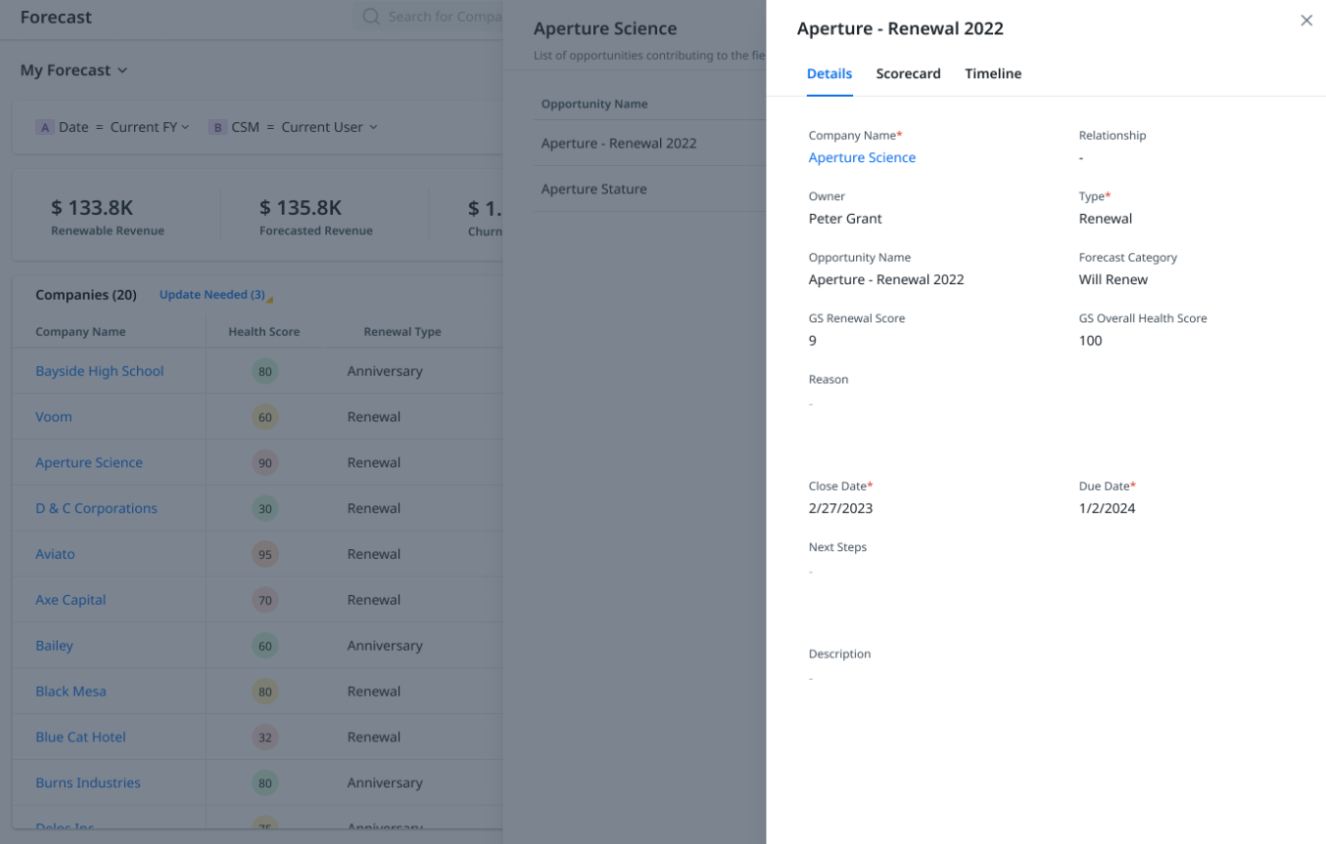
To access the opportunity data of a company, perform the following steps in the Company View page:
Click the Company field. A slide-out panel appears listing the opportunities associated with the company.
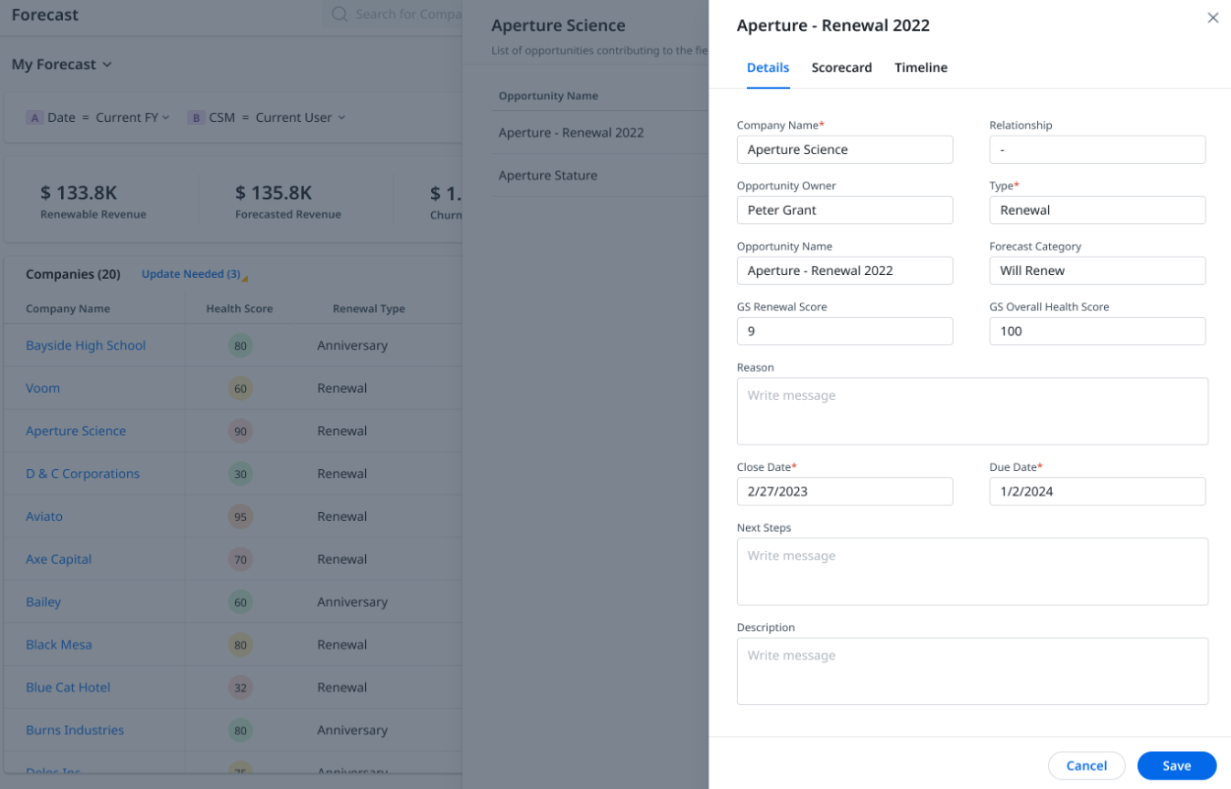
Click any opportunity under the Opportunity Name column. A slide-out panel appears displaying the opportunity details.
CSMs can perform the following actions:
View the Details, Scorecard, Timeline, and Product information associated with the opportunity.
Edit and update opportunity details in-line on the go.
Add a new opportunity.
IMPORTANT: To access opportunities, CSMs must select the Company Name column in the Column Editor dialog when creating or configuring a company view.
Show or Hide Opportunity Views in Forecast
Admins can now control the visibility of the out-of-the-box opportunity views in Forecast using the Show Opportunity View toggle switch. This feature makes the user experience more intuitive by allowing admins to hide opportunity views when forecasting is exclusively performed at the account level, rather than at the opportunity level.
Admins can access the toggle switch by navigating to Administration > Renewal Center > Forecast Section.
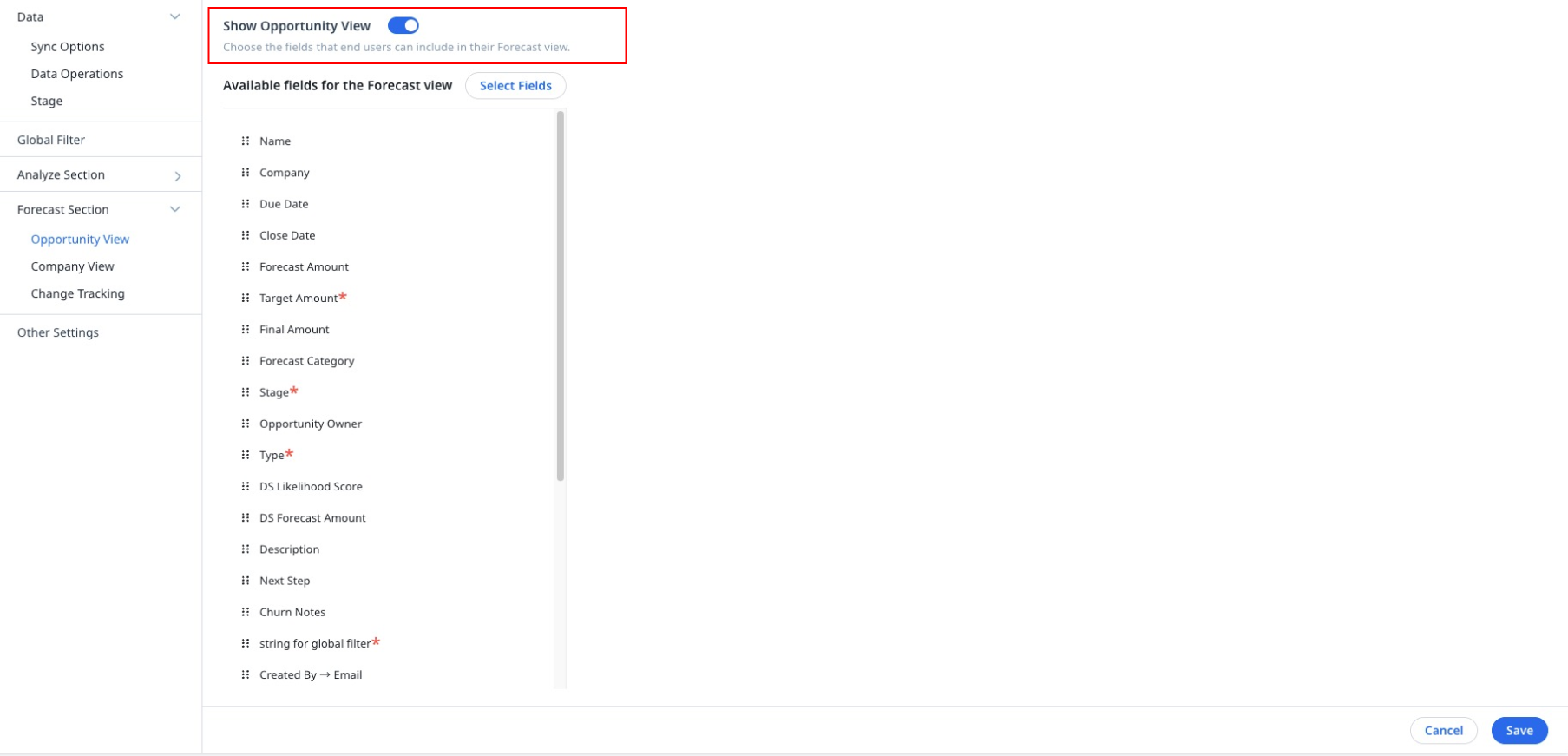
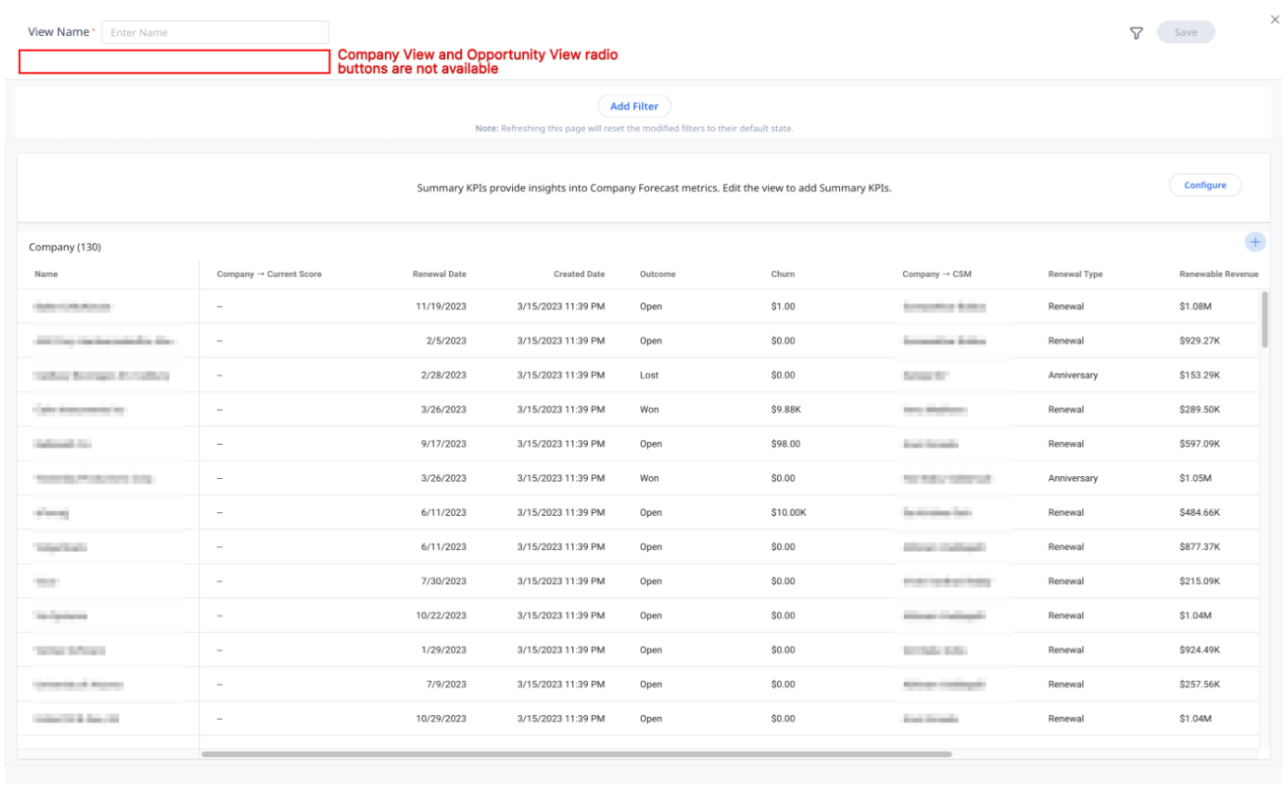
When the toggle switch is turned OFF, CSM cannot access the Opportunity View radio button on the Create New View page. This indicates that the admin has hidden opportunity views, thereby limiting CSMs to only create company views or access the out-of-the-box company views.
Notes:
The Show Opportunity View toggle is turned ON by default.
The Analyze page in Renewals displays an empty state when the Show Opportunity View toggle is turned OFF.
Customize Company and Relationship Insights in Create Opportunity
The enhanced customer insights empower Renewal Managers to drive effective conversations with customers and make better strategic decisions. Admins can customize and populate these insights with data from the Company and Relationship objects. This customization enables admins to tailor the insights for their Customer Success team's needs and preferences.
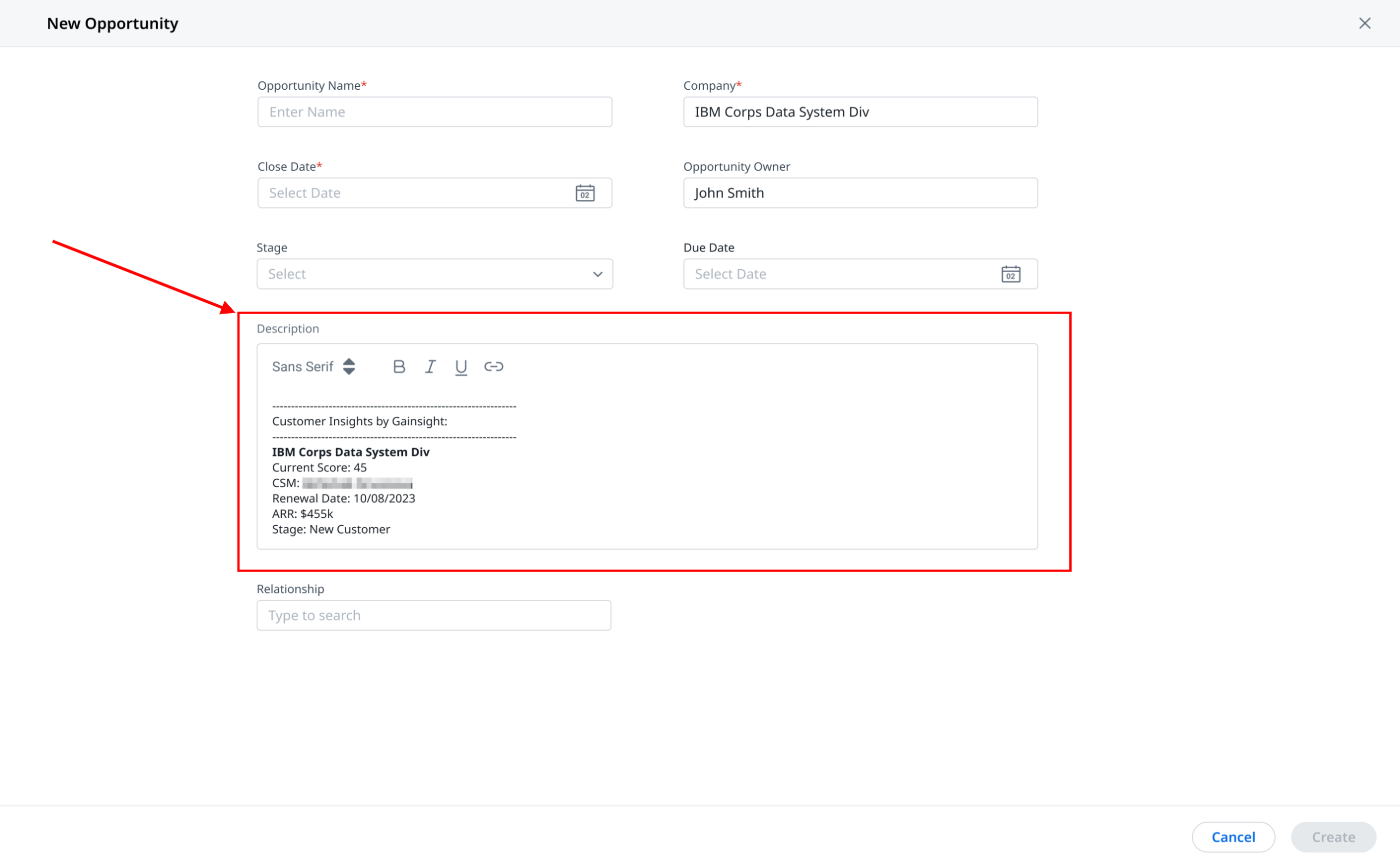
The insights configuration is available in the Description field of the Detail View. Admins can access the Detail View by navigating to Administration > Renewal Center > Analyze Section.

CSQL
Click here to expand for more information on CSQL
With Customer Success Qualified Leads (CSQL) , you can unlock a new pipeline source, expand your portfolio and showcase how Customer Success can be a growth engine for your business. CSQL is a purpose-built lead creation tool for CSMs. The leads are automatically enriched with CS insights and delivered to sales in their CRM helping CSMs showcase their impact to revenue.
Ability to Create CSQLs from R360
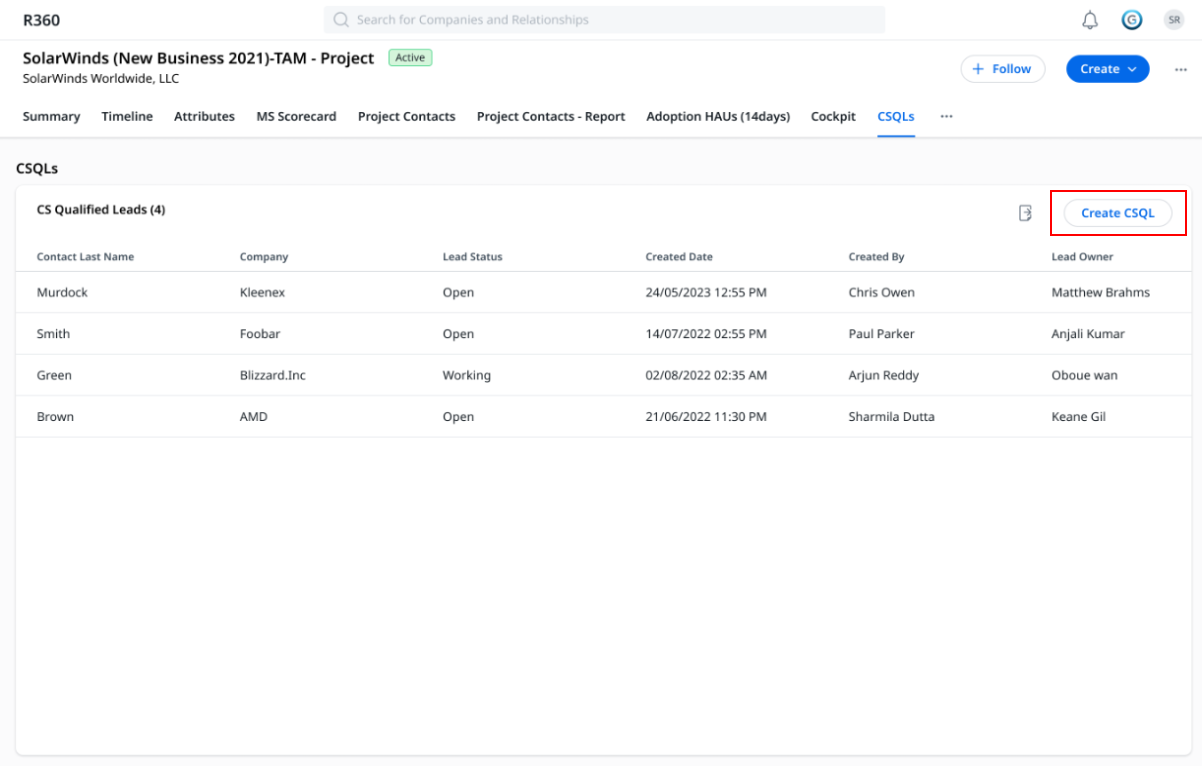
CSQLs enable customers to identify and capture qualified leads, providing their sales and marketing teams with necessary avenues for business expansion. In addition to creating CSQLs from C360, CSMs can create qualified leads from R360. They are no longer required to navigate to C360 to create qualified leads, thereby simplifying the lead creation process.
CSMs can create CSQLs from R360 as either leads or opportunities, depending on the Sync Option configured by their admins.
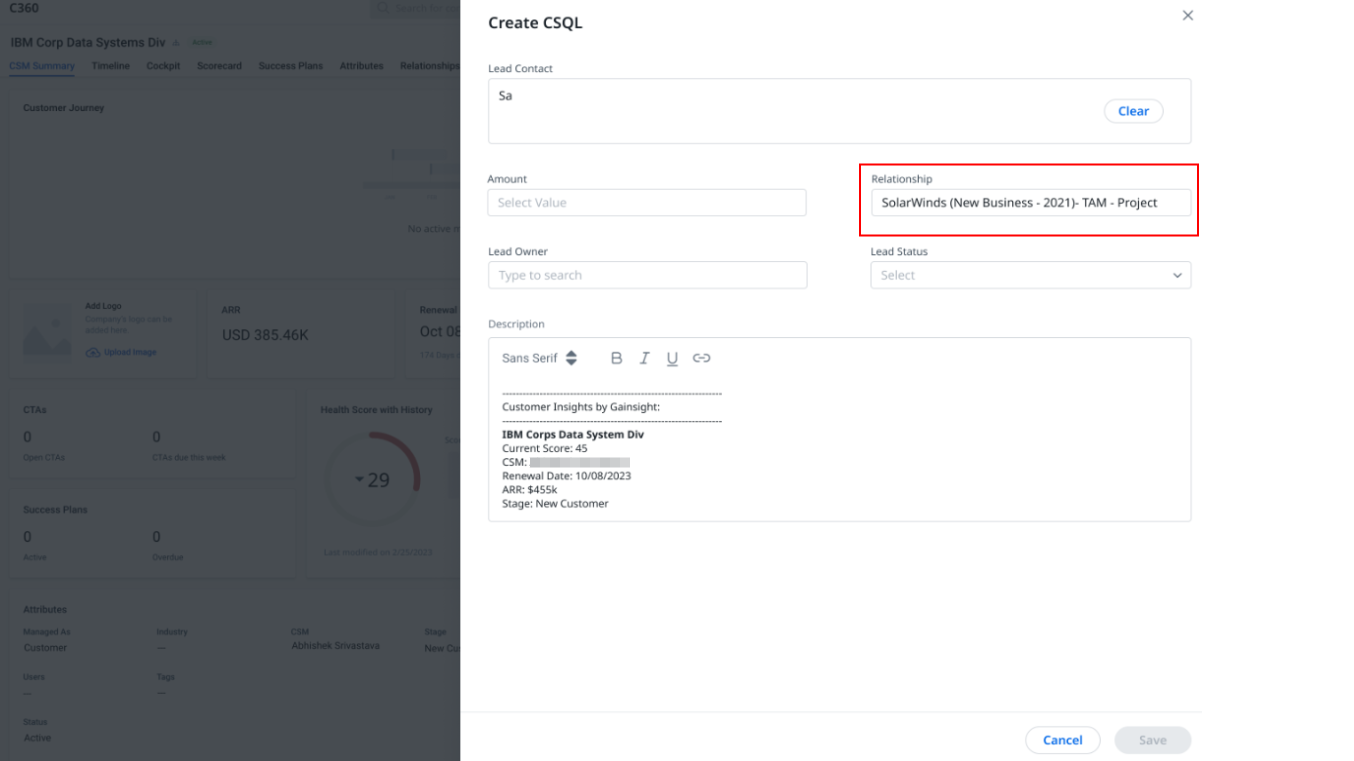
The Relationship field is also available for CSMs when creating CSQLs from C360 and Gainsight Home. This field helps CSMs assign the relevant Relationships to the Company.
Notes:
The admin must configure the CSQL widget and the CSQL section in R360 Layouts.
The admin must configure the Relationship field in the Detail View of CSQL.
For more information on how to create CSQLs from C/R360, refer to the CSQL in 360 article.
For more information on how to configure the CSQL section and widget in 360 Layouts, refer to the Configure CSQLs article.
Ability to Provide Additional Customer Insights in the Description Field
The sales and marketing teams use the customer insights available in CSQLs to have better conversations with the lead contact. In addition to the company-level insights, they need relationship and contact (person) level insights to understand their leads better and customize the nurturing strategies.
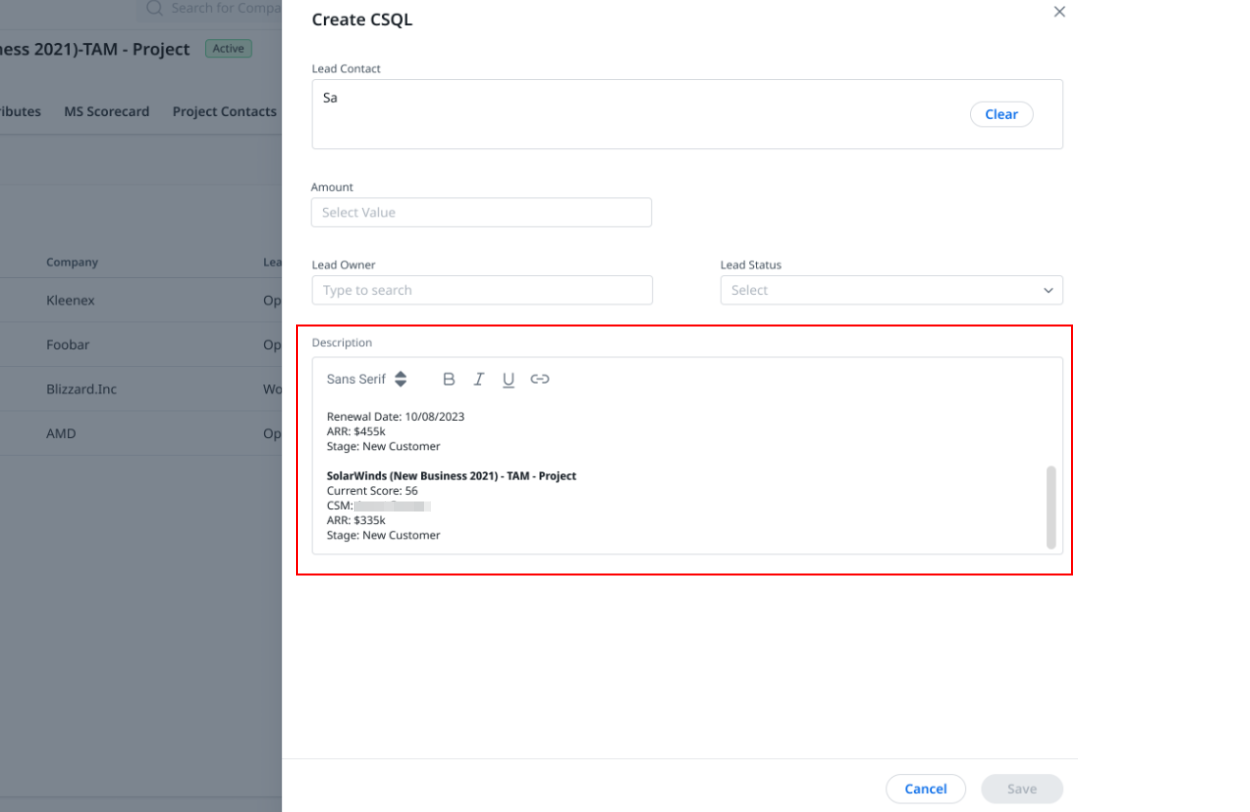
To empower the customer-facing teams with valuable 360-degree insights to succeed in business, admins can configure the Description field in the Detail View of CSQLs. Admins can add relevant insights from the Company, Relationship, and Company Person objects for their CSMs and end users. They can add insights not only at the Company level but also at the Relationship level as well, thereby further extending the capabilities of CSQLs to R360. To configure the Description field, admins can navigate to Administration > CSQLs > Detail View.
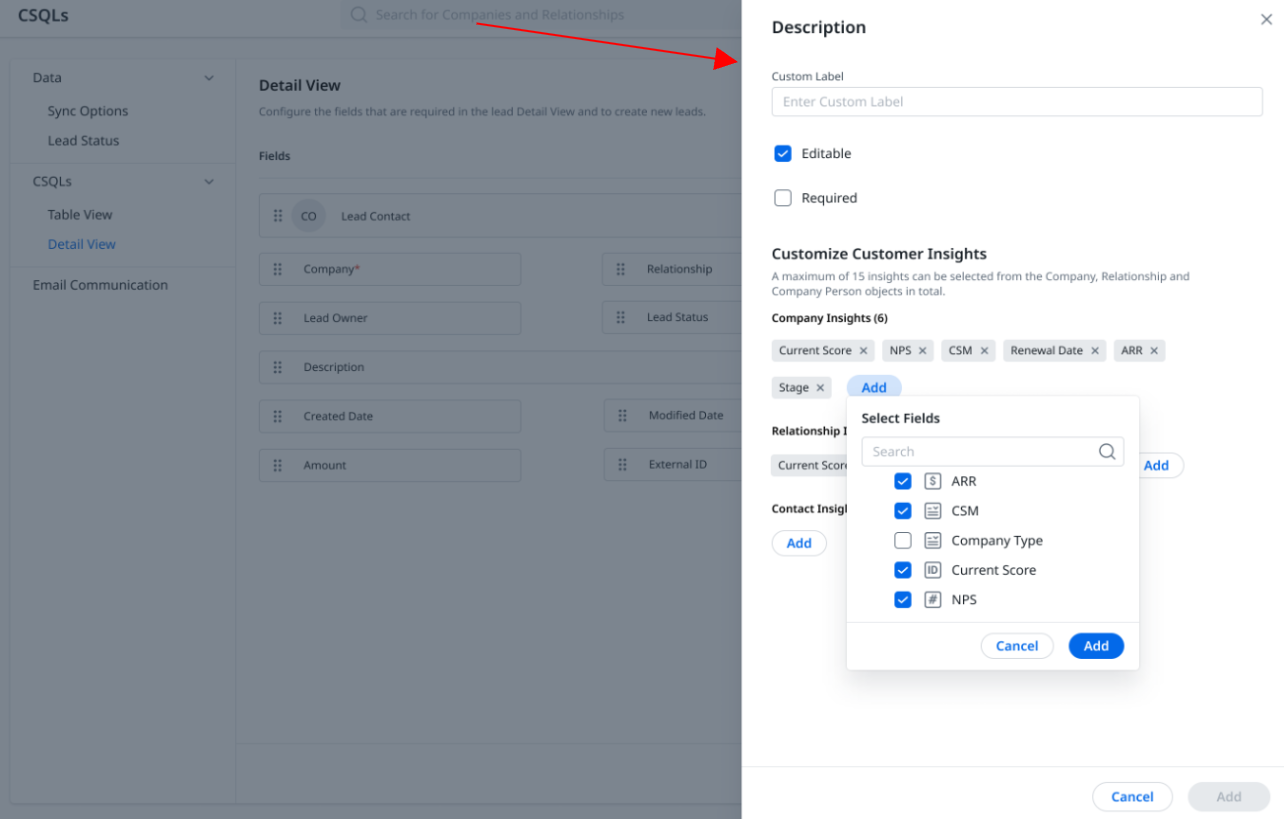
The insights added by admins are available as Customer Insights by Gainsight: when the CSMs are creating CSQLs.
For more information on how to configure the Description field, refer to the Configure Detail View section of the Configure CSQLs article.
Platform
Gainsight’s Platform turns customer success into a significant competitive advantage for your company. Reflect the nuances of customer relationships, intuitively surface insights, and accelerate your efforts with built-in best practices.
Connectors 2.0
Click here to expand for more information on Connectors 2.0
Connectors are integrations that are offered out-of-the-box so you can connect various data sources and sync their information to Gainsight.
Connector Jobs Enhancements
Gainsight brings the following enhancements to Connector Jobs:
Ability to Preview Sample Data while Creating Jobs
Users can preview the sample data for an object during job creation. This enhancement helps to empower implementation teams and reduce dependency on external stakeholders for data preview. By providing the ability to preview data, users gain insights into the extracted data and thus accelerate the integration setup.
Example Business Use Case: The process of setting up connectors and onboarding new clients from external data sources consumes time and resources, causing delays and bottlenecks for implementation teams. Often meetings with admins of external systems like Jira and Zendesk are required to understand their data model.
However, the data preview feature now empowers implementation teams to overcome these difficulties by allowing them to preview extracted data for analysis and validation.
Note: With this release, the Hubspot Connector is enhanced with this capability. Gainsight plans to gradually implement this for the rest of the connectors.
For more information on how to preview the data of a job, refer to the Preparation of Connector Jobs article.

Ability to Download Data from the Execution Logs
The execution logs are now enhanced with data download capability, which is specifically available during the extraction phase of connector jobs. This enhancement enables admins to download data from source systems, aids in the setup of connector jobs, and facilitates issue debugging during job failures.
Key Benefits:
Ability to download the Success Records files.
Ability to download the Failed Record files.
Ability to download the extraction files from the Execution logs.
For more information on how to download the data from execution logs, refer to the Activity Page article.

HubSpot Integration Enhancements
Important:
All our customers can experience the new HubSpot enhancement from August 1st , 2023.
The HubSpot integration with Gainsight brings enhanced visibility between sales and customer success teams. With the bidirectional sync capability and expanded access to various objects, admins can now push Timeline entries from Gainsight to Hubspot and synchronize relevant data with the Hubspot objects.This integration enables the Sales team to have visibility into customer engagements which improve operational efficiency and enhances visibility across teams. Furthermore, the bidirectional sync allows CSMs to create new deals, such as upsells or renewals, directly from Gainsight, opening up additional revenue opportunities.
With this enhancement, the following new objects are available for Hubspot Connector:
Source Objects:
Line Items
Feedback Submission
Custom Objects
Target Objects for writeback in the Load to HubSpot action:
Deal
Products
Tickets
Engagement Objects (Call, Meeting, Tasks, Email, Notes)
IMPORTANT: Admins need to reauthorize their existing HubSpot Connection to view these enhancements.
For more information on the Hubspot integration, refer to the Hubspot Connector article.
X-Org 2.0 Support For Connectors
Gainsight introduces X-Org 2.0 support for Connectors. With this new capability, admins can migrate Connector Jobs seamlessly between the sandbox and production environments. This feature allows users to validate the effectiveness of a configuration before it is implemented in the production environment. By leveraging Gainsight's X-Org, users can confidently test and migrate assets, ensuring a smooth and efficient transition between environments.
Note: On completion of migration ensure that the connection with the production tenant is authenticated.
For more information on how to migrate Connector assets, refer to the Migrate Connector Jobs via X-Org 2.0 article.
Remove Deleted Fields From Source In Connectors Job
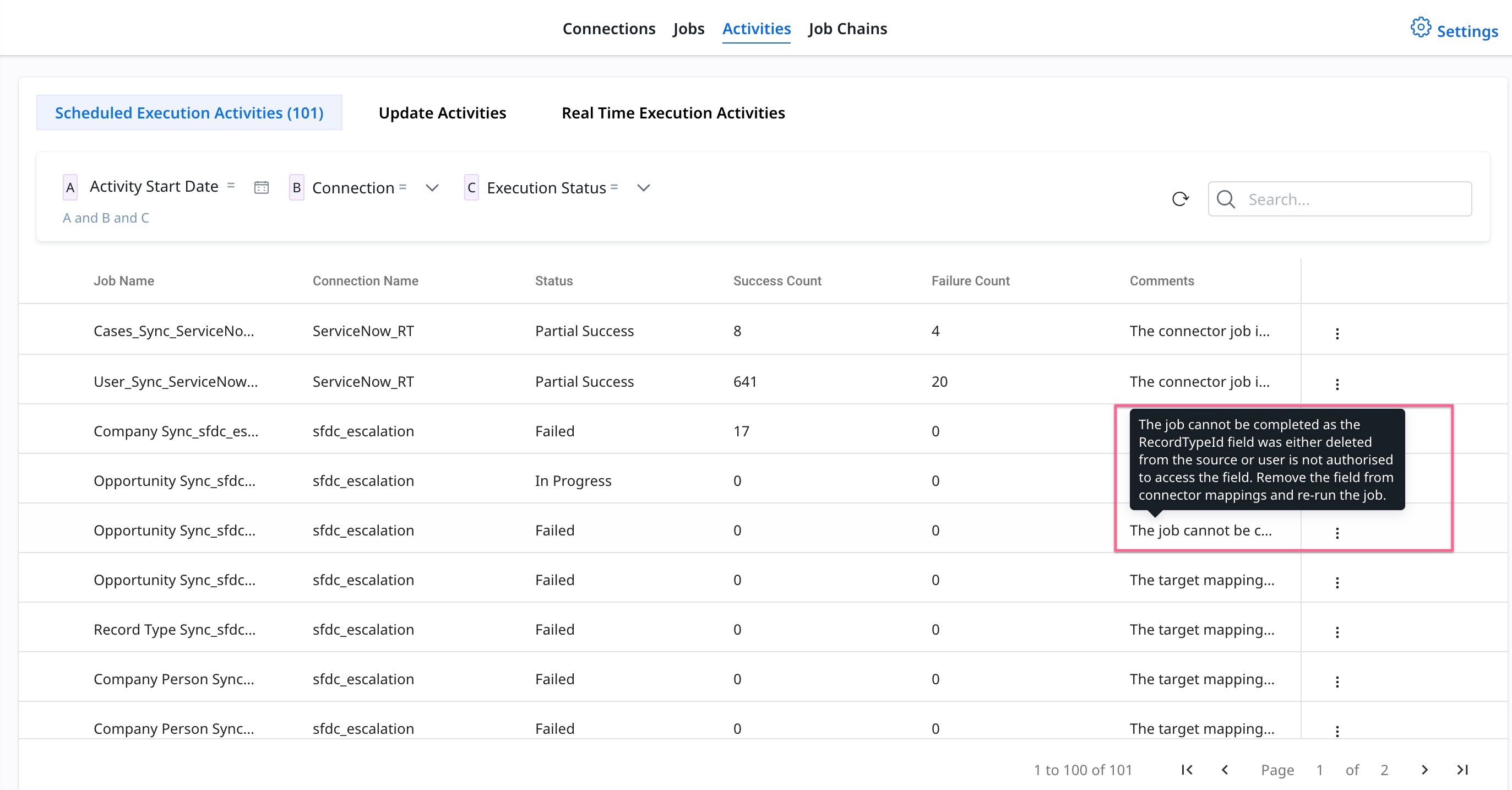
Gainsight introduces a valuable enhancement to help admins troubleshoot unsuccessful executions of Connector jobs. From the Activities list page under the comments columns, Admins now have the ability to identify and remove fields that the user does not have permission to access or fields that are deleted from the source and are causing job failures. Admins can remove such fields from the Preparation stage and re-run the jobs.
This enhancement empowers admins as it eliminates the need to raise a ticket with Gainsight Support to remove the externally-deleted source fields.
For more information on how to effectively identify and remove failure-causing source fields, refer to the Activity Page article.
Data Designer
Click here to expand for more information on Data Designer
Data Designer makes it easier for you to discover richer, more meaningful insights from your customer data. It provides a simple, easy-to-use solution to merge and transform your data, then make it accessible across the Gainsight platform for further analysis and exploration.
Download and Analyze Report Data From Explore Step
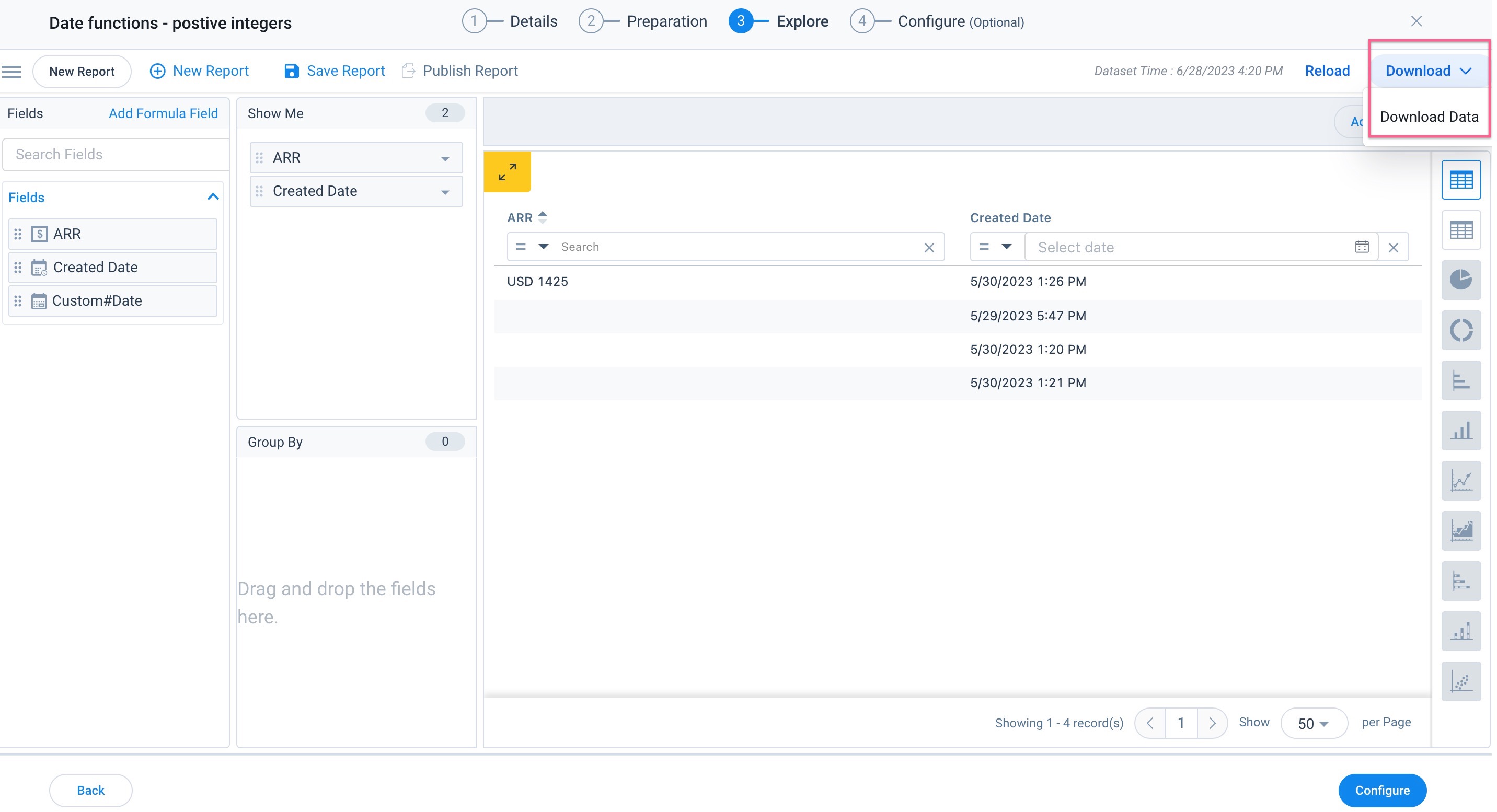
Data Designer now has a Download option in the Explore step that allows admins to download report data and validate their designs before making them available across Gainsight as Dataspace.
This new feature eliminates the need for additional steps such as building reports separately and then validating the designs.
For more information on how to download reports data, refer to the Explore Details in Data Designer article.
Rules Engine
Click here to expand for more information on Rules Engine
Rules Engine is designed to improve your underlying customer data to produce superior customer outcomes. It can perform powerful multi-step, in-memory data transformations for large datasets in Gainsight within one rule. Transformations include aggregations, multi-dataset merges, formulas, and time-series calculations; helping your team to better identify meaningful data signals.
Enhanced Horizon Rules
The further enhanced Horizon Rules, based on the feedback received during the BETA phase, is Gainsight's commitment to customer-centric product growth. The following enhancements are made in the rules workflow to make it more efficient:
Duplicate Branch: The option to duplicate a branch is available in the Rule Action Setup step in addition to cloning the action. This enhancement helps admins to easily replicate and modify the required branches of a rule, without having to recreate a complex logic.
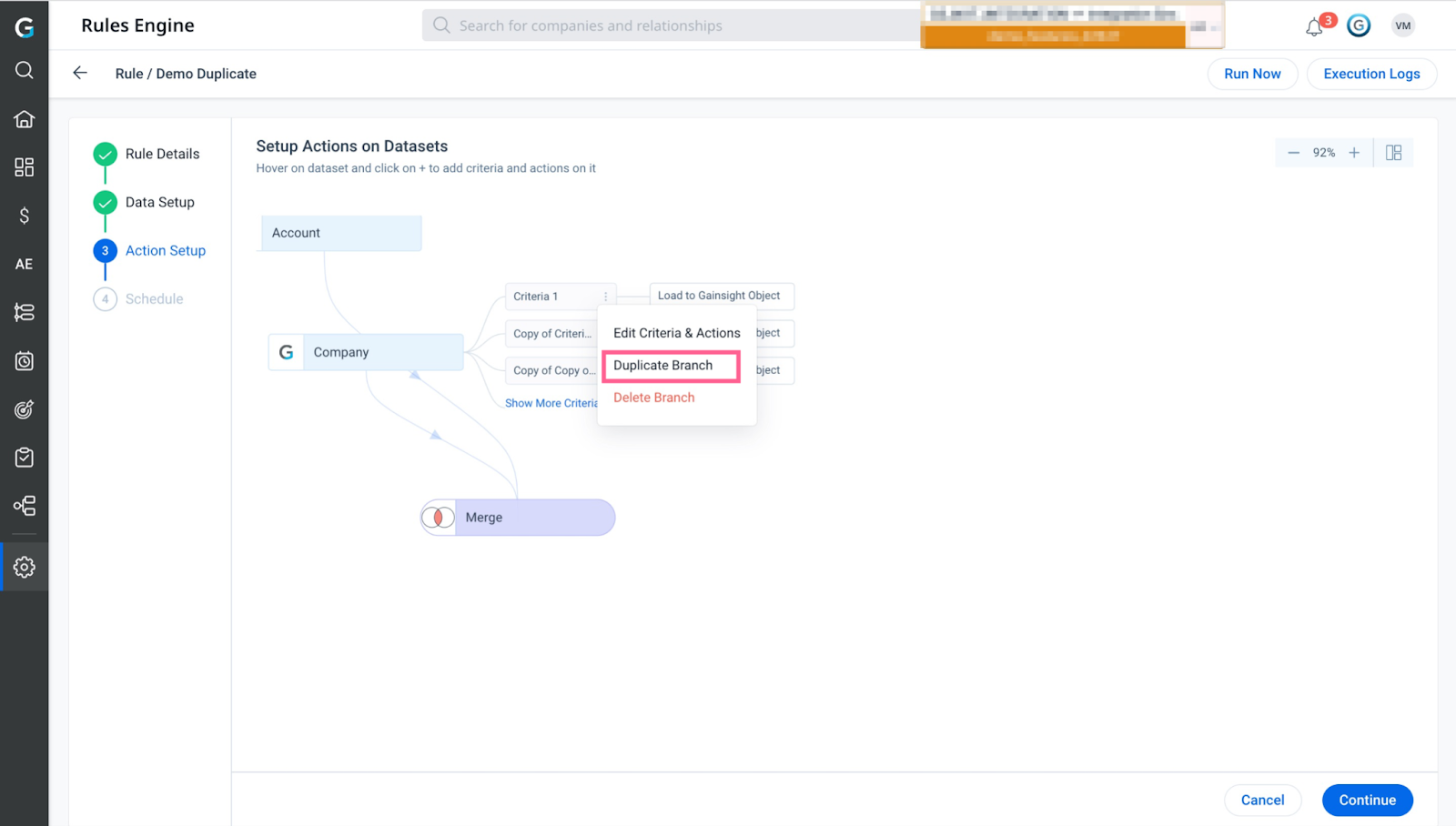
Download Criteria Records in Execution History: The ability to download criteria records in rule executions give admins more comprehensive insights. With this enhancement, admins can easily access and analyze the specific criteria used during the execution, thereby empowering them to track and validate the applied logic.

For more information on how to duplicate a branch, refer Rules Engine Horizon Experience Overview article.
For more information on how to download the Criteria records, refer Schedule and Execute Rules article.
Additional Resources
For more information about the previous or upcoming major release versions/dates, refer to the Gainsight NXT Release Process [updated for 2023] article.
Net Promoter®, NPS®, NPS Prism®, and the NPS-related emoticons are registered trademarks of Bain & Company, Inc., NICE Systems, Inc., and Fred Reichheld. Net Promoter ScoreSM and Net Promoter SystemSM are service marks of Bain & Company, Inc., NICE Systems, Inc., and Fred Reichheld.