
Q1 2026 Release Notes for Customer Communities (CC)
Release Date: April 23, 2026
Enhancements
Build Custom Community Extensions with Developer Studio
Gainsight CC introduces Developer Studio, a Gainsight CC feature that enables engineering teams to build, version, and deploy custom community widgets using GitHub. Rather than using a constrained in-product HTML editor, Developer Studio meets developers where they already work in their IDE, using AI coding tools, and surfaces the resulting widgets as reusable, managed components inside the community WYSIWYG editor.
Previously, community customization relied on a raw HTML widget block in CC Control, which had no version control, no reusability across pages, no auditability of changes, and no support for multiple files or assets. Engineers were required to write and maintain code inside an in-product browser editor with no AI tooling support.
Customers, partners, and internal teams use the same set of tools to build, test, and deploy custom functionality on their communities.
Key Benefits
Developer Studio provides the following benefits for community developers and admins:
- Ship Changes in Seconds: See community updates within seconds of pushing code to GitHub, with no manual publishing steps.
- Build with Familiar Web Technologies: Create custom widgets using HTML, CSS, JavaScript, or React with a versioned SDK for accessing community data and services.
- Connect to External Services Securely: Keep credentials secure while connecting to services such as Salesforce, Zendesk, and Jira through server-side Application Programming Interface (API) connectors. Manage connector definitions directly in GitHub alongside widget code for full version control over external data dependencies.
- Protect Community Pages by Default: Keep custom code safe with automated security scanning, Shadow DOM isolation, and Content Security Policy restrictions.
- Deploy from Staging to Production with Git Branches: Connect different community instances to different Git branches to test on a staging instance and promote to production through a standard Git merge.
- Track Every Change with Full Auditability: View the complete history of every widget change in Git, including who changed what, when, and why.
- Build Widgets with AI Coding Tools: Use the included agents.md file in the widget repository template to enable AI coding tools such as Cursor and Claude Code to generate correct, deployable widgets automatically.
- Reuse Widgets Across Pages: Publish a widget once and allow community managers to place it on any page through the WYSIWYG editor without writing or copying code.
Capabilities
Developer Studio includes the following capabilities:
- Custom Widgets: Build self-contained UI components that run inside Shadow DOM isolation on community pages, with configurable properties that admins can edit without touching code.
- GitHub-Based Workflow: Manage all custom code in a connected GitHub repository with version control, branching, code review, and automated publish-on-push. Use separate branches per environment to support a staging-to-production deployment workflow.
- Secure API Connectors: Call external APIs through a server-side proxy that supports multiple authentication types, including API Key, OAuth Client Credentials, JWT, and OAuth JWT Bearer. Set up and manage connectors directly in GitHub alongside widget code. API keys and secrets are stored securely in the Gainsight platform, not in the repository.
- Widget SDK: Use a CDN-hosted, versioned JavaScript SDK to read configuration, call connectors, query Shadow DOM elements, listen for real-time changes, and access community data.
- Page Assets (Scripts and Stylesheets): Manage custom CSS and third-party scripts through GitHub with placement control and conditional loading rules.
- Developer Portal: Access documentation covering quickstart guides, widget tutorials, connector setup, SDK reference, and troubleshooting. The documentation is available in both human-readable and LLM-optimized full-text format, consumable by AI coding agents.
- Widget Reusability: Once a widget is published, community managers can place it on any page in the community through the WYSIWYG editor without writing or copying code.
Limitations
- Third-party script integration does not include native version control. Reserve third-party scripts for analytics and tracking tools such as Mixpanel and Hotjar. For anything beyond lightweight tracking, use the custom widget path for better maintainability.
- CSS customization is managed separately in the Layout Editor and is not part of the GitHub repository workflow.
For more information, refer to the Developer Portal documentation.
For more information on API endpoints, refer to the Gainsight CC API Reference.
Release Date: April 21, 2026
New Feature
Map and Sync CS Attributes to Community User Profile Fields
Admins can now map attributes from CS standard objects (Person and Company Person) to CC user profile fields. This mapping is configured on the new User Profile Field Mapping page. Once mappings are saved, attribute values sync automatically on a recurring schedule.
Prerequisites
- A one-click connection between CS and CC must be established from the Connectors page in CS.
- The desired user profile fields must be added in CC before they can be mapped to CS attributes.
Key Benefits
- Automate Attribute Sync: Eliminate the need to raise support tickets by automatically syncing CS attributes to CC user profile fields on a recurring schedule.
- Enhance Personalization, Segmentation, and Communication: Use synced CS data in CC to drive personalization, segmentation, and targeted community experiences.
Synchronization Schedule
After mappings are saved, a scheduled job on the CS side runs every four hours to sync the mapped attribute values to CC user profile fields. The sync begins from the next four-hour cycle after the mappings are saved.
All mapped attributes sync during each four-hour cycle. Sync statuses are reflected on the mappings page. You can export the last synced data using the Export to CSV option.
Limitations
- Lookup fields are not supported for mapping.
- On-demand sync for individual attributes is not available. All mappings sync on the automated four-hour cycle.

For more information on mapping fields, refer to the Configure User Profile Field Mapping article.
Enhancements
Reach Global Audiences with Enhanced SEO for Community Content
Gainsight Customer Community now delivers improved search engine optimization (SEO) across localized homepages, breadcrumb navigation, and content language declarations. These enhancements help search engines understand, index, and surface your community content more accurately to the right regional audiences, without any manual configuration from your team.
This release includes the following SEO and accessibility improvements for community content:
- Localized Homepage Language Tagging: Localized homepages are now tagged with the correct hreflang signals so that search engines serve your English, German, French, or other language-specific homepage to the appropriate regional audience automatically.
- Structured Breadcrumb Data: Breadcrumb trails are now embedded as structured data that search engines read directly. This enables your community pages to appear with cleaner, more navigable links in search results, which can improve click-through rates from organic traffic.
- Content Language Declaration: Pages now correctly declare their content language in the HTML markup. This allows screen readers to select the right voice and enables browsers to offer accurate translation prompts, improving accessibility for global audiences.
Key Benefits
These enhancements provide the following benefits for community managers and their audiences:
- Improved Regional Targeting: Ensure the right localized homepage reaches the right audience in search results, such as serving your German homepage to users searching in German.
- Higher Organic Click-Through Rates: Display richer, more trustworthy breadcrumb links in search results that help users understand your content hierarchy before they click.
- Better Accessibility for Global Users: Support accurate screen reader behavior and browser translation across all community languages, making your community more inclusive.
For more information on how to set up SEO, refer to the Configure SEO Settings article.
Display Category Thumbnail Image on Section Pages
Thumbnail images added to categories are now visible on Category navigation cards on section pages in Community. Previously, while you could upload thumbnail images during category creation, these images were not displayed on the section pages. With this update, thumbnail images appear directly on section pages, giving community members a more visual and intuitive browsing experience.

For more information on how to add the thumbnail, refer to the Configure Community Sections article.
Switch Community Languages with the New Language Switcher and Expanded Regional Support
Gainsight Customer Community now supports 25 languages across 36 regional variants, a significant expansion from the previous 19. This enhancement includes:
- A redesigned language switcher in the community header
- Regional variants for English, Chinese, French, Portuguese, and Spanish
- Entirely new languages such as Hungarian, Indonesian, Norwegian, Polish, Thai, Turkish, and Vietnamese.
- These additions enable organizations to deliver a more comprehensive localized experience for community users worldwide.
Redesigned Language Switcher
A new language switcher icon is now available in the community header. End users can click the globe icon to view and select from the list of published languages. The selected language is applied immediately, translating all system-generated content such as interface text, metadata, and phrases into the chosen language.
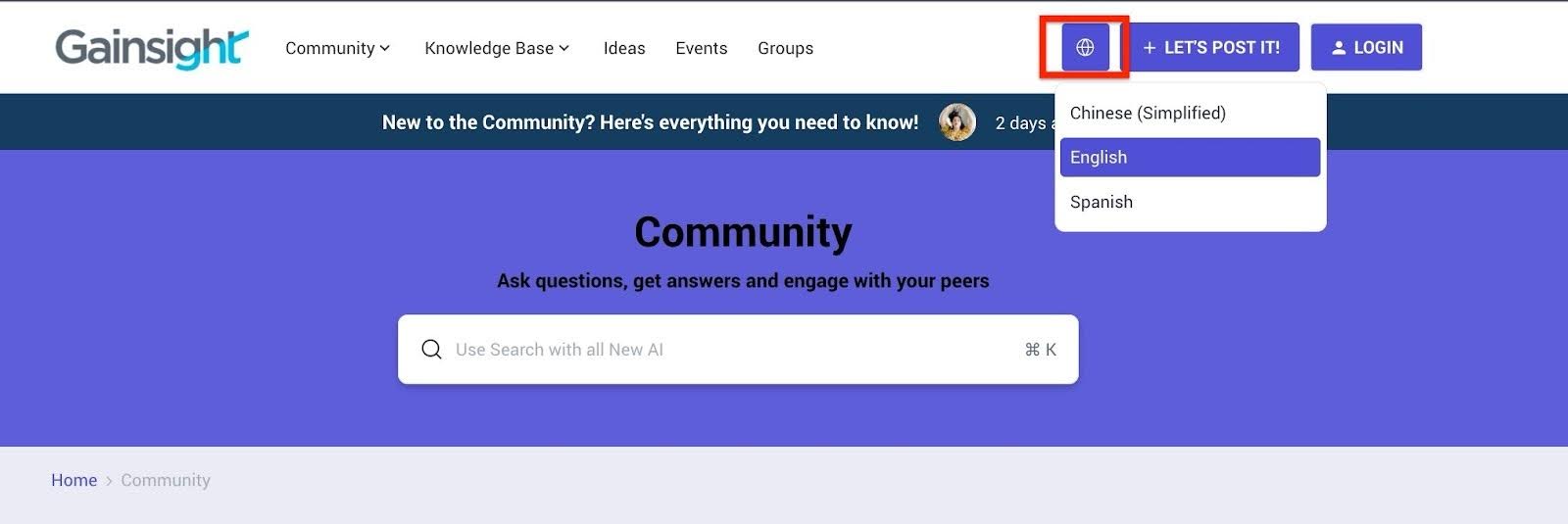
Expanded Language Support (19 to 36 Languages)
Community Admins can now enable and publish up to 36 languages and regions from Control > Language Settings. The following 17 new languages have been added:
- Chinese (Traditional) (zh-tw)
- English (Australia) (en-au)
- English (Canada) (en-ca)
- English (Global) (en)
- English (Ireland) (en-ie)
- English (Singapore) (en-sg)
- English (South Africa) (en-za)
- English (United Kingdom) (en-gb)
- French (Canada) (fr-ca)
- Hungarian (hu)
- Indonesian (id)
- Norwegian (no)
- Polish (pl)
- Spanish (United States) (es-us)
- Thai (th)
- Turkish (tr)
- Vietnamese (vi-vn)
For more information on language settings, refer to the Configure Language Settings article.
Manage Group Members and Requests with Group Moderators
Gainsight introduces the Group Moderator role, designed to empower trusted community members to manage their groups directly from Destination. This role replaces the former Group Admin and introduces secure, flexible tools for group membership and content oversight.
What is a Group Moderator role?
The Group Moderator role is a community member promoted by a Community Manager or admin to manage a specific group within Gainsight CC. Once assigned, moderators can perform key administrative tasks directly from Destination, streamlining group oversight and improving responsiveness within their community.
What Can Group Moderators Do?
Group moderators can now manage key group functions from Destination, including:
- Member Management:
- Add or remove existing community members in real time
- Instantly add users without email confirmations or approval workflows
- Join Request Handling (for private and hidden groups only): View, approve, or decline join requests from within Destination.
- Content Control: Edit and update featured content displayed prominently at the top of the group's page to ensure visibility for key discussions and resources.
- Moderation Widget Access: Use the Moderation Widget on the group overview page to access group management functions without needing to log into Control.
- Secure Invite Links: Invite links now include expiry settings (24 hours, 7 days, 30 days, or 90 days), preventing unauthorized or prolonged access.
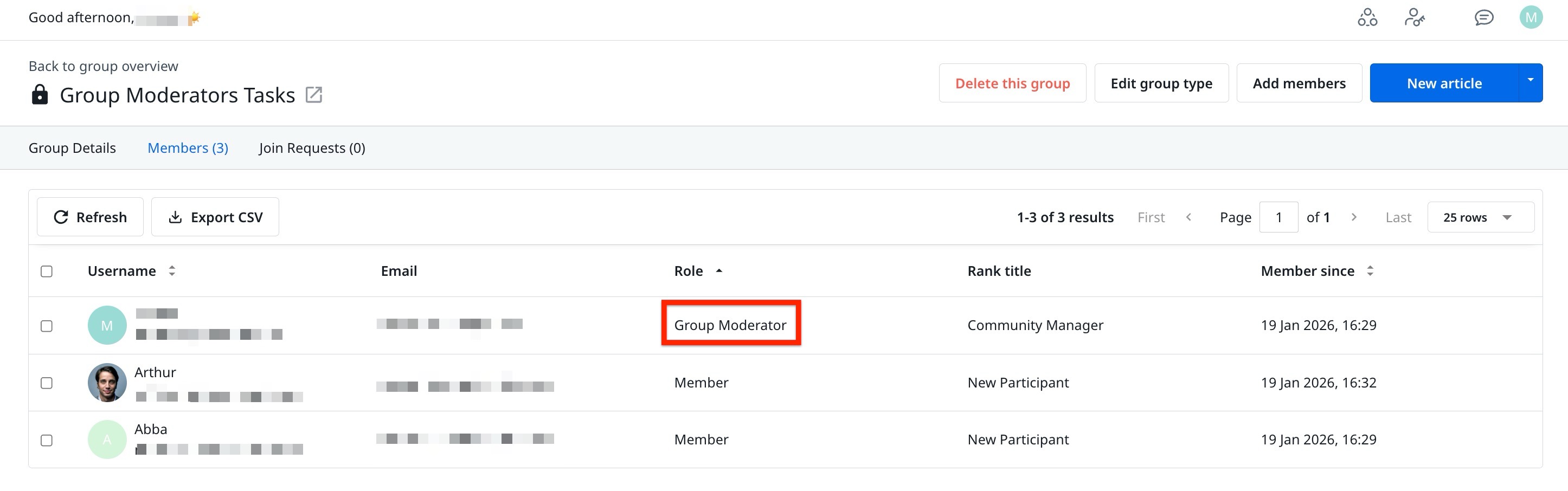
For more information on Group Moderator, refer to the Manage Groups With the Group Moderator Role article.
Release Date: March 11, 2026
Enhancements
Schedule Exports in Customer Community
Gainsight has enhanced the Community’s data export functionality by introducing the capability to perform recurring exports. This enhancement enables admins to automate and schedule report generation, thus reducing manual effort.
Admins can configure exports to run at a defined time and download retrieve the generated file once the system completes processing. You can select from the following frequencies for running the exports:
- Weekly: Runs every week on the selected day.
- Biweekly: Runs every two weeks on the selected day.
- Monthly: Runs on the first day of every month.
- Quarterly: Runs on the first day of the calendar quarter.

For more information on how to schedule exports, refer to the Exports Overview article.
Release Date: March 03, 2026
New Features
New Out-of-the-Box Community Dashboards (Open Beta): Subscription Trends and Subscription Status
In addition to the existing out-of-the-box (OOB) Community Dashboards, Gainsight has added two new dashboards: Subscription Trends and Subscription Status.
To use the dashboards:
- Log in to Control.
- Navigate to Analytics > New Dashboards (BETA).

Limitations
- SSO Requirement: New OOB dashboards (Open Beta) are available only for SSO-enabled communities, and the SSO flag must be set to true for SSO login.
- Licenses Requirement (CS+CC): Community users with Viewer_Analytics license in CS can view dashboards. Users with lower licenses must request an upgrade from CS admins.
Subscription Status Dashboard
The Subscription Status dashboard provides a current-state view of subscription distribution and status across your Community.
You can use the Subscription Status dashboard to:
- View total active subscriptions.
- Identify subscription distribution across categories.
- Understand which areas drive the most engagement.
- Detect low-performing categories or topics.

For more information on the Subscription Status dashboard, refer to the Subscription Status Dashboard article.
Subscription Trends Dashboard
The Subscription Trends dashboard provides a time-based view of subscription activity across your Community. It enables administrators to track how subscriptions evolve and identify growth or decline patterns over time.
You can use the Subscription Trends dashboard to:
- Monitor subscription growth trends over time.
- Identify spikes or drops in new subscriptions.
- Track unsubscribe patterns.
- Analyze engagement momentum across categories or topics.
- Support strategic decisions with historical data insights.

For more information on the Subscription Trends dashboard, refer to the Subscription Trends Dashboard article.
Release Date: February 24, 2026
Enhancements
Configure Segment Visibility and Dropdown List in Mega Menu
Gainsight has enhanced Mega Menu to give admins more control over navigation and custom menu structures, enabling greater configurability and more personalized end-user experiences.
Segment Visibility
Admins can now control which navigation items are visible to specific user segments, allowing them to personalize the Mega Menu based on user roles, behavior, or guest access.
Key Benefits
- Personalized navigation experience
- Improved content relevance
- Increased engagement
- Reduced menu clutter
To control the user view, the admin must first create segments to assign the pages. For more information on how to create segments, refer to the Segments article.

Dropdown List in Custom Navigation Items
Admins and Community Managers can now add a dropdown list under custom navigation items in the Mega Menu.
For example, a Products navigation item can include sub-items linking to individual product pages.
Example Business Use Case
Create a structured navigation model where:
- Products (parent Navigation Item)
- Product A
- Product B
- Product C
Each sub-item links to its own product-specific URL.
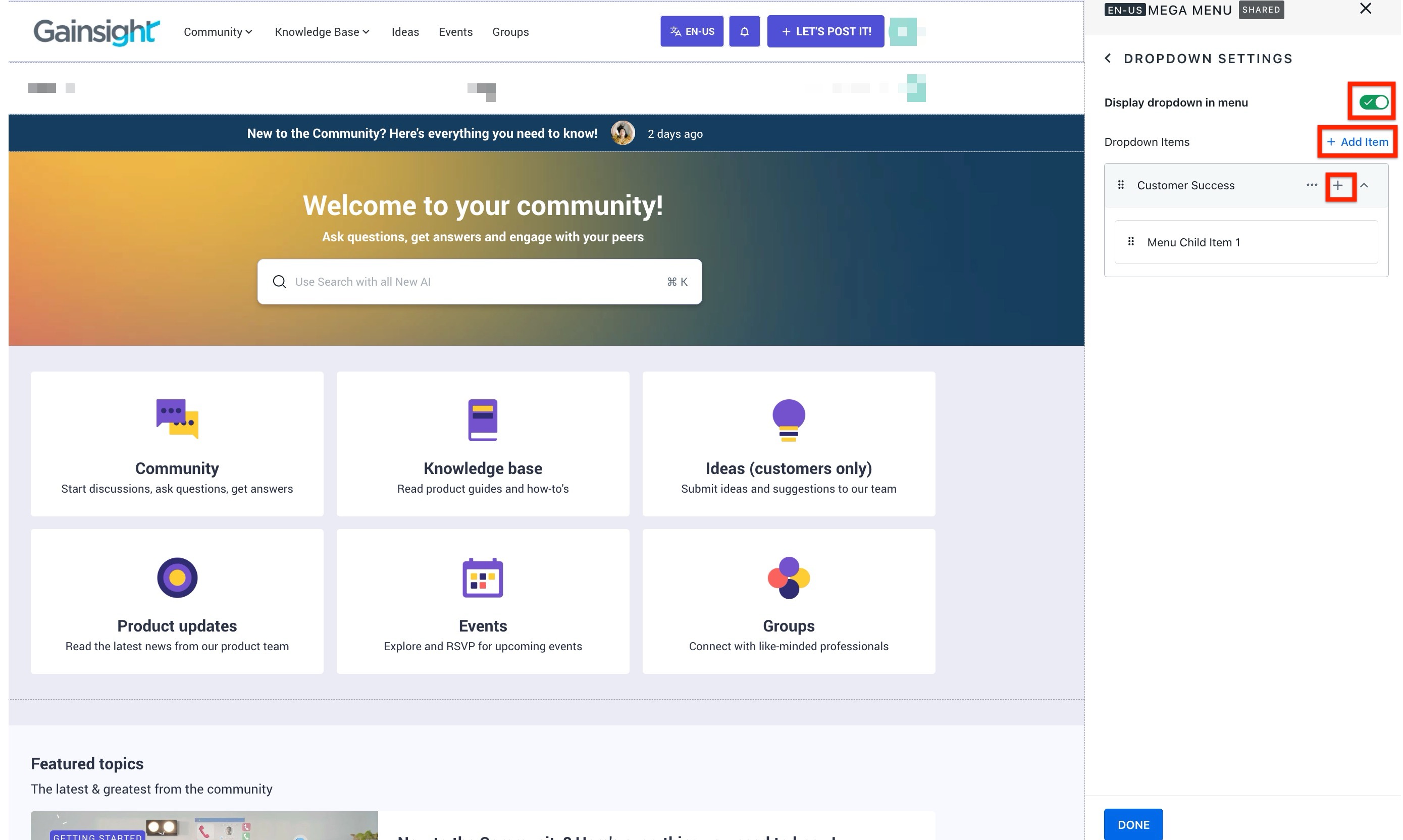
For more information on configuring the Mega Menu, refer to the Configure Mega Menu Widget in Destination article.
Release Date: February 10, 2026
Enhancements
Enable Category-Based Organization for Ideas and Product Updates (Open BETA)
Ideas and Product Updates can now be created within Categories in Community.
This enhancement can be enabled by an admin to improve how content is organized, discovered, and displayed across the Community.
Once enabled, users are required to select a category when creating a new Idea or Product Update. This ensures that all new content is properly categorized and easier to navigate within the Community.
Users can filter both Ideas and Product Updates by category in the Destination view, and view them in the Tabs widget alongside other supported content types.
- When this feature is not enabled, the existing behavior continues. Ideas are posted in the Ideas module and remain independent of Community categories.
- Existing Ideas in the Ideas module remain unchanged. Gainsight recommends that admins move existing Ideas into relevant categories to maintain consistency and benefit from the improved navigation and filtering options.
Before adding ideas and product updates to categories, admins must enable ideas from settings page in community.
To enable Ideas:
- Log in to Control.
- Navigate to Settings > Open Beta. The Open Beta page appears.
- Turn on the Ideas and Product Updates in Categories toggle.

What’s New
- Mandatory Category Assignment:
- Each new Idea or Product Update must be linked to a Community Category before it is published. Categories structure content under relevant product areas, enabling members to browse and contribute more effectively.
Note: Gainsight recommends that, before enabling this feature, you consider your existing community structure and which categories would be best for capturing ideas.
Ideas Example:

Product Updates Example:

- Each new Idea or Product Update must be linked to a Community Category before it is published. Categories structure content under relevant product areas, enabling members to browse and contribute more effectively.
- Category-Based Filtering on Destination:
- Users can now filter Ideas and Product Updates by category in the Destination view. This helps members quickly locate content related to specific products or topics of interest.
Ideas Example:

Product Updates Example:

- Users can now filter Ideas and Product Updates by category in the Destination view. This helps members quickly locate content related to specific products or topics of interest.
- Tabs Widget Support for Ideas:
- The Ideas and Product updates tab includes a filter that allows users to view Ideas or product updates based on the product area.
Ideas Example:

Product Updates Example:

- The Ideas and Product updates tab includes a filter that allows users to view Ideas or product updates based on the product area.
For more information on how to add ideas and product updates to a category, refer to: