
PX Release Notes March 2026
Release Date: March 17, 2026 (EU | US)
Announcement
In-App Hub (formerly KC Bot)
[Know More]Knowledge Center Bot Renamed to In-App Hub
The Knowledge Center Bot (KC Bot) has been renamed to In-App Hub within PX to better reflect the functionality and evolving capabilities of the feature. We believe this updated name more accurately represents the nature of the feature and aligns with current naming conventions across the industry.
There are no changes to functionality as part of this update. All existing configurations, content, and settings remain unchanged.

The product UI has already been updated to reflect the new name. Documentation, help articles, and screenshots will be updated progressively over the coming months.
Enhancements
Analytics
[Know More]Surface Frictional Click Interactions
PX adds rage clicks as a behavioral signal to help you identify unresponsive or confusing UI elements that may indicate user frustration during interaction. A rage click is captured when a user clicks three or more times within one second on the same element, highlighting moments where the experience may be frustrating, unresponsive, or misleading.
Tracking rage clicks makes it easier to uncover high-friction areas in the product, understand where users encounter interaction issues, and prioritize UX improvements that influence adoption and retention.
You can use Rage Clicks in PX to:
- Review repeated interaction signals in User Activity under User Profile
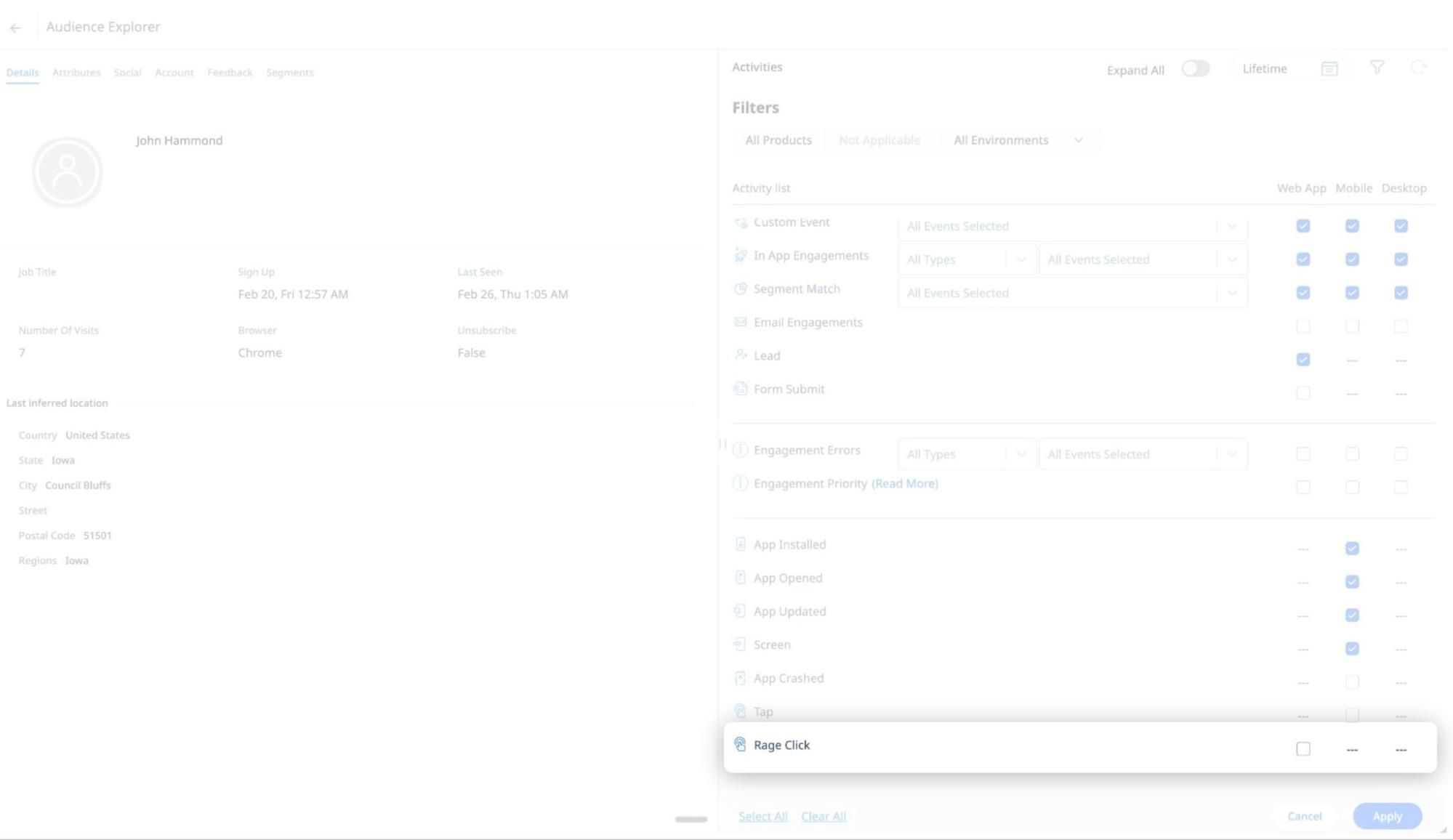
- Analyze interaction patterns in Query Builder to surface identified elements or features with elevated friction
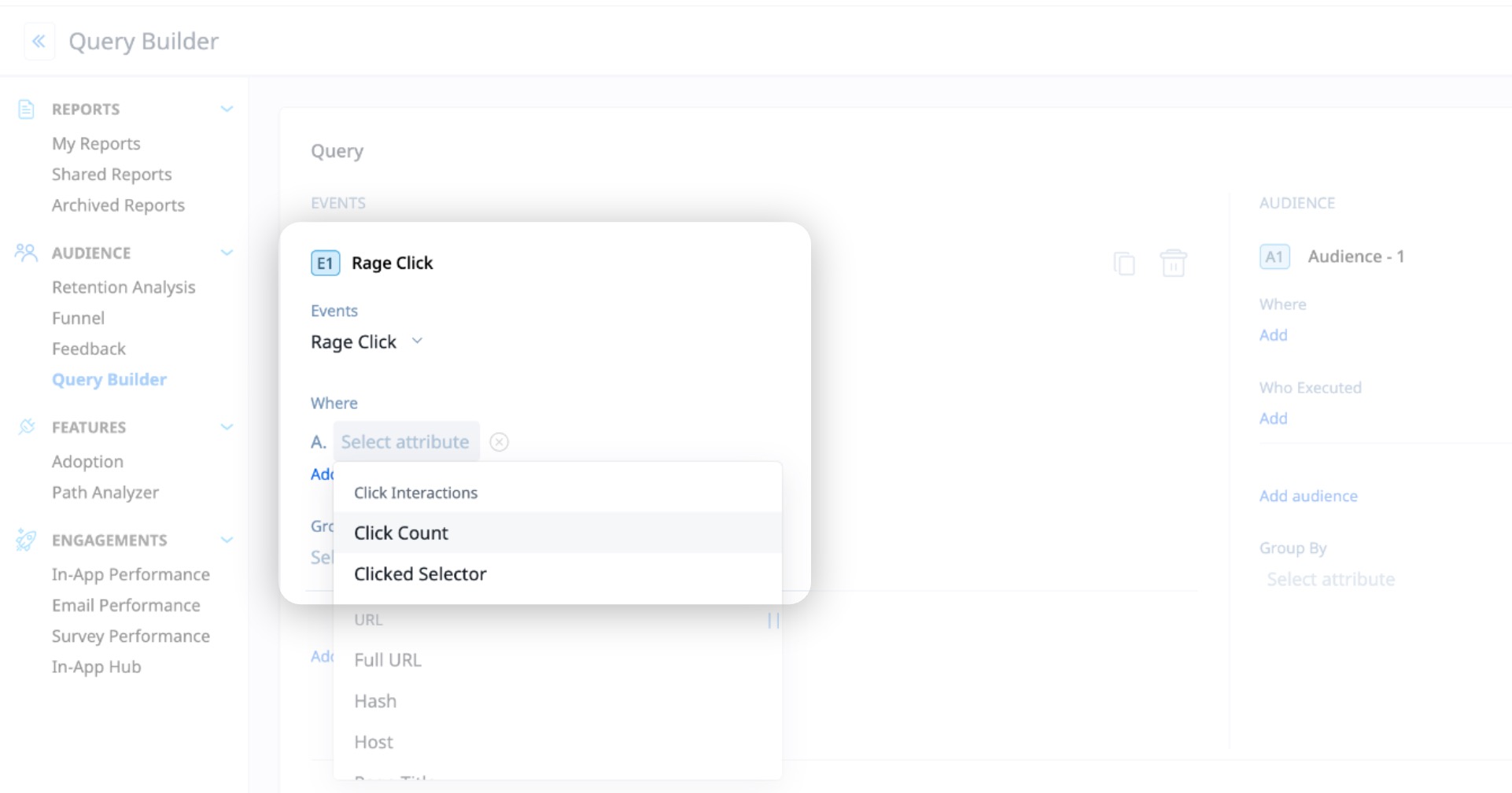
- Segment users and journeys based on rage click behavior to inform product and experience decisions
- Rage clicks are currently captured only in web applications.
- A rage click is a synthetic event created when three or more click events occur within the same one-second interval. The one-second interval is evaluated per fixed second (non-rolling). Rage click events are derived from standard click events and are not a separate event type.
- Example: When there are two Rage clicks by a user, RageClick 1 with three click events followed by RageClick 2 with four click events (total seven click events - click1, click2 … click7), the user activity would should up as follows when filtered by Click and Rage Click events:
- RageClick2 (click7 appears are RageClick2)
- Click6
- Click5
- Click4
- RageClick1 (click3 appears are RageClick1)
- Click2
- Click1
- Example: When there are two Rage clicks by a user, RageClick 1 with three click events followed by RageClick 2 with four click events (total seven click events - click1, click2 … click7), the user activity would should up as follows when filtered by Click and Rage Click events:
Audience and Accounts Explorer
[Know More]Expanded Product Score Configuration
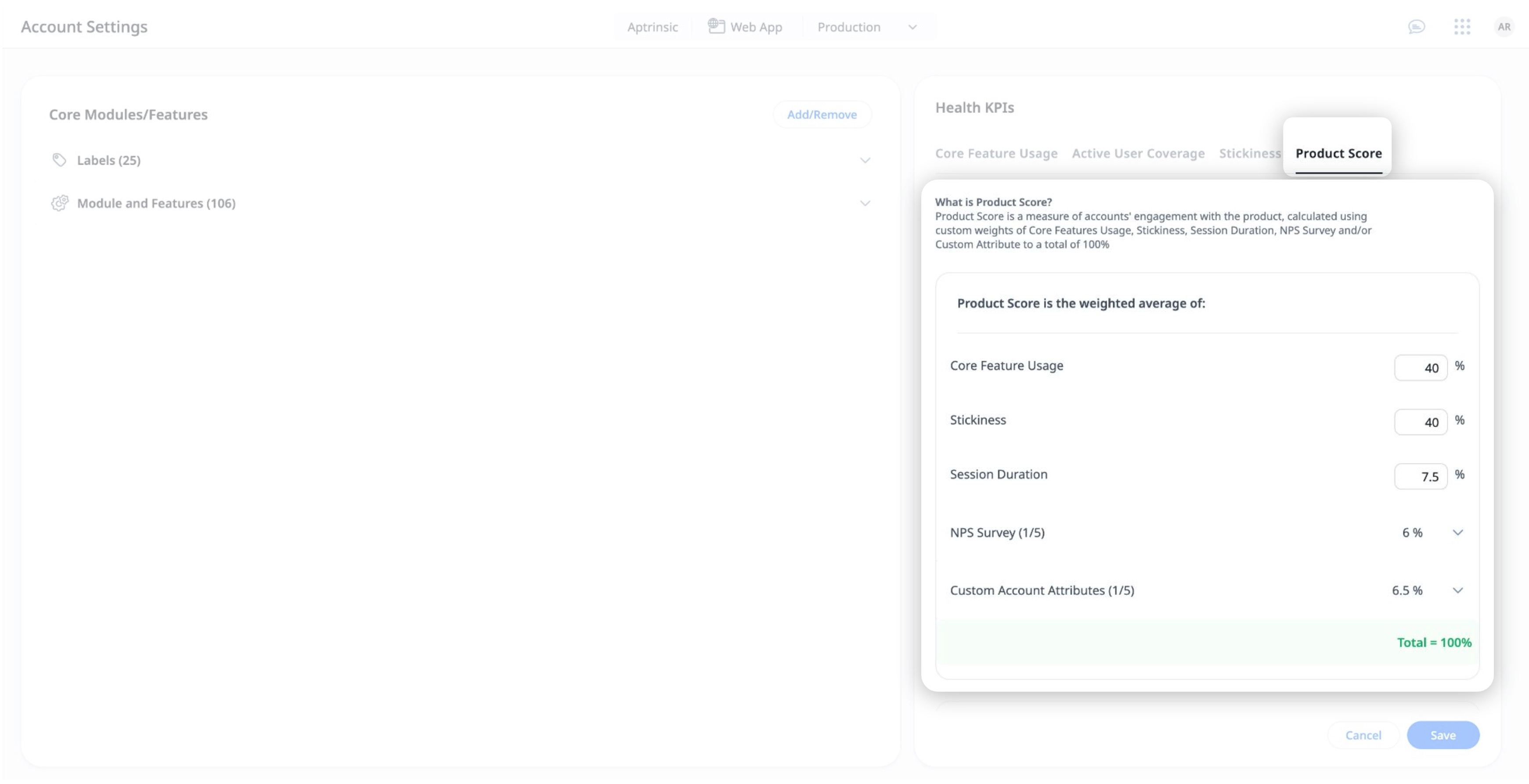
PX enhances the Product Score metric in the Health widget in Accounts Explorer with configurable weight distribution and additional input parameters, helping you with a more comprehensive product score or health across accounts or a particular account.
Previously, Product Score applied equal weightage to Core Feature Usage and Stickiness. You can now:
- Customize the weight distribution between Core Feature Usage and Stickiness
- Include additional parameters to influence the overall Product Score. New configurable parameters include:
- Session Duration
- NPS Survey
- Custom Account Attributes
Example Business Use Case
A SaaS company uses Product Score as a primary indicator of overall product health at the account level. While Core Feature Usage and Stickiness measure adoption, the team also wants Product Score to reflect customer sentiment (NPS), time spent in product (Session Duration), and an internal account specific metric maintained in their CRM. By configuring weights across these inputs, the organization creates a unified Product Score that more accurately represents account health. This enables teams to identify highly healthy accounts that may serve as advocates, as well as accounts showing early risk signals that require proactive attention from Customer Success or other teams.
- For parameters that are not inherently percentage-based, PX normalizes values to a 0–100 scale before applying weight calculations.
- The default configuration remains 50% Core Feature Usage and 50% Stickiness. Newly introduced parameters are set to 0% by default to prevent changes to existing Product Score dashboards.
- Changes to Product Score configuration can take up to 24 hours to reflect.
- You can add up to five active NPS surveys from the last 90 days and five custom account attributes to the Product Score calculation.
For more information, refer to the Configure Account Settings section of the Accounts Explorer article.
In-App Hub (formerly KC Bot)
[Know More]Track Localization Status for In-App Hub Content
PX enhances localization in the new In-App Hub (formerly KC Bot) by introducing a Content Localization view that provides centralized visibility into translation and enablement status for all content used in the In-App Hub.
The Content Localization list displays which languages each content is translated and enabled for, and clearly identifies where localization is incomplete. This enables you to:
- Validate translation coverage across configured languages
- Identify missing translations before launch
- Confirm that all bot-related content is ready for a broader rollout

For more information, refer to the Localize Content for In-App Hub article.
Localization API Enhancements
The Import and Export Localization APIs are enhanced to support additional PX assets, allowing you to automate localization workflows beyond articles, engagements, and bots.
Localization APIs now support:
- Linked Articles
- Web Links
- Javascript Functions
- In-App Hub
For more information, refer to the Localization API documentation.
| Net Promoter®, NPS®, NPS Prism®, and the NPS-related emoticons are registered trademarks of Bain & Company, Inc., NICE Systems, Inc., and Fred Reichheld. Net Promoter ScoreSM and Net Promoter SystemSM are service marks of Bain & Company, Inc., NICE Systems, Inc., and Fred Reichheld. |