This document has undergone changes since the first published date. Refer to the Revised Sections table for more information.
Revised Sections
Section Name | Revision Date |
|---|---|
April 25, 2024 |
Gainsight Release Notes Version 6.41 contains the following subsections:
Announcements: Describes important changes to the application that are implemented now or will be in the near future.
Enhancements (per module): Describes improvements made in the existing product capabilities.
Notes:
The modules in the Release Notes are categorized based on the following two product areas: Customer Success (CS), and Platform. The modules in each category are in alphabetical order. This is to ensure that the information in the release notes is more organized and easily searchable/consumable by our customers.
 : This symbol indicates that an enhancement originated as a customer suggestion from Gainsight Community.
 : This symbol indicates that the enhancement was made as part of the Horizon Experience (H) project.
 : Admin Controlled: Enhancement can be viewed only after the admin configures it in the product and makes it available for end users.
 : Automatic Update: End users have access to the enhancement without Admin configuration.
 : AI-Supported Features: The feature or content within the feature has been generated using AI.
Summary List/Quick View
Type | List of Enhancements/New Features |
|---|---|
Announcements |
|
Admin Controlled |
|
Automatic Update |
|

Announcements
Connectors
Databricks Integration with Gainsight
Gainsight's new Databricks Connector makes it easy to use data from Databricks to improve customer understanding and decisions. This tool helps with:
Getting Better Insights: Learn more about your customers.
Targeting Customers Effectively: Group your customers accurately for better service.
Predicting Needs: Use analytics to foresee and meet customer demands.
Making Smart Decisions: Base your actions on solid data.
For more information on how to set this up, refer to the Connectors section.
Integrations of CC, CE, and PX within Journey Orchestrator Program
Enhance Customer Success with New Cross-Product Integrations
Important:
These CC integrations will be available on the customer org from June 8th, 2024 and CE, PX integrations will be available from June 12th, 2024. Detailed instructional and support documentation will be available to ensure a smooth adoption.
IMPORTANT: These integrations will be available on the customer org fromMay 31st, 2024. Detailed instructional and support documentation will be available to ensure a smooth adoption.
We are thrilled to unveil new enhancements to our Customer Success (CS) initiatives through integrations involving Customer Education (CE), Product Experience (PX), and Customer Community (CC) using our Journey Orchestrator (JO) platform. These developments will significantly improve your onboarding and engagement programs.
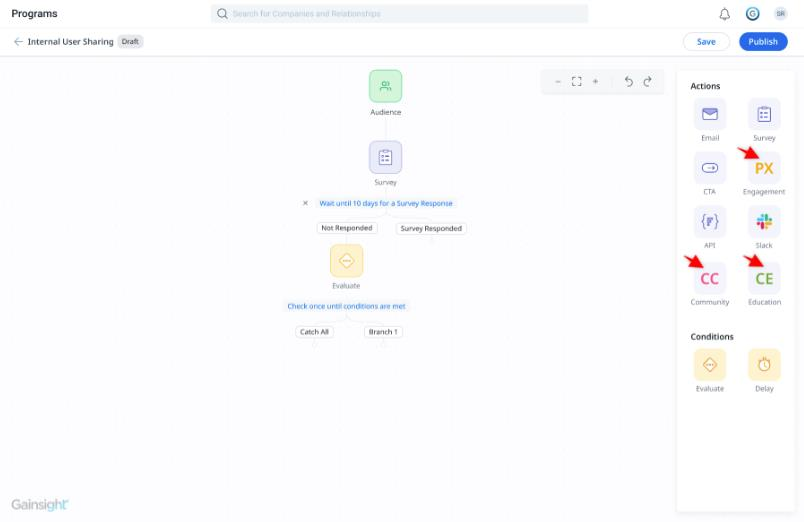
The following table outlines the features of each integration component involved in the new cross-product integrations within the Journey Orchestrator platform. This format helps clearly present the key functionalities and advantages of each integration:
Integration | Feature | Description |
|---|---|---|
JO-CE Integration | Direct Course Material Selection | Admins can select specific course materials directly from the Journey Orchestrator, ensuring a seamless integration and relevant learning experience. |
Dynamic Participant Management | Utilize the capability to branch participants based on the completion status of the course, enhancing personalized learning paths. | |
Insightful Statistics & Reports | Access detailed course performance and completion reports. | |
JO-PX Integration | Enhanced PX Engagement Selection | Select PX engagements within JO programs to be more intuitive and efficient, |
Immersive Visual Display & Interactive Preview | See a visual list of PX Engagements and quickly filter, search, and sort through engagements. Hover over an engagement to view an autoplay carousel that showcases the steps of the engagement. This interactive approach significantly improves the selection process, making it not just faster but also more intuitive. | |
JO-CC Integration | Badge Selection | Choose from a variety of badges in CC that can be assigned as part of your customer engagement programs. This feature allows for enhanced user interaction and recognition in community forums, fostering a stronger sense of achievement and loyalty. |
R360
Relationship Merge and Reparenting
In response to the dynamic nature of business structures, Gainsight CS NXT introduces two powerful features: Relationship Merge and Reparenting. These enhancements are designed to address the complexities of organizational changes, streamline data management, and ensure a reflective model of your evolving business environment.
For more information on Relationship Merge, refer to the Relationship Merge and Reparenting section.
Rules Engine
Upcoming Deprecation of Bionic Rules: Transitioning to Enhanced Horizon Rules
We are set to transition from Bionic Rules to Horizon Rules starting in the first week of June, with an expected completion by January 2025. Horizon Rules will provide an enriched visual experience and several enhancements that simplify the rule creation and management for admins.
Migration Timing and Communication Details:
Event | Timing |
|---|---|
Start of Migration | First week of June 2024 |
Expected Completion | January 2025 (Subject to change) |
Notice of Migration | Email notification sent 30 days before migration activities. |
Reminder Notice | Additional notification sent 1 week before migration. |
Notice of Completion | Email to Super Admin with audit logs, post-migration. Note: Bionic Rules will be available in an inactive state via an archived folder for your review for 30 days after migration. |
Important:
Please note that Bionic Rules will continue to run and can be modified up until your migration date. However, bug fixes will no longer be supported after May 31st, 2024. Rules should be migrated or recreated via Horizon Rules.
For more detailed information and ongoing updates, please visit our community post here. You can subscribe and follow the post to stay informed and submit any queries you may have regarding the migration process.
Write/Draft emails with AI
Enhance Email Communication with the 'Write with AI’
Gainsight is excited to introduce the Write with AI capability, integrating GPT-3.5 to effortlessly craft personalized email texts. This capability is available in the Timeline, Cheat Sheet Summary (C360), Email Assist (P360), Email Assist (Cockpit)and Email Template Builder. Boost efficiency and enhance personalization in your emails with AI-driven insights.
For more information on the Write with AI feature, refer to the Introducing AI for Enhanced Email Communication section.
Enhancements
Customer Success (CS)
360
Click here to expand for more information on 360
The Customer 360 (C360) is a central hub of your customer’s business information in Gainsight. It synthesizes business data from various sources and provides you with a holistic view of your customers. This minimizes the preparation time for your customer meetings.
Relationship Merge and Reparenting
In response to the dynamic nature of business structures, Gainsight CS NXT introduces two powerful features: Relationship Merge and Reparenting. These enhancements are designed to address the complexities of organizational changes, streamline data management, and ensure a reflective model of your evolving business environment.
Note: Relationships cannot be merged across two different relationship types.
Key Enhancements | What it Does/Benefit | Example Use Case |
|---|---|---|
Merging Relationships Across Companies | Allows administrators to combine two relationships from different companies. Ensures Gainsight accurately represents business changes, avoiding data fragmentation. | When two companies in your portfolio merge, you can consolidate their relationships in Gainsight to reflect this new change. |
Merging Relationships Within the Same Company | Eliminates duplicate relationships within the same company by merging them. Streamlines customer data for clearer insights and reporting. | When discovering redundant or overlapping customer engagements, you can merge these to maintain a singular, comprehensive customer view. |
Reparenting a Relationship to Another Company | Provides the flexibility to move a relationship to a different company. Keeps Gainsight aligned with your company’s restructuring or realignment. | If a business unit spins off from a parent company, you can reparent its relationship to the new entity in Gainsight. |
Impacts and Benefits of Relationship Merge in Other Feature Areas in NXT:
Module/Area | Functionality | Benefits |
|---|---|---|
Reports and Dashboards | Enhances reporting filters to accurately display changes from company mergers or relationship consolidations. | Provides a true-to-life view of business dynamics, ensuring data reflects actual organizational changes. |
Cockpit | Synchronizes CTAs, associated people details, and calendar integrations with merged entities. | Reduces manual updates, facilitates smoother operations, and decreases administrative overhead. |
Success Plan | Automatically updates Success Plans and CTAs and aligns with merged entities. | Ensures continuity and clarity in managing operations and strategic initiatives. |
Survey | Updates Customer feedback to align with merged entities | Enhances data accuracy and consistency in customer feedback analysis. |
Text Analytics | Updates Voice of Customer textual feedback and associated sentiment to align with merged entities. | Boosts data precision and ensures uniform analysis of customer sentiments. |
Timeline | Ensures all the timeline entries move to the new combined relationship after the merge. If a relationship is merged to a different company all the entries also move along with it. | Ensures accuracy in record keeping. |
Scorecards | Deletes the scorecard history and the timeline entries related to score updates of the losing relationship during a merge. Assigns the scorecard to the master relationship. | Ensures data accuracy and eliminates confusion by removing stale data of the losing relationship. |
To access Relationship Merge, navigate to Administration > Relationship > Click Relationship Merge tab.

For more information on how to merge or reparent a relationship, refer to the Relationship Merge and Reparenting article.
Journey Orchestrator
Click here to expand for more information on Journey Orchestrator
Journey Orchestrator is the hub for automated communications within Gainsight. This powerful tool harnesses the potential of automation to streamline your interactions with customers. Perfectly suited for customer success teams, Journey Orchestrator helps to launch personalized automated emails tailored by customer attributes such as health score, product usage, survey results, and lifecycle stage. Journey Orchestrator makes it effortlessly easy to enhance your customer relationships, ensuring personalized touchpoints that drive engagement and satisfaction. Re-imagine your strategy with smarter, scalable interactions and maintain the personal touch that sets your service apart.
Introducing Slack Action in Advanced Programs
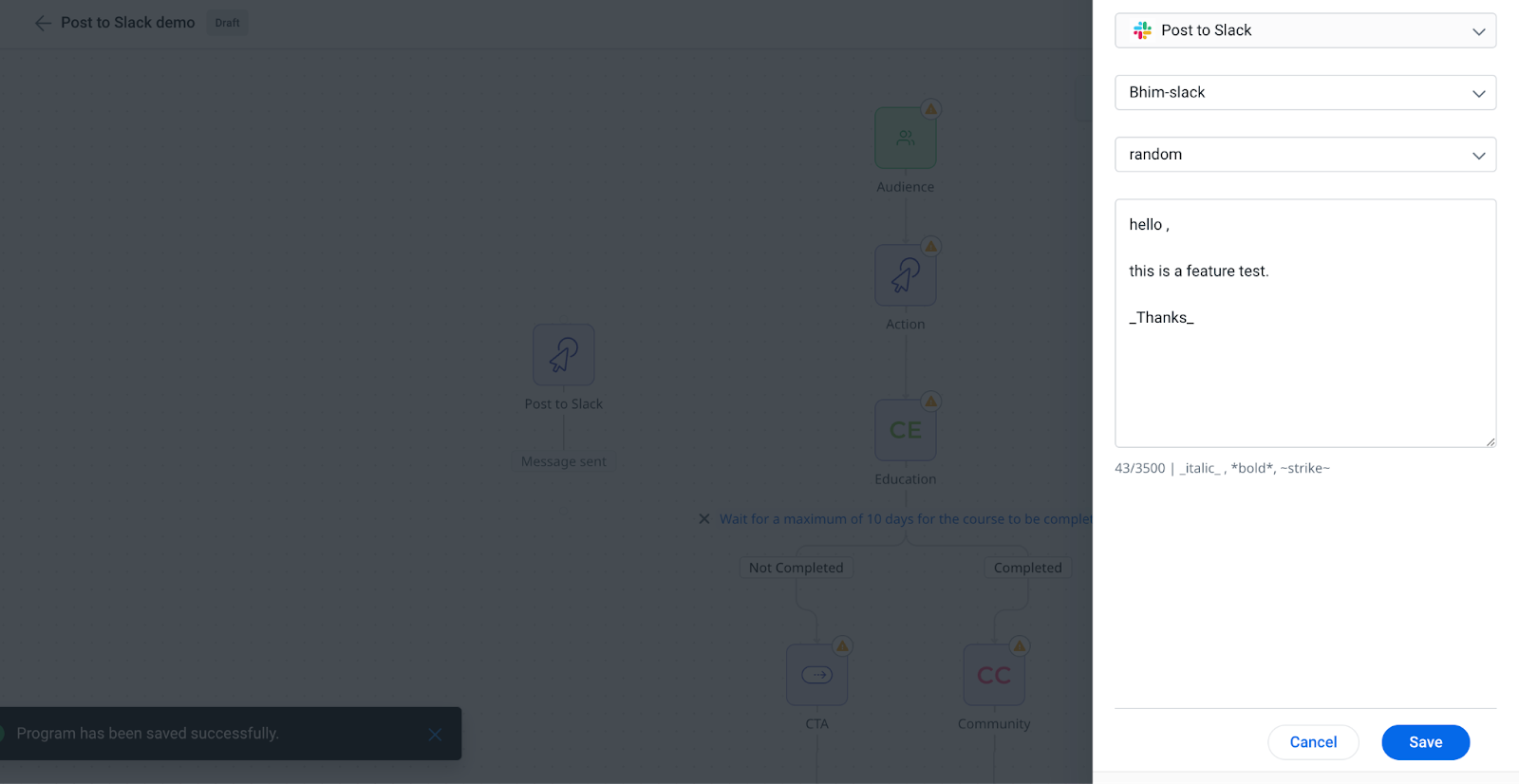
Gainsight has introduced a significant enhancement to its Journey Orchestrator: integration with the Slack platform. This integration aims to streamline communication processes, allowing admins to engage directly with teams through Slack, enhancing collaboration and response times. Admins can access Slack as an action within the Advanced Programs configuration. The Slack integration within Journey Orchestrator provides the following capabilities:
Out-of-the-Box Slack Connector Setup: Securely authorize the Slack app from Gainsight, ensuring a seamless and efficient integration process. Performing the Slack connector setup requires Slack admin permissions.
Easy Selection of Slack Channels and Workspaces: Directly post messages to selected Slack channels and workspaces from within Journey Orchestrator, facilitating targeted communications.
Comprehensive Message Customization: Utilize formatting options and tokens to inject customer-specific data into messages, making communications more relevant and impactful.
Insightful Analytic Reports: Access reports in Journey Orchestrator's individual Program Analytics for details on each participant's message delivery status.
To access the Slack action:
Navigate to Digital Journey > Programs.
Create a new Advanced Program.
Note: This feature is only available in the new version of Advanced Program.
For more information on Slack, refer to the Redesigned Advanced Programs Admin Guide article.
Flexibility to Move a Scheduled Advanced Program to Draft
Gainsight CS NXT has introduced an enhancement that significantly improves the management of Advanced Programs, providing administrators with greater control and flexibility. This update addresses the previous limitation where scheduled programs could not be edited without canceling and restarting them.
What's New:
Draft State Reversion: The scheduled Advanced Programs can now be reverted to the draft state, allowing for further modifications before finalizing.
Edit and Reschedule: Administrators can make necessary adjustments to the program content and reschedule it as needed.
For more information on how to reschedule advanced programs, refer to the Redesigned Advanced Programs Admin Guide article.
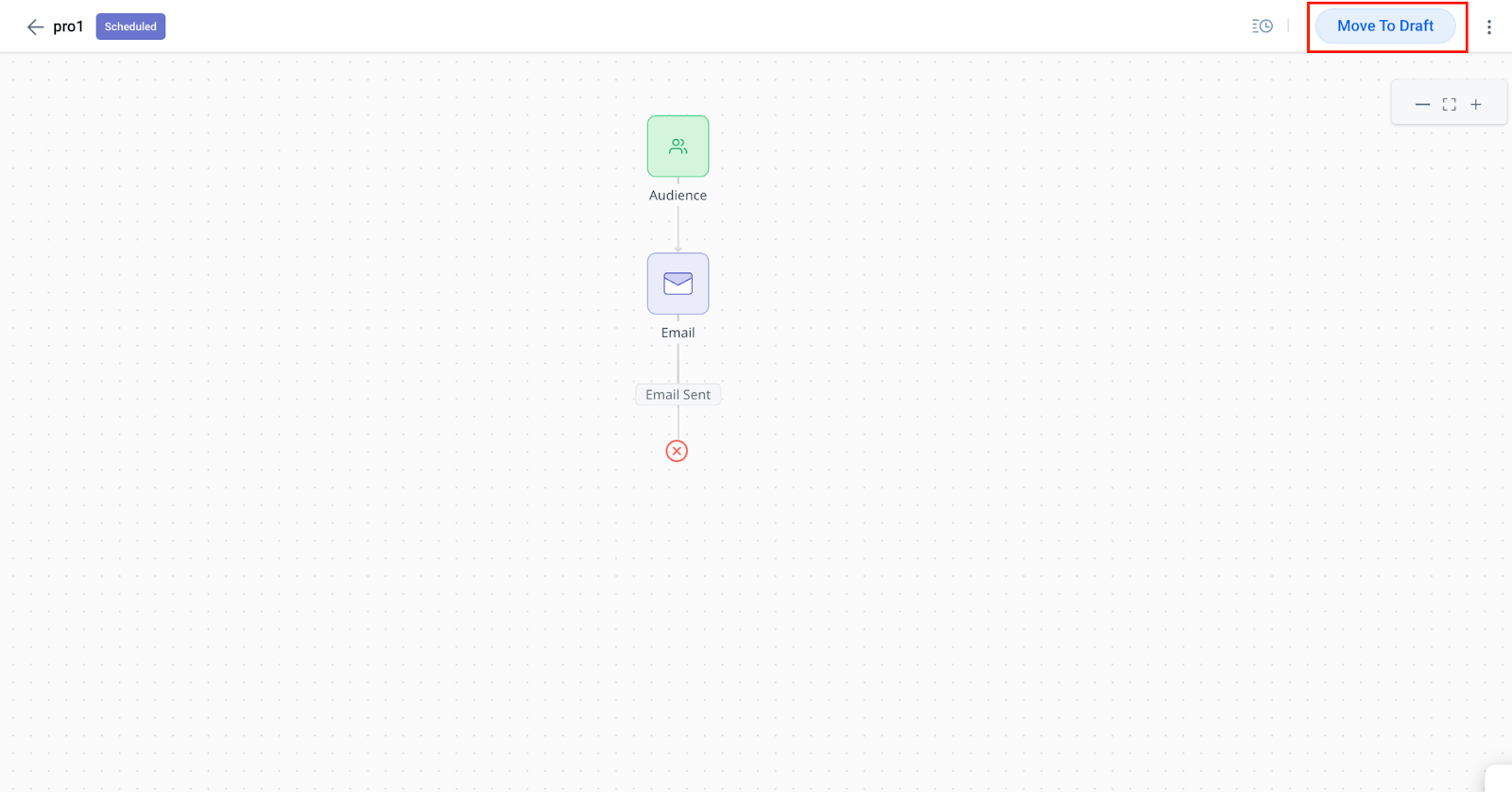
To move the scheduled program to draft state:
Navigate to Digital Journey > Programs.
Click any scheduled Advanced Program.
Click Move To Draft.
Introducing AI for Enhanced Email Communication
Gainsight is proud to unveil the 'Write with AI' feature, an innovative enhancement that transforms email communication. Integrating the power of GPT-3.5, this feature automatically generates personalized email text based on user prompts, combining efficiency with personalized touch.
Here’s how it works:
User Prompts: Simply type or select a prompt, and 'Write with AI' crafts the content, drawing from a deep understanding of language and context.
Interface and Interaction: Within Gainsight’s email application, users will find an intuitive AI tool ready to assist in email creation.
Customization: The AI-generated text is fully editable, giving users control to fine-tune messages ensuring they perfectly align with the intended tone and message.
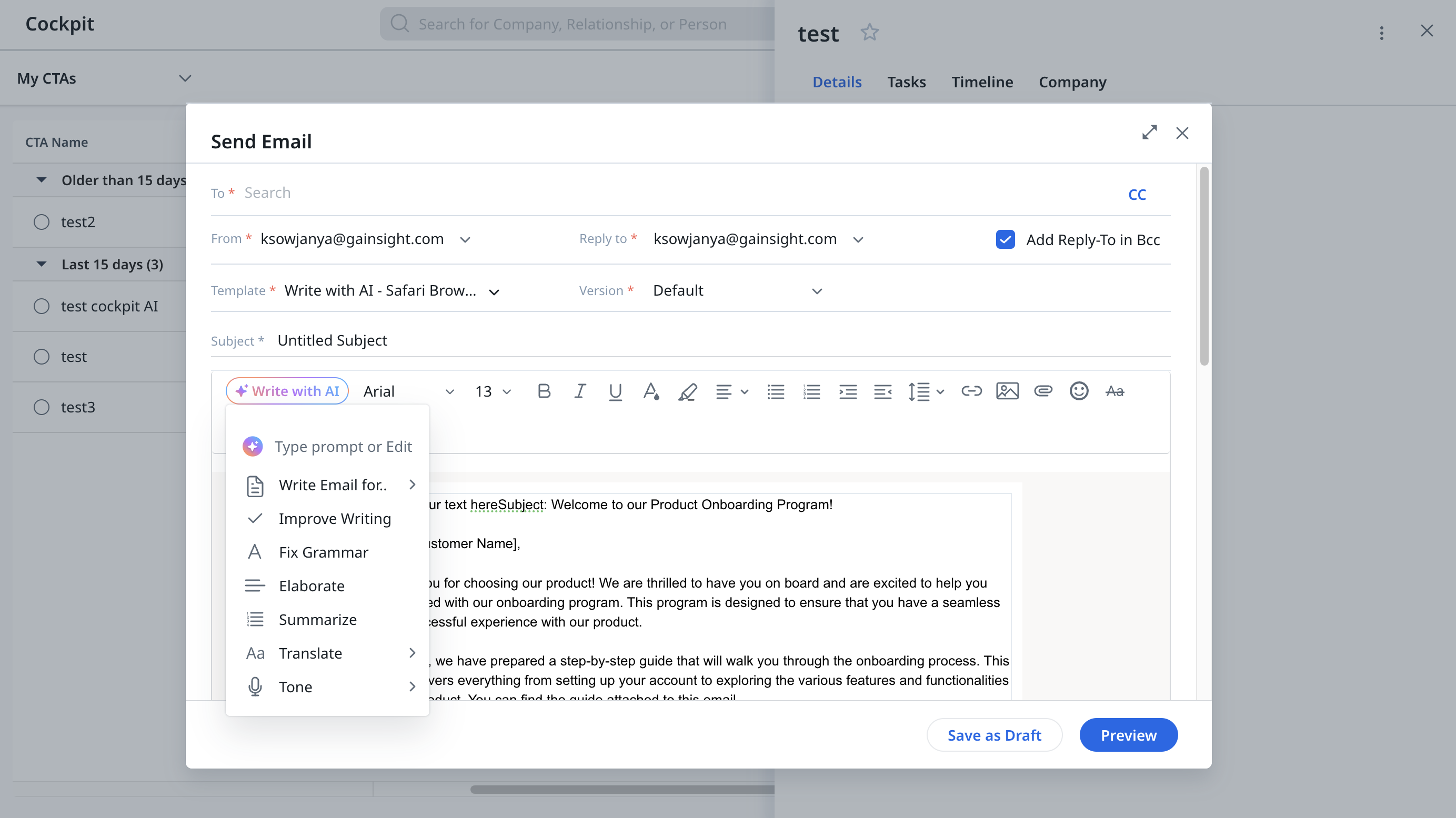
The Write with AI feature will be visible on following Gainsight pages while composing an email:
Email Assist (Cockpit)
Timeline
Cheat Sheet Summary (C360)
Email Assist (P360)
Email Template Builder
For more information on Write with AI, refer to the Email Template Builder article.
Platform
Connectors
Click here to expand for more information on Connectors
Connectors are integrations that are offered out-of-the-box so you can connect various data sources and sync their information to Gainsight.
One-Click Integration - Customer Success and Customer Communities
In this latest update, Gainsight is excited to introduce a seamless integration with Customer Communities. This enhancement enables Admins to easily sync user data and activities from Customer Communities directly into Gainsight NXT, streamlining workflows and enhancing user engagement.
Key Benefits | What it does | Use Case |
|---|---|---|
Streamlined Data Sync | Automates the synchronization of user data and activities between Customer Communities and Gainsight NXT | Admins can ensure that user engagements are up-to-date in Gainsight, enabling better tracking and management of community interactions |
Enhanced Customer Success | Provides detailed insights into how community interactions contribute to customer success | Organizations can tailor community content and interactions more effectively, fostering a supportive environment that drives engagement. |
For more information on how to integrate Customer Communities, refer to the Customer Communities and Gainsight Integration - Admin Guide article.
To connect Customer Communities, navigate to Administration > Connectors 2.0.

One-Click Integration - Customer Success and Customer Education
In this latest update, Gainsight is excited to introduce a seamless integration with Customer Education, further expanding the capabilities of Gainsight NXT. This enhancement simplifies how admins merge customer training with success strategies, enhancing the Gainsight NXT platform.
Business Use Case
CSMs can track customer education and training to offer tailored support. Access to this data helps CSMs spot knowledge gaps, suggest further training, and ensure customers make the most of product features
Admins can compile data like certification status, product usage, and support interactions to create a complete picture of customer health. Adding certification data to this scorecard improves the accuracy of assessing customer engagement and skills.
For more information on how to integrate Customer Education, refer to the Customer Education Integration article.
To connect Customer Communities, navigate to Administration > Connectors 2.0.
Databricks Integration with Gainsight
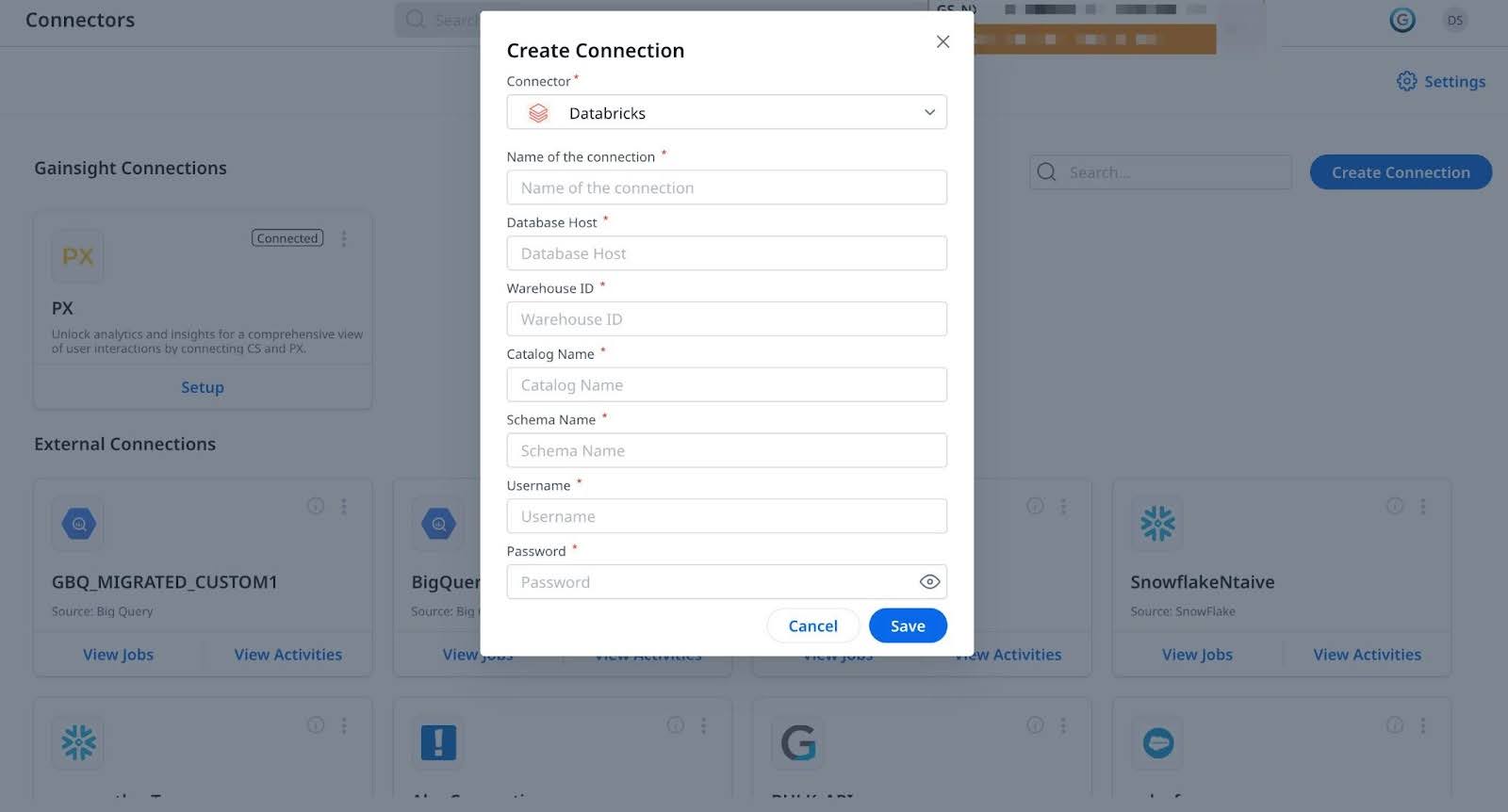
Gainsight introduces a new Databricks Connector, designed to ingest data from Databricks tables into Gainsight to enrich customer insights, improve segmentation, employ predictive analytics, and make data-driven decisions, ultimately driving enhanced customer success.
Key Benefits:
Improved Data Ingestion: You can now easily bring data from Databricks tables into Gainsight. This capability lets you connect with multiple warehouses and schemas, and perform transformations and merges between tables in connectors for meaningful data ingestion in Gainsight.
Expanded Data Connectivity: With the new Databricks connector, you can utilize Data Designer to blend Databricks tables with other data sources in Gainsight. This integration opens up possibilities for richer insights, which can be leveraged in Reporting, Rules, and Journey Orchestrator (JO).
For more information on how to connect Databricks, refer to the Databricks Connector article.
To connect Databricks, navigate to Administration > Connectors 2.0 > Click Create Connection. The Create Connection dialog appears.
Data Designer
Click here to expand for more information on Data Designer
Data Designer makes it easier for you to discover richer, more meaningful insights from your customer data. It provides a simple, easy-to-use solution to merge and transform your data, then make it accessible across the Gainsight platform for further analysis and exploration.
Google BigQuery and Databricks in Data Designer
Important:
This feature will be available for customers from April 27, 2024 onwards
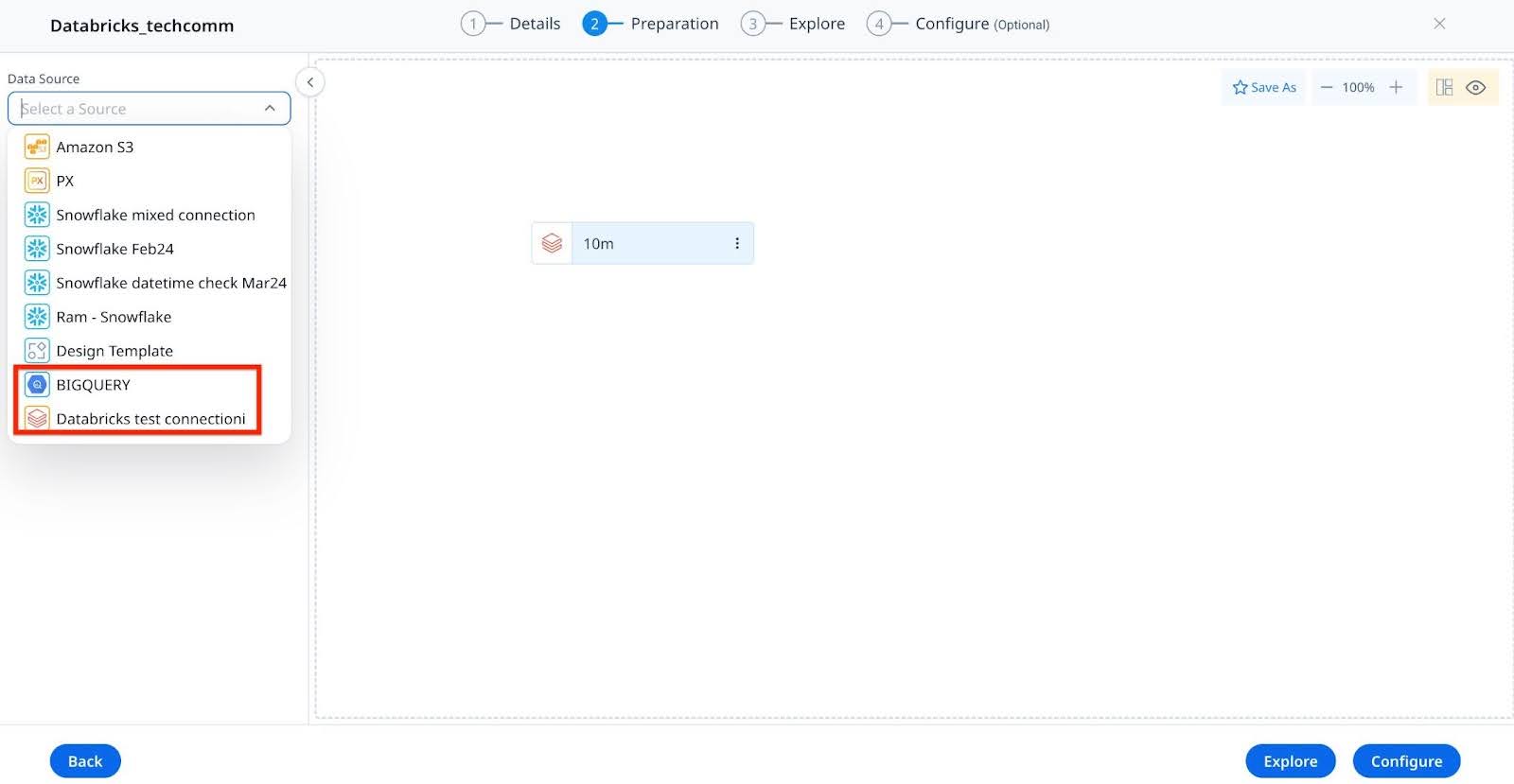
Data Designer is now enhanced to add Google BigQuery and Databricks as new data sources. Admins can now create a dataset by fetching data from a Google Bigquery and Databricks in any Gainsight objects and external sources.
This helps to uncover hidden correlations between disparate data sources such as cases, usage adoption, and health scores and to build datasets incorporating both Gainsight Object and available external source, ensuring flexibility and compatibility across platforms and much more.
To use this enhancement, navigate to Administration > Data Designer, and open an existing dataset or create a new design. In the Preparation tab, from the Data Source dropdown list, you can now see Google BigQuery and Databricks along with Matrix Data.
For more information on how to data ingestion from:
Google BigQuery, refer to the Use Data from Google BigQuery in Data Designer article.
Databricks, refer to the Use Data from Databricks in Data Designer article.
Rules Engine
Click here to expand for more information on Rules Engine
Gainsight Data Management supports an admin to create and manage Gainsight Objects directly from the Data Management page. As an analogy, a Gainsight Object and its field(s) can be thought of as a database table and its columns. Data Management can be accessed from Administration > Data Management.
Migrate to Horizon Rules Engine to Enhance Performance
Gainsight no longer supports enhancements to the Bionic Rules Engine and encourages customers to migrate to the new Horizon Rules Engine Experience as soon as possible. Starting with the May 2023 release, Gainsight will automatically migrate all customers to the new Horizon Rules Engine. Before this migration, customers will receive an email inviting them to migrate to the new Horizon experience. This process will include a seamless automatic migration of all existing layouts and templates. Admins will have the opportunity to review the new layouts and templates to make any necessary changes. For more information, please refer to the Change Document for Rules Engine Horizon Experience.
Enhanced Customer Health Tracking with Set Score Rule Action Templates (BETA)
Important:
This feature will be rolled out to customer orgs in a phased manner. The rollout will be complete by May 3, 2024.
This feature will be available in customer orgs across all data centers fromApril 27, 2024onwards.
Gainsight introduces a beta feature enhancing customer health tracking: Set Score Rule Action Templates. These templates enable administrators to automate updates of crucial Scorecard measures like NPS® (Net Promoter Score), CSAT (Customer Satisfaction Survey), Engagement, and Support, key indicators for churn identification and prevention.
What’s New:
Automated Score Updates: Use predefined templates to automate updates, ensuring near-real-time accuracy in customer health scores.
Industry-Inspired Templates: Developed from best practices, the templates simplify score updating processes for essential measures.
The following four Set Score rule action templates are available:
Set score for NPS® measure based on average NPS® score: Assess customer loyalty and the likelihood of recommending your product and/or service. Use this rule template to set the NPS® measure score using the average NPS® score over the past N days.
.png?sv=2026-02-06&spr=https&st=2026-11-24T18%3A06%3A54Z&se=2026-11-24T18%3A33%3A54Z&sr=b&sp=r&sig=tlaiSBX1oYx0gAQKHZ1KD7z6VAEKg%2FU18LE9jE8HOgE%3D)
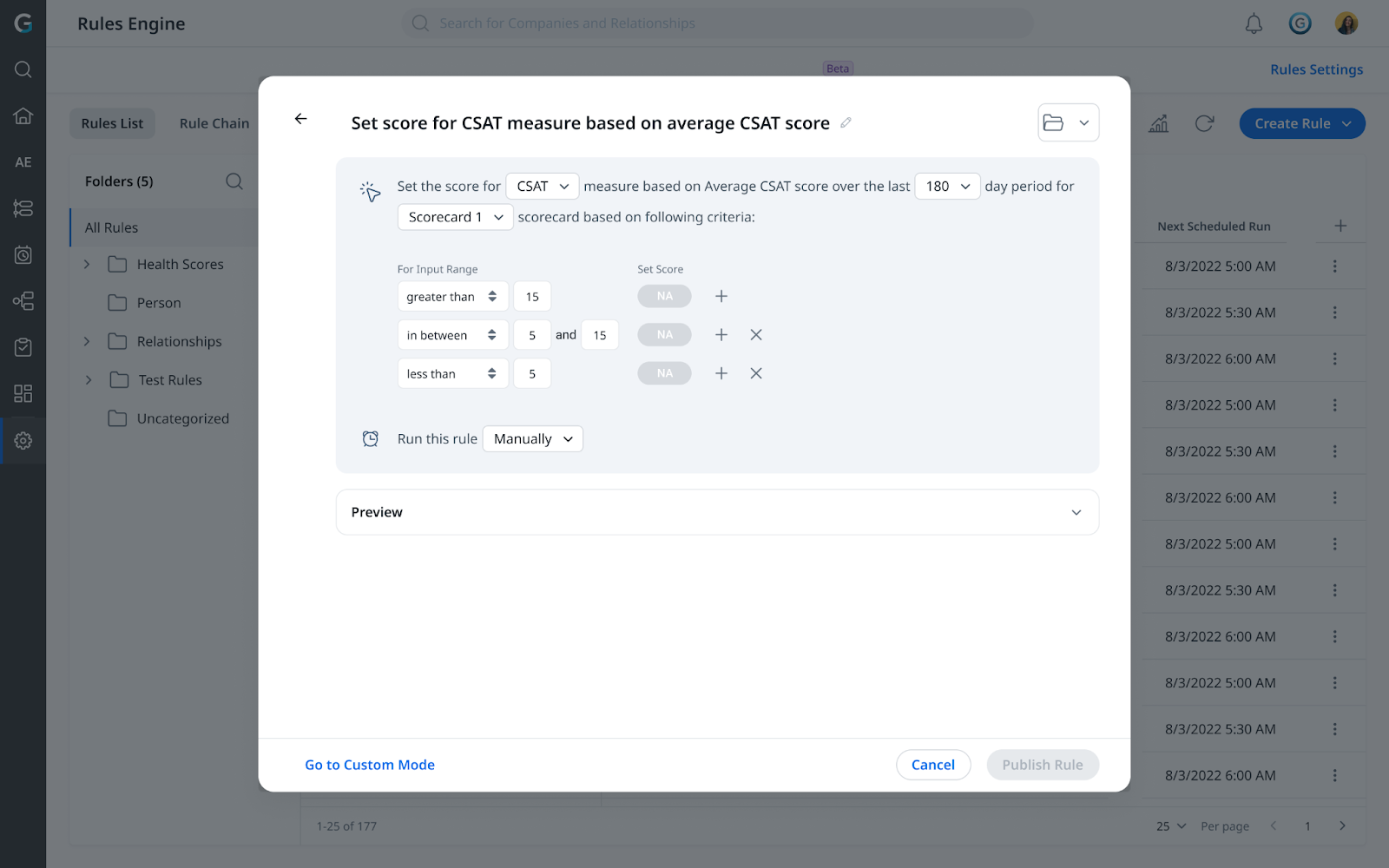
Set score for CSAT measure based on average CSAT score: Track the overall product and/or service usage satisfaction of your customers through surveys. Use this rule template to set the CSAT measure score using the average score over the past N days.
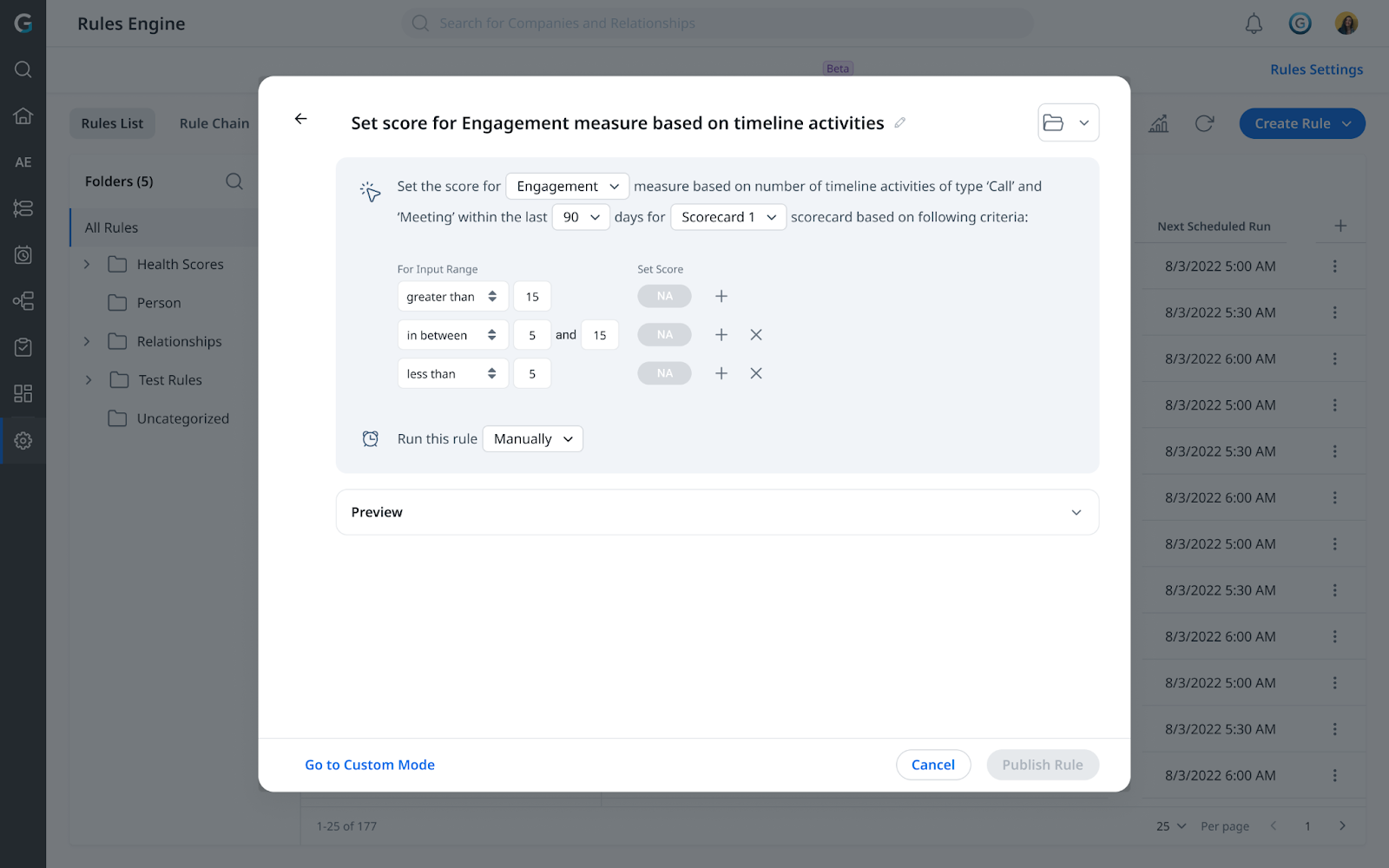
Set score for Engagement measure based on timeline activities: Determine customer engagement levels by tracking interactions over the past N days, based on Timeline activity types such as Calls and Meetings. Use this rule template to set the Engagement measure score using the number of Timeline activities over the past N days.
Set score for Support score measure based tickets volume: Monitor the frequency of support tickets raised by your customers. This rule template updates the score based on the number of tickets with a specific status over the past N days.
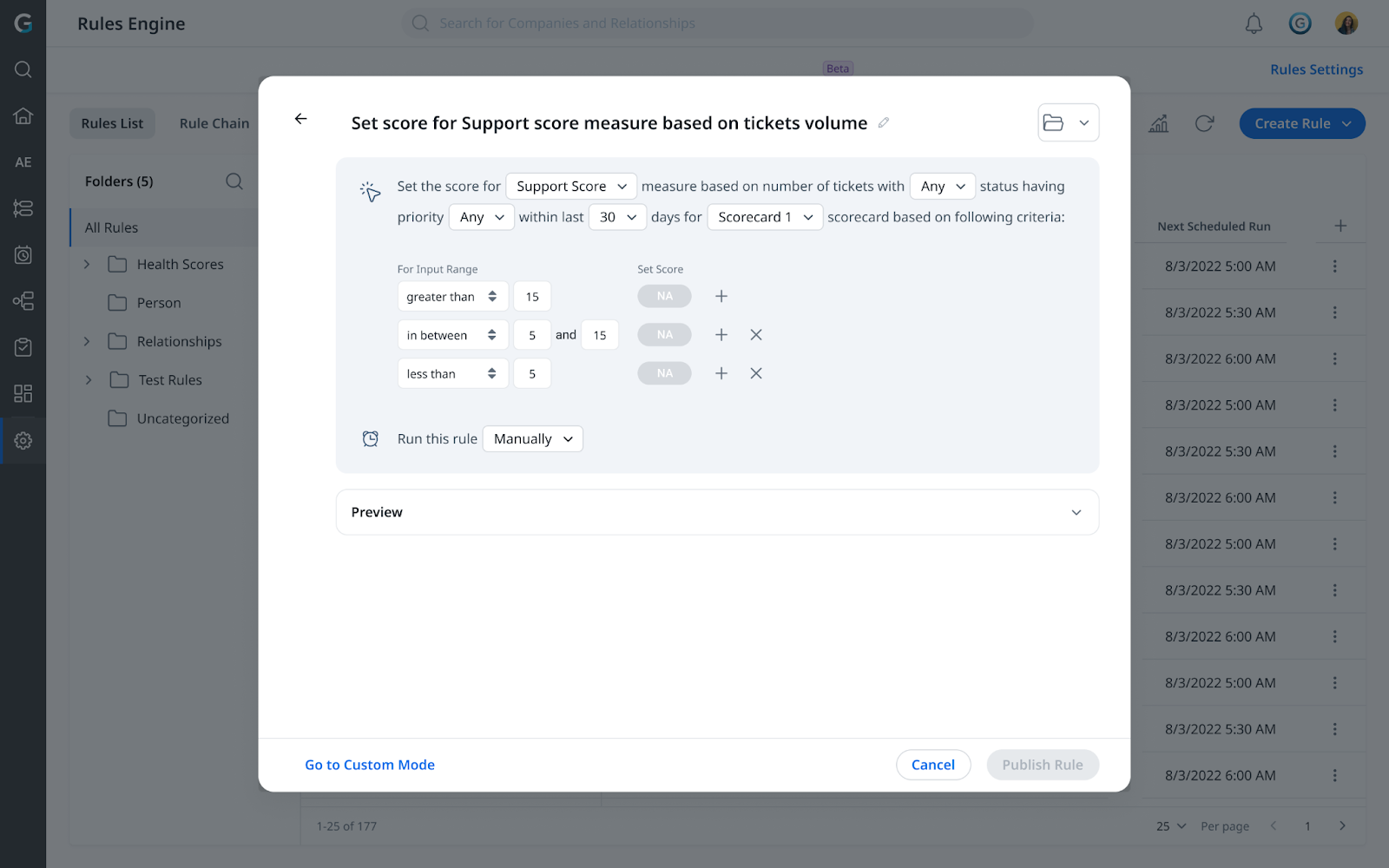
Additionally, you can select Go to Custom Mode to customize the template according to your business needs.
For more information on how to use the set score rule action templates, refer to the Scorecard Templates section of the Rules Template article.
For more information on how to customize a rule action template, refer to the Customize Templates section of the Rules Template article.
User Management
Click here to expand for more information on User Management
Admins can use this feature to manage Gainsight users and their allocated licenses and permissions. User Management can be accessed from Administration > Users and Permissions > User Management.
Redesigned Permission Bundle
Gainsight has updated its Permission Bundle to enhance user experience and customization. This update offers a more intuitive design, flexible access controls, and efficient configuration options.
Redesigned User Experience: The Permission Bundle's interface has been overhauled to make navigation and management more user-friendly, facilitating easier access and control over permissions.
Permission Bundle Customization for Users: In addition to the default Viewer and Viewer Analytics license permission bundles, administrators can now create customized permission bundles for Viewer and Viewer Analytics paid license types. They can define and customize module access within these licenses and assign users to these bundles. This allows for precise control over what each user can access and do in Gainsight.
Efficient Configuration with Cloning: The ability to clone existing permission bundles enables administrators to quickly replicate configurations and save significant time.
For more information, refer to the Permission Bundles article.
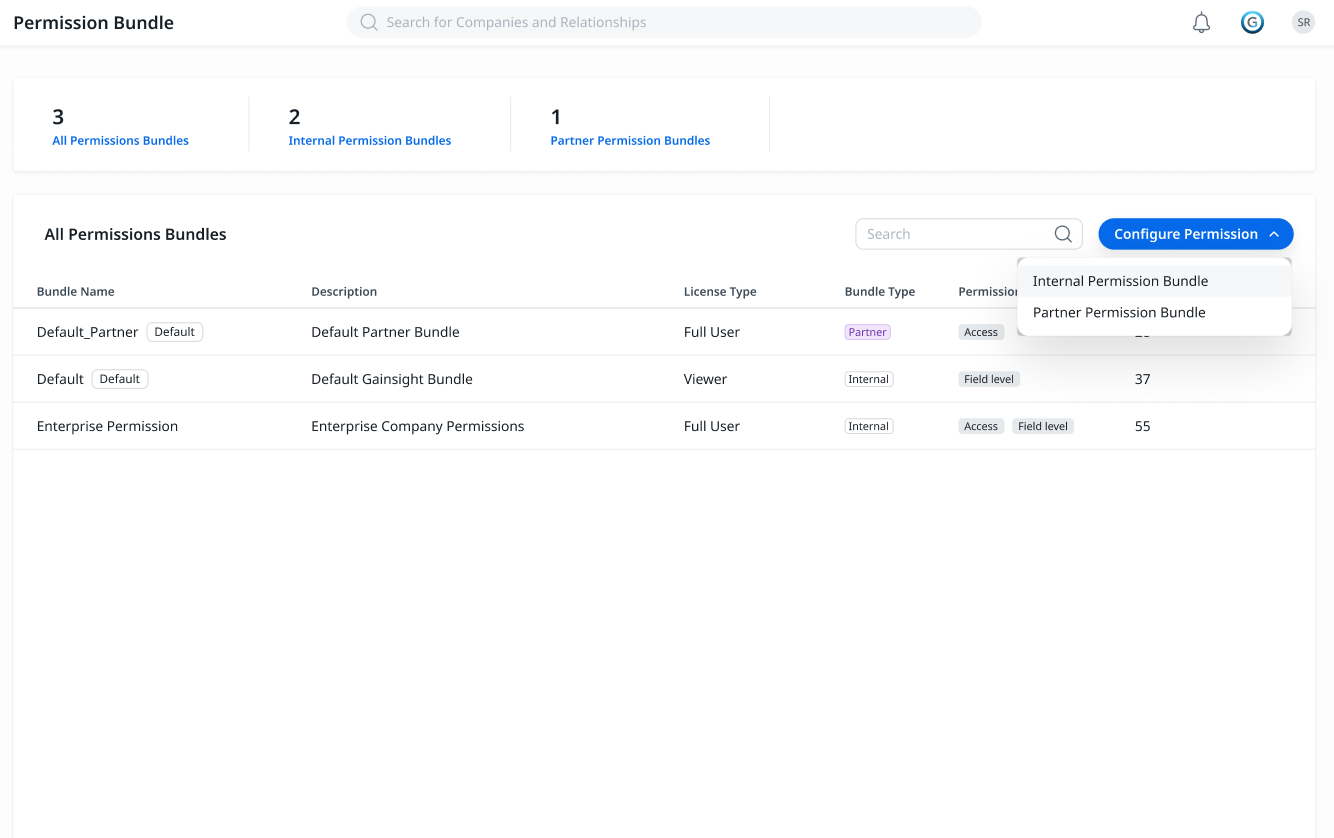
Note: Currently, Default Viewer and Default Viewer Analytics bundles can be assigned to Full license users. With this enhancement, however, these bundles will no longer be assignable to Full license users. Full license users who currently have these bundles assigned will continue to retain them until an admin manually updates their permissions.
Net Promoter®, NPS®, NPS Prism®, and the NPS-related emoticons are registered trademarks of Bain & Company, Inc., NICE Systems, Inc., and Fred Reichheld. Net Promoter ScoreSM and Net Promoter SystemSM are service marks of Bain & Company, Inc., NICE Systems, Inc., and Fred Reichheld.