This article provides a list of enhancements that are available as On-Demand Features in the June 2026 Customer Success (CS) product release.
This article provides a list of enhancements that are available as On-Demand Features in the June 2026 Customer Success (CS) product release.
The Gainsight On-Demand Release Notes contains the following subsection:
Enhancements (per module): Describes improvements made in the existing product capabilities.
What Are On-Demand Feature Release Notes?
The features and enhancements in the Release Notes are GA-ready, with documentation and support available, but are not enabled by default.
If you would like early access for any feature, please submit a support ticket.
If you choose not to access these features early, they will be available in your tenants automatically with the upcoming major release.
Quarterly releases will continue as usual. Admin-controlled features will remain configurable by admins.
Icon Glossary For Release Notes
Click here for more information on icons used in the Release Notes
Titles | Descriptions |
|---|---|
Automatic Update | End users have access to the enhancement without Admin configuration. |
Admin Controlled | Enhancement can be viewed only after the admin configures it in the product and makes it available for end users |
Horizon Experience | This symbol indicates that the enhancement was made as part of the Horizon Experience (H) project. |
Gainsight Community | This symbol indicates that the enhancement originated as a customer suggestion from Gainsight Community. |
AI Update | The feature or content within the feature has been generated using Gainsight AI. |

Quick View
Type | List of Enhancements |
|---|---|
Admin Controlled Update | |
Automatic Update |
|
Enhancements
Note
MCP enhancements notated below have been enabled for all customers and a support ticket is not needed.
Spaces and Timeline enhancements remain On-Demand. Please contact support to enable the Spaces and Timeline features.
Important
To take advantage of the enhancements below, complete the following:
Claude: Each user needs to disconnect and reconnect the app.
ChatGPT: The Admin needs to refresh the app.
Query Gainsight Data Using Your Existing Reports in MCP

Automatic Update

AI Update
Gainsight CS Model Context Protocol (MCP) now searches your report definitions to better understand your natural-language queries, helping deliver more accurate and relevant results.
What’s New
The following capabilities are now available:
Search Reports: When you submit a query, Gainsight CS MCP automatically searches across reports you have access to. It matches report names, descriptions, and filter logic against your query to identify relevant reports.
Fetch Report Data: Once a relevant report is identified, Gainsight CS MCP retrieves the data from that report.
Modify Report Logic Dynamically: When your query requires adjustments to a report’s logic, Gainsight CS MCP can apply the following modifications:
Add fields not originally included in the report output.
Add new filters based on your query criteria.
Modify existing unlocked filter values to match your request.
Remove unlocked filters irrelevant to your query.
Recognize Tenant Vocabulary: You do not need to translate internal vocabulary into Gainsight field names. Because reports encode your organization’s terminology, such as custom tier names, account segments, or team labels, the MCP understands these terms automatically.
Key Benefits
This enhancement provides the following outcomes:
Existing reports now serve as a knowledge layer for Gainsight CS MCP, enabling natural-language querying without additional configuration.
Query results automatically respect your data governance rules, so locked filters remain enforced, and only reports within your permissions are searched.
Limitations
The following constraints apply to report-based querying:
Only reports with a Matrix Data Architecture (MDA) connection type are included. Reports sourced from Salesforce (SFDC) or other external connections are not.
Only reports that have run in the last 90 days are included.
Reports without meaningful names or descriptions may not appear in search results, as Gainsight CS MCP relies on report metadata to determine relevance.
Locked filters in a report cannot be altered or removed.
Example Business Use Case
A CSM asks: "Show me all Enterprise-tier accounts with open renewals."
The Gainsight CS MCP searches accessible reports, identifies one that filters by account tier and renewal status, applies the relevant filter values, and returns the scoped results.
For detailed setup instructions, refer to the Set Up Gainsight CS MCP Server Integration article.
Query Your Portfolio Data in Gainsight CS MCP
Automatic Update
AI Update
Gainsight CS MCP now supports portfolio-level queries by reading the filters you have configured on the Gainsight Home.
When you reference My Portfolio in a query, the MCP retrieves your personal Home filters and applies them automatically.
What's New
The following capabilities are now available:
Retrieve Portfolio Filters: Gainsight CS MCP now reads the company and relationship filters that you have set, which define your portfolio scope.
Automatic Filter Application: When your query references “My Portfolio”, the MCP retrieves your Gainsight Home filter configuration and applies those filters to the query. Only companies or relationships matching your portfolio criteria are returned.
Company and Relationship Support: Both company-level and relationship-level Gainsight Home filters are supported and applied automatically to matching queries.
Prerequisites
At least one filter must be configured in Gainsight Home.
Key Benefits
This enhancement provides the following outcomes:
Gainsight CS MCP reads your Gainsight Home filter configuration automatically, so you do not need to specify account lists or filter criteria in every query.
The portfolio definition used in Gainsight CS MCP queries matches exactly what you see in Gainsight Home, ensuring a consistent view of your book of business across Gainsight.
Limitations
Gainsight CS MCP determines portfolio scope exclusively from the Home filters. It does not read portfolio definitions from other Gainsight surfaces or configurations.
Example Business Use Case
A CSM has configured a filter in Gainsight Home where ARR is greater than or equal to $1 million, resulting in a scoped set of companies in their portfolio view.
The CSM asks: “Get the ARR and CSM details of companies in my portfolio.”
The Gainsight CS MCP retrieves the Gainsight Home filter, queries the Company object with that filter applied, and returns the ARR and CSM assignment details for the matching companies.
For detailed setup instructions, refer to the Set Up Gainsight CS MCP Server Integration article.
Search Contacts for Companies and Relationships in Gainsight CS MCP
Automatic Update
AI Update
CSMs can now look up account contacts directly through the MCP server using natural-language queries.
What's New
The following enhancements are included in this update:
New Search Contacts tool: The Gainsight CS MCP server includes a dedicated tool that retrieves contact information from any company or relationship. When you ask a question such as “Who are the key contacts at Abett?” the server identifies the company, invokes the Search Contacts tool, and returns relevant people from the Person object.
Filter-aware queries: You can refine contact searches by attributes such as role, title, or other Person-object fields. For example, asking “Get me contacts from Abbett whose title is Director” applies a filter on the title field and returns only matching results.
Company and Relationship person support: The tool queries both the Company Person and Relationship Person objects in the backend, ensuring that contacts are returned regardless of how person data is structured in your Gainsight instance.
Contextual response formatting: The tool retrieves a broad set of contact details, including name, email, role, title, and more. The LLM then selects and formats the most relevant fields based on the context of your query.
Limitation: This tool supports read-only access. You cannot create, update, or delete contacts through the MCP server.
For detailed setup instructions, refer to the Set Up Gainsight CS MCP Server Integration article.
Spaces
Gainsight has introduced the following enhancements to Spaces in this release:
Manage Reports with Tabbed View and Reordering in CSM Reports Widget
Automatic Update
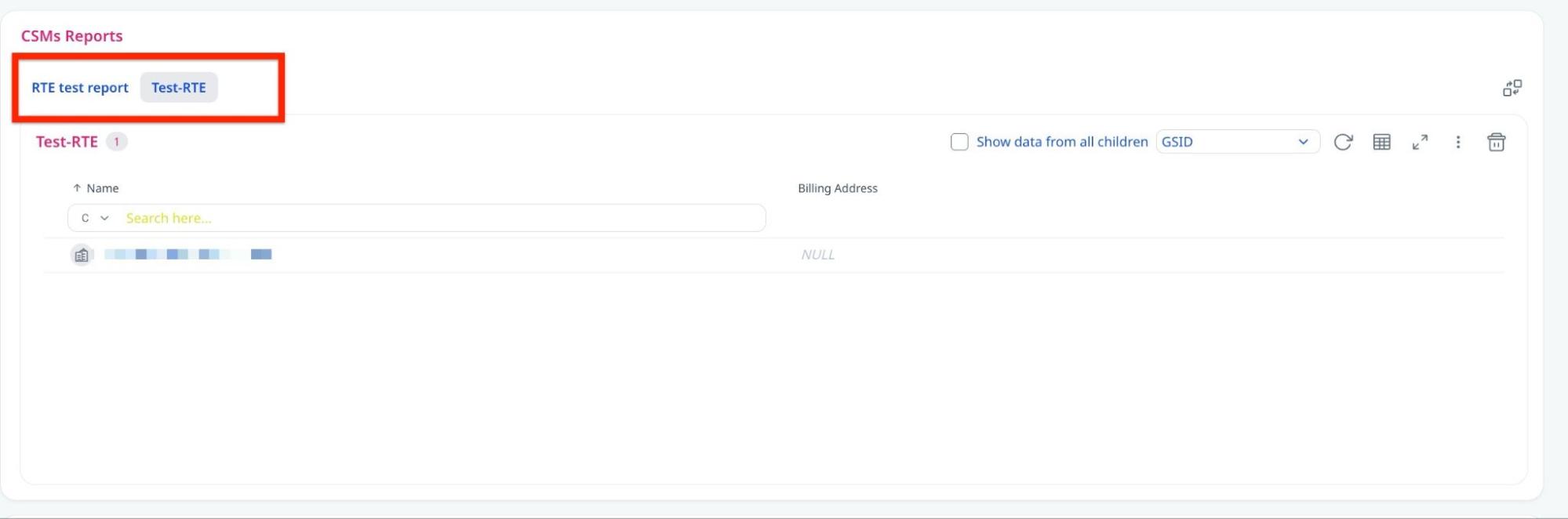
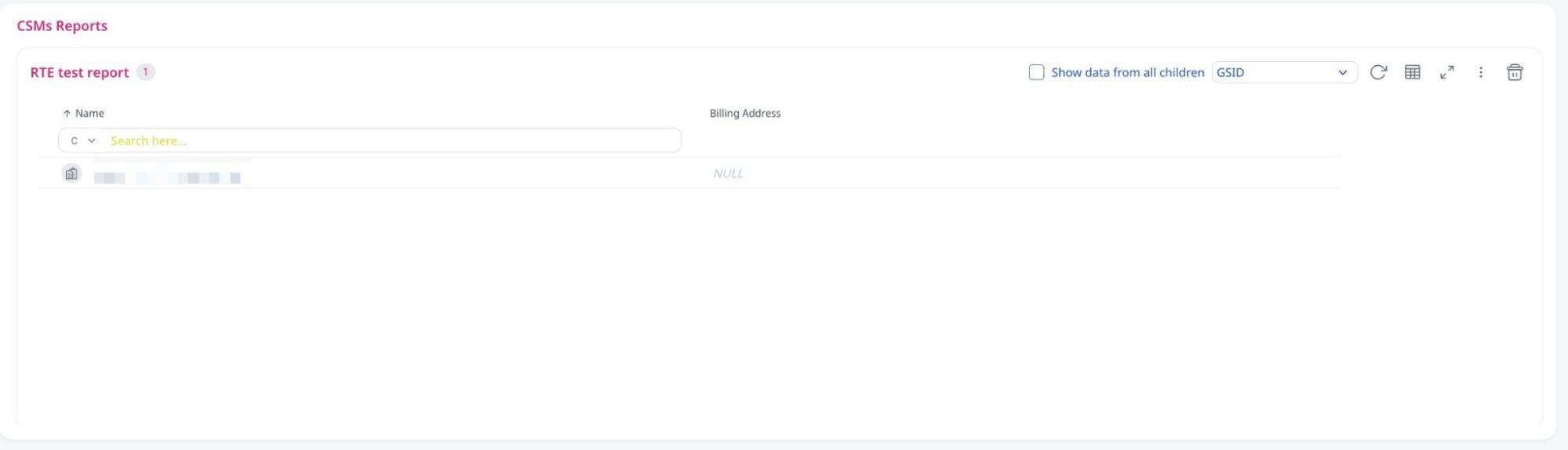
CSMs can now view and manage reports in the CSM Reports widget using a tabbed layout. Previously, all reports appeared in a scrollable list, making it difficult to navigate between them.
What's New
Reports now appear as tabs, making it easier to identify and navigate between them.
CSMs can reorder report tabs to prioritize the most relevant ones.
When adding reports, Gainsight filters the list by the logged-in CSM by default. CSMs can remove or modify this filter to search across all available reports.
Filter selections are saved and restored the next time the widget is opened.
Note
CSMs can switch to the new tabbed view by clicking Switch to New Version. End users see the same view and tab order as configured by the CSM, but cannot make changes.

New UI
Old UI
Send Test Emails Before Sending Spaces Invitations
Automatic Update
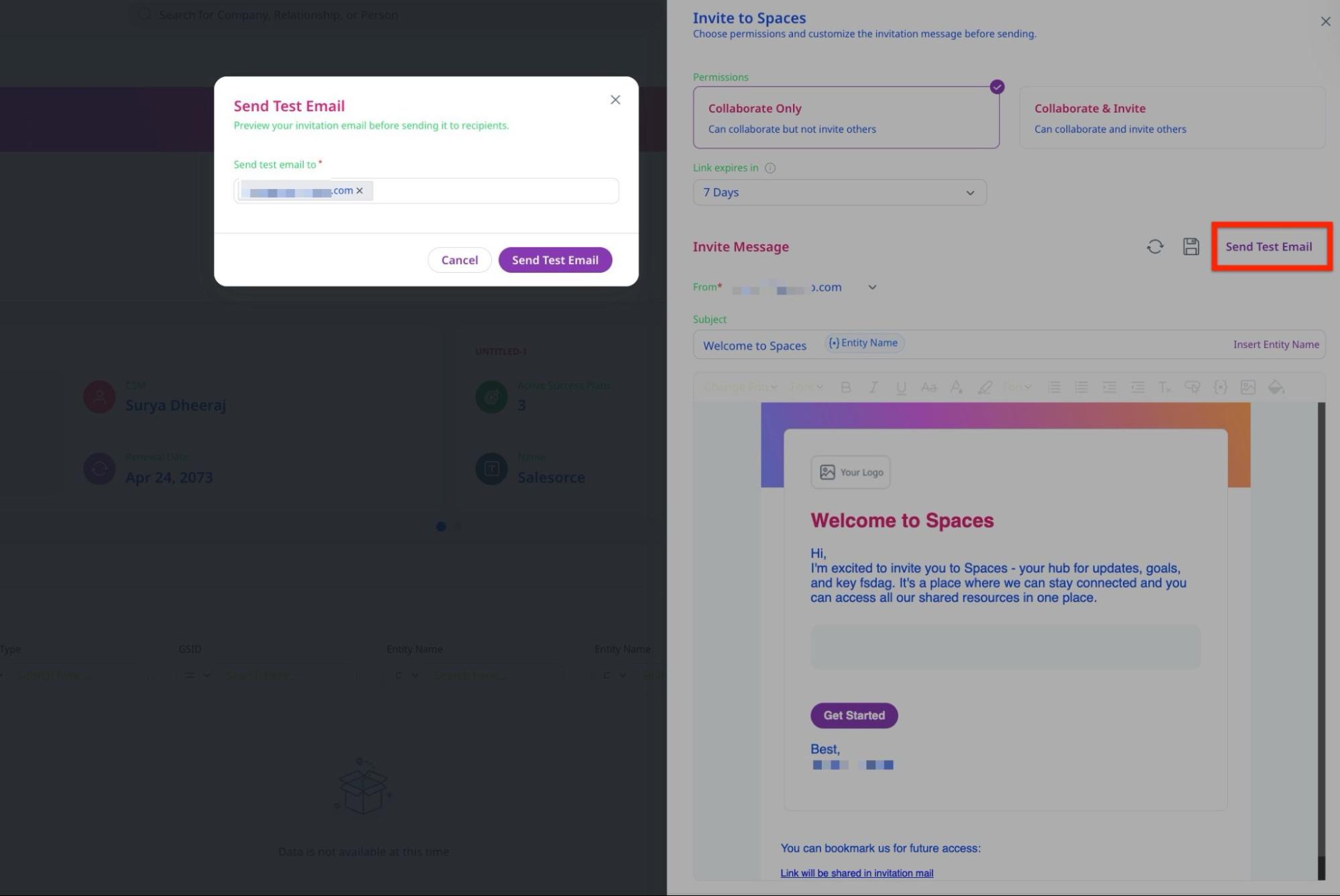
Admins and CSMs can now send test emails before sending Spaces invitations to customers to verify that the email content, formatting, and tokens appear correctly.
What's New
A Send Test Email option is available in the invite workflow for both individual and bulk invites.
The logged-in user's email address is prepopulated by default and can be changed to any internal user's address.
For bulk invites, admins can select a company or relationship to preview how tokens resolve in the email. This does not send an actual invitation or grant access to the selected company.
For more information, refer to the:
Timeline
Associate Timeline Activities with Success Plans

Admin Controlled
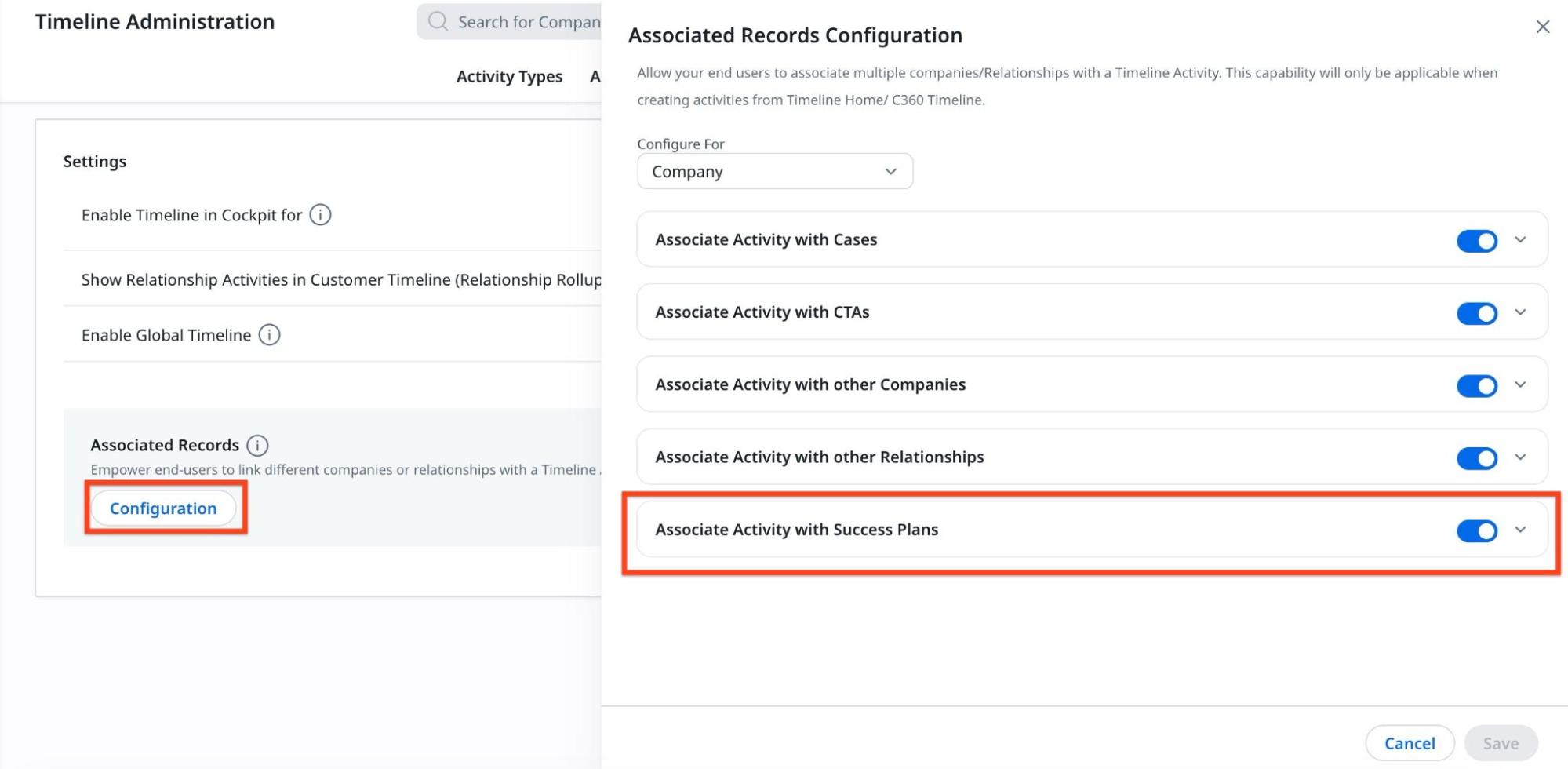
Gainsight has enhanced the existing Associated Records capability in Timeline by introducing support for Success Plan associations. Admins can now enable users to link Timeline activities with relevant Success Plans for both Companies and Relationships, improving context and visibility across customer engagements.
Key Capabilities
Success Plan Association in Timeline: Users can associate Timeline activities with existing Success Plans directly from the Associated Records section.
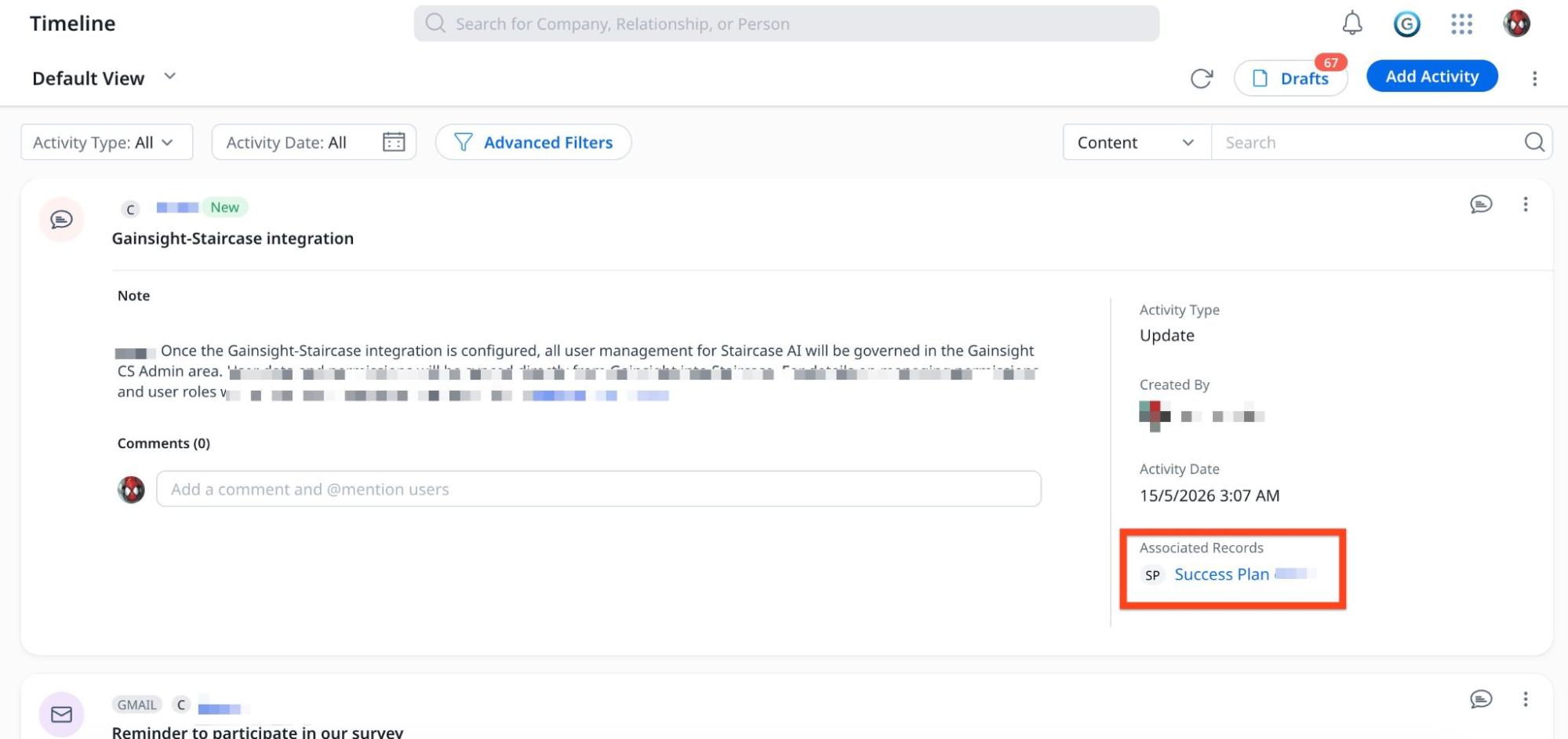
Admin Configuration Controls: Admins can enable or deactivate Success Plan association for Companies and all Relationship types. This setting is deactivated by default. Once enabled, users can search Success Plans using fields such as Name, Type, Status, and Owner. Admins can further customize searchable fields and filter criteria.
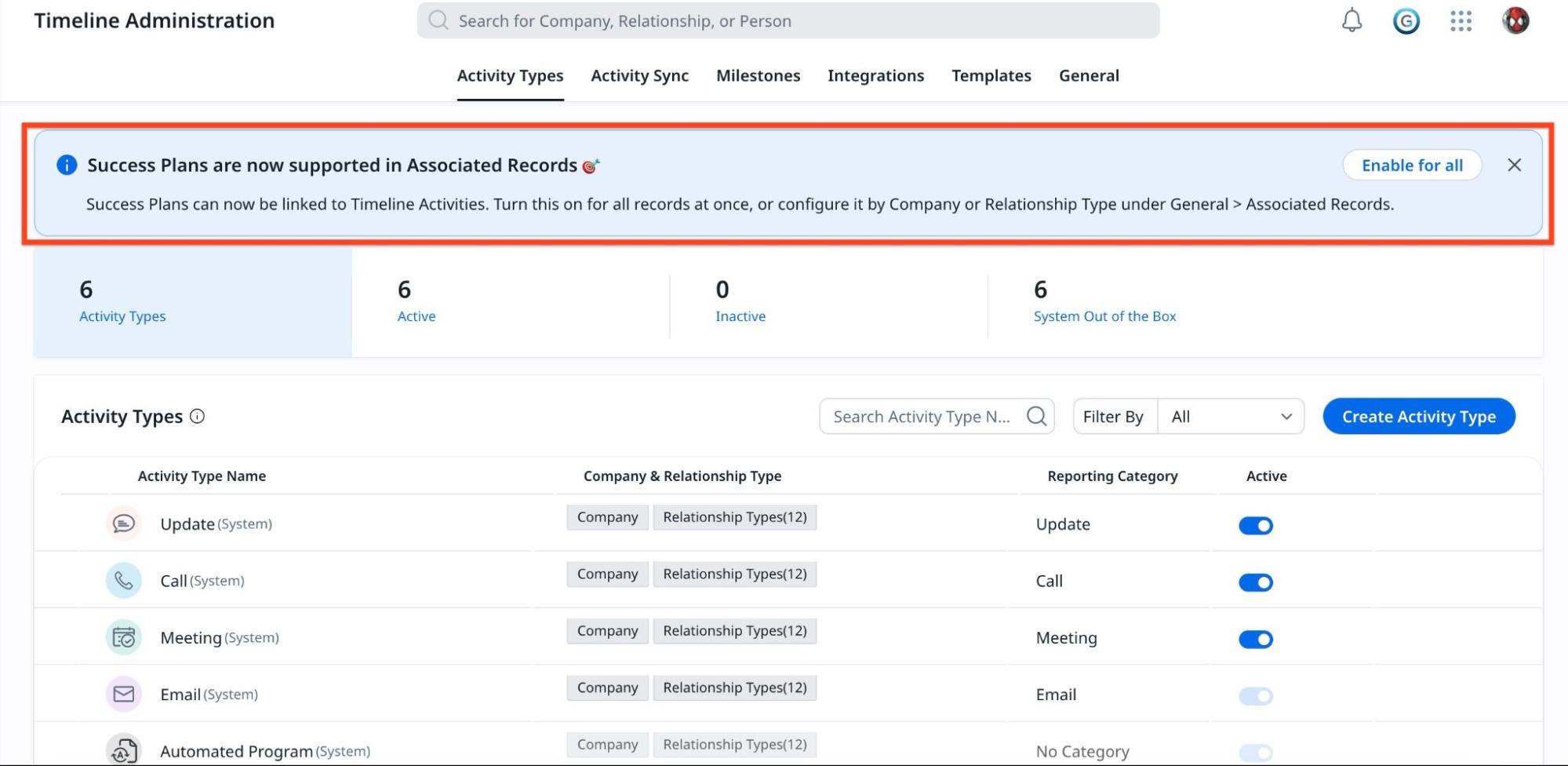
Bulk Enablement Option: Admins can activate Success Plan association across all Companies and Relationship types at once using the Enable for All option, which applies default settings. Once configured from the General tab, the option no longer appears.
Key Benefits
Link activities directly to Success Plans, providing better visibility into customer engagement and progress.
Easily search and associate relevant Success Plans without leaving Timeline.
Configure search, display, and filtering options to align with business needs.
Quickly enable the feature across all entities using bulk enablement, reducing setup time.
Note
The Associate Activity with Success Plans is deactivated by default and must be enabled by admins. When enabled, the default configuration includes a Status = Active filter and common searchable fields such as Name and Owner
For more information on how to configure associated records, refer to the Configure Associated Records to Timeline article.
Additional Resources
For more information about the previous or upcoming major release versions/dates, refer to the Gainsight NXT Release Process [updated for 2026] article.