This article explains how to integrate AWS S3 or Google Cloud Storage with Gainsight PX to export usage data.
Overview
When you configure a connection to your storage bucket, Gainsight PX periodically exports user, account, and event data rollups to the bucket in the format (JSON, XML or CSV) you choose.
Following are the advantages of integrating Gainsight PX with storage buckets:
Store usage data for further processing by other services such as security logs and for future reference
Integrate with data warehouse platforms
Run machine-learning algorithms
Prerequisites
Ensure the following are configured to integrate PX with storage buckets:
Storage bucket (AWS or Google) with valid credentials and write permission to the bucket.
Time zone as per your location. PX exports data to your bucket once per day for the previous day. The job starts at 3 AM according to your subscription's timezone. The data will be available in a timeframe anywhere between a few minutes to a few hours, depending on the size of the files. For example, to create daily rollups for user events, PX sums up all events for the day based on your time zone. To set your Time Zone, navigate to Administration > Company Details > Time Zone.
Authentication Methods
Gainsight PX allows you to integrate the following mechanisms with Gainsight PX to export usage data:
AWS
Google Cloud Storage
AWS Authentication
Gainsight PX allows you to authorize access to customer-owned AWS S3 buckets using the following two methods:
User Access Keys
IAM User Roles
For more information about S3, refer to the Amazon S3 site.
User Access Keys
To authenticate using Access Keys, provide an access token and security key for an AWS user that has permissions to create files in the specified bucket. The token and security key can be obtained from the AWS Console. For more information on creating AWS users and security keys in the AWS Console, refer to the Managing access keys for IAM users article.
IAM User Roles
The IAM User Role method allows access to the S3 bucket to be controlled via AWS roles without the exchange of any secret keys. Authentication is accomplished by creating a customer-owned AWS role which has permissions to write to the customer’s bucket. In addition, the role is configured so that a provided Gainsight AWS user can assume the role.
To configure IAM Roles authentication:
IMPORTANT: In the JSON examples below, elements in green should be substituted with values from the AWS instance.
Create an AWS role, with the following policy, substituting in the ARN for your bucket.
{
    "Version": "2012-10-17",
    "Statement": [
        {
            "Action": [
                "s3:ListBucket",
                "s3:GetBucketLocation"
            ],
            "Effect": "Allow",
            "Resource": "arn:aws:s3:::aptrinsic-test-bucket"
        },
        {
            "Effect": "Allow",
            "Action": [
                "s3:PutObject"
            ],
            "Resource": "arn:aws:s3:::aptrinsic-test-bucket/*"
        }
    ]
}
Define Trust Relationship for the PX role, by substituting the PX Subscription ID obtained from the top of the Company Details page in your PX subscription. (https://app.aptrinsic.com/settings/subscription).
Note: Do not change the arn:aws:iam::581300747314:user/gspx-ext-s3-exports entry, it should remain as shown, as it is the PX user that will assume the role.{ "Version": "2012-10-17", "Statement": [ { "Effect": "Allow", "Principal": { "AWS": [ "arn:aws:iam::581300747314:user/gspx-ext-s3-exports" ] }, "Action": "sts:AssumeRole", "Condition": { "StringEquals": { "sts:ExternalId": "PX subscription ID" } } } ] }Create a bucket with a policy that grants access via the role created in Step 1 to the bucket:
{
    "Version": "2012-10-17",
    "Statement": [
        {
            "Sid": "allow-access-px-bucket",
            "Effect": "Allow",
            "Principal": {
                "AWS": "arn:aws:iam::99999:role/s3-export-role"
            },
            "Action": "s3:*",
            "Resource": "arn:aws:s3:::aptrinsic-test-bucket/*"
        }
    ]
}
Google Cloud Storage Authentication
Gainsight PX allows you to configure the S3 exporter to point to a Google Cloud Storage bucket using a GCP/S3 interoperability layer.
Prerequisites: Ensure that you have access to your Google Cloud Storage Bucket and have generated the Google HMAC keys. For more information on HMAC Keys and how to generate them, refer to the HMAC keys and Create HMAC keys articles respectively.
To configure Google Cloud Storage bucket, follow all the steps listed in the Integrate S3 Export section, with the exception of the following:
In the S3 Bucket Name field, prefix the bucket name with gs: This indicates to PX that the bucket is a Google Storage bucket, and not an S3 bucket.
In the AWS Access Key field, enter the Access ID HMAC key value obtained from the Google Cloud Console.
In the AWS Security Token field, enter the Secret HMAC key value obtained from the Google Cloud Console.
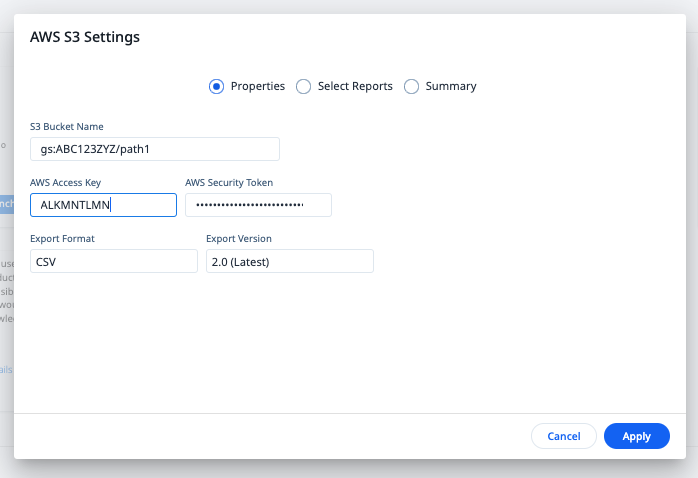
Configure Data Export
To establish connection between Gainsight PX and S3 bucket:
Navigate to Administration > Integrations.
Click the Settings icon or Authorize button on the Amazon S3 Export widget in the Data Integrations section. The AWS S3 Settings dialog appears.
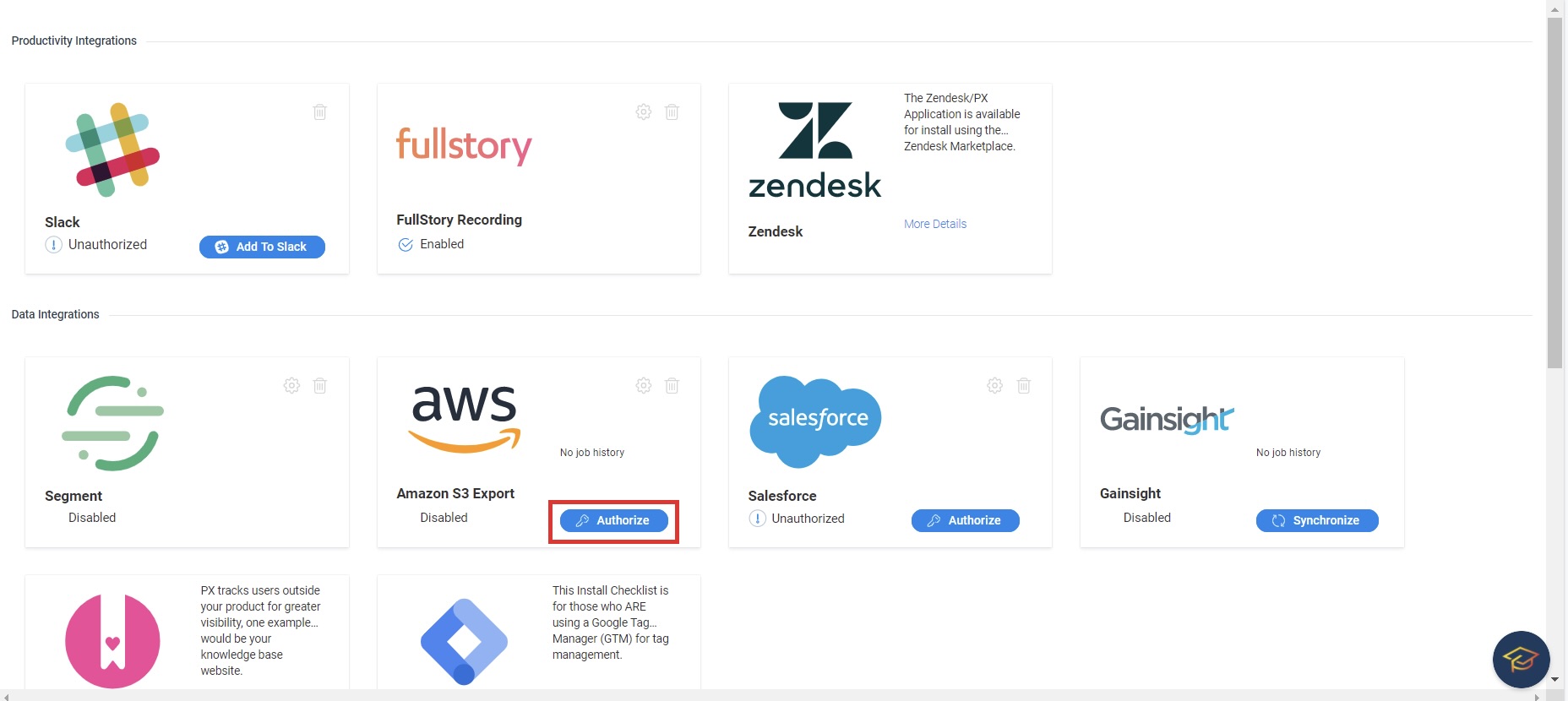
From the Authorization Method dropdown menu, select the type of authentication.
Enter the following details based on the Authorization Method selected:
User Access Keys:
S3 Bucket Name: Bucket name and any optional sub-folder(s) separated by slashes. This is the name of the bucket that was created in S3. For Example, to export files to a bucket ABC123 with a folder “export” use ABC123/export.
AWS Access Key and AWS Security Token credentials of your S3 bucket. Ensure you enter valid credentials to establish an S3 integration.
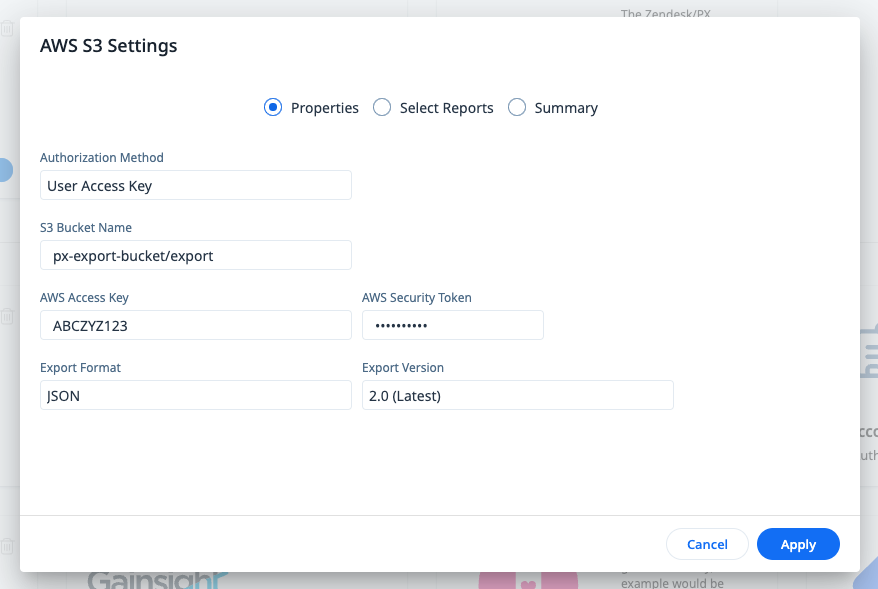
IAM User Roles:
S3 Bucket Name: Bucket name and any optional sub-folder(s) separated by slashes. This is the name of the bucket that was created in S3. For Example, to export files to a bucket ABC123 with a folder “export” use ABC123/export.
User Role ARN: Enter the ARN of the AWS user role that was created using the AWS Console. For more information, refer to the IAM Roles section.
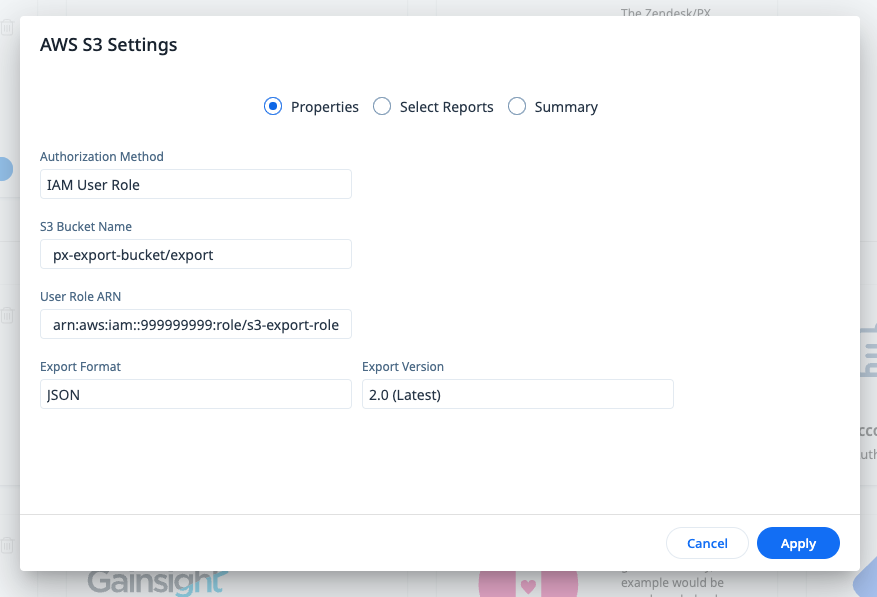
Choose data type from the Export Format drop-down list:
CSV
JSON
XML
Choose the Export Version of the file
1.0
2.0 (Latest)
Note: Gainsight supports two versions of export; 1.0 and 2.0. Version 2.0 is the latest and supports environment variables and is the recommended export method. List of files, fields, and groups differ for both the versions. For more information, refer to the Export Files Definition 2.0 and Export Files Definition 1.0 sections.
Get the Data Exports feature flag enabled by Support. Click the Select Reports option to view the Data Export Reports and PX Generated Reports sections. You can select the files you want to export to the AWS S3 bucket.
Click the Summary option to view the summary of reports exported to the selected destination source.
Click Apply.
If the credentials of your S3 bucket are valid, the status of integration changes to Authorized. Also, the Synchronize button is displayed. PX exports the data every day based on your time zone and includes data for the previous day. For more information on how to configure your time zone, refer to the Prerequisites section.
Click on the Synchronize button to understand the schedule for next sync.
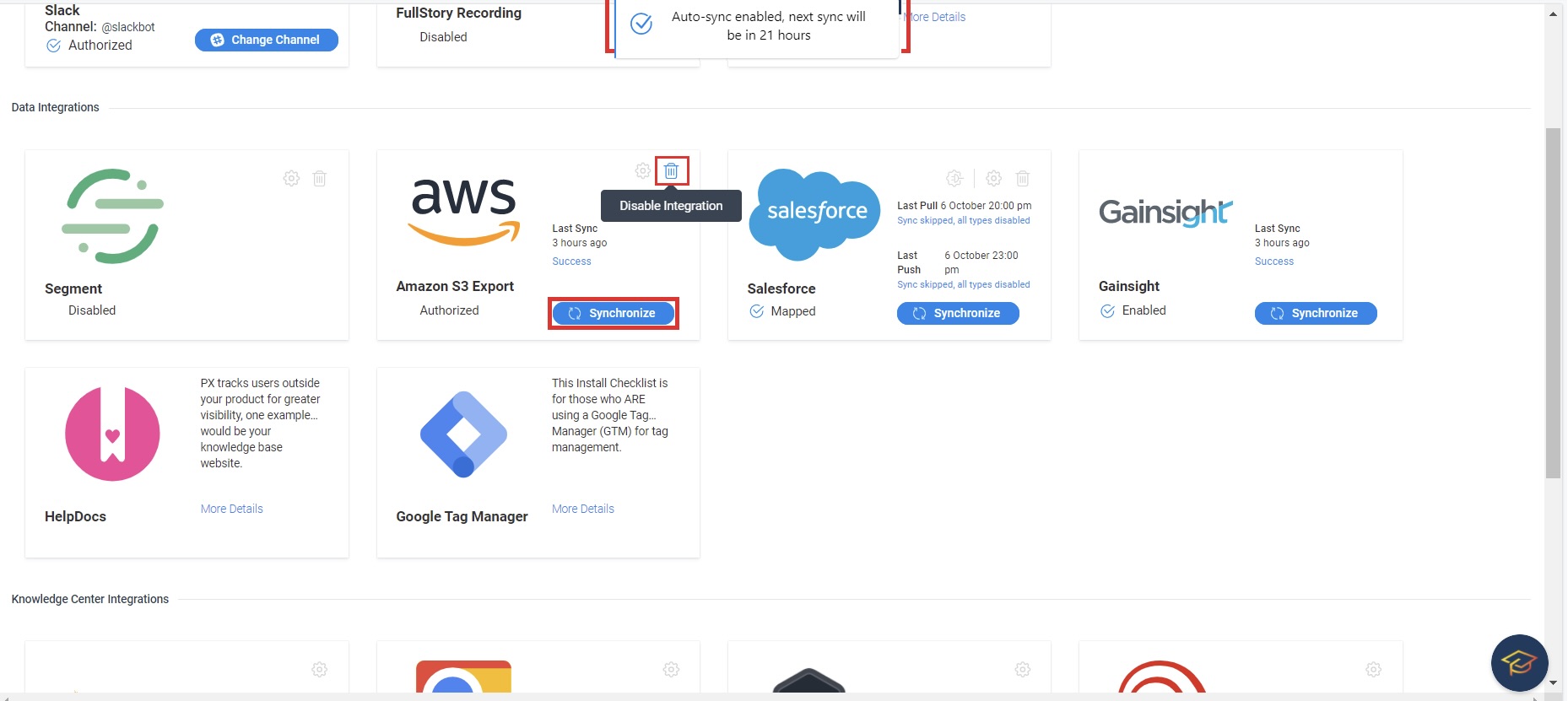
Click the Disable Integration icon to disable PX integration with S3.
Export Files
Below are definitions of the output files, including field names and types. Once you receive the data from storage buckets, use the information below to help you write and process the data. The files are compressed using gzip.
Note: For JSON extracts, the null values are omitted from the output files.
Filename Structure:
The filenames are of the form:
GainsightPX_{ExtractType}_{ISODateTime}.{json|csv|xml}.gz
Below tables give an overview about each export at its summary level.
Export Files Definition 2.0
Export Type: Account Exports
Export | Summary |
|---|---|
Accounts | Account attributes |
Account_Custom_Event_Rollups | Daily counts of custom events, grouped by day, account, event |
Account_Email_Engagement_Rollups | Daily counts of email engagements, grouped by day, account, engagement, eventType |
Account_Event_Rollups | Daily counts of FORM_SUBMIT, PAGE_VIEW, SEGMENT, SESSION_INITIALIZED events grouped by day, account, eventType
|
Account_Feature_Match_Rollups | Daily counts of feature matches, grouped by day, account, feature |
Account_InApp_Event_Rollups | Daily counts of In-App engagements, grouped by day, account, engagement, eventType |
Export Type: User Exports
Export | Summary |
|---|---|
User_Custom_Event_Rollups | Daily counts of custom events grouped by day,user,productKey, account, event |
User_Engagement_Rollups | Daily counts of In-App engagements grouped by day, user, propertyKey, account, engagement, eventType |
User_Event_Rollups | Daily counts of FORM_SUBMIT, PAGE_VIEW, SEGMENT, SESSION_INITIALIZED events grouped by day, user, productKey, account, eventType.
|
User_Feature_Rollups | Daily counts of feature matches grouped by day, user, propertyKey, account, feature |
User_Email_Engagement_Rollups |
Export Type: Survey/Feedback Exports
Export | Summary |
|---|---|
Survey_Responses | Surveys Response events |
Feedback_Responses | Feedback events |
Multi_Question_Survey_Responses | Multiple Question Survey Responses |
Export Type: New Knowledge Center Bot Exports
Export | Summary |
|---|---|
KNOWLEDGE_CENTER | Contains metadata for Knowledge Center bots, including ID, name, status, description, and related details. |
KNOWLEDGE_CENTER_INTERACTION | Captures analytics on how often the bot was opened and the number of user interactions (clicks). |
KNOWLEDGE_CENTER_CONTENT_ANALYTICS | Provides insights into how content (Engagements, Articles, Web Links) is accessed and used in the KC Bot. |
KNOWLEDGE_CENTER_SEARCH_ANALYTICS | Reports user search behavior, including keyword usage and interaction with search results in the bot. |
KNOWLEDGE_CENTER_TASK_LIST_ANALYTICS | Tracks daily progress of task lists completed or interacted with by users within the KC Bot. |
Export Files Definition 1.0
Export Type: Account Exports
Export | Summary |
|---|---|
Accounts | Account attributes |
Account_Custom_Event_Rollups | Daily counts of custom events, grouped by day, account, event |
Account_Email_Engagement_Rollups | Daily counts of email engagements, grouped by day, account, engagement, eventType |
Account_Event_Rollups | Daily counts of FORM_SUBMIT, PAGE_VIEW, SEGMENT, SESSION_INITIALIZED events grouped by day, account, eventType.
|
Account_Feature_Match_Rollups | Daily counts of feature matches, grouped by day, account, feature |
Account_InApp_Event_Rollups | Daily counts of In-App engagements, grouped by day, account, engagement, eventType |
Export Type: User Exports
Export | Summary |
|---|---|
User_Custom_Event_Rollups | Daily counts of custom events grouped by day,user,productKey, account, event |
User_Engagement_Rollups | Daily counts of In-App engagements grouped by day, user, propertyKey, account, engagement, eventType |
User_Event_Rollups | Daily counts of FORM_SUBMIT, PAGE_VIEW, SEGMENT, SESSION_INITIALIZED events grouped by day, user, productKey, account, eventType.
|
User_Feature_Rollups | Daily counts of feature matches grouped by day, user, propertyKey, account, feature |
Users | User attributes |
Export Type: Survey/Feedback Exports
Export | Summary |
|---|---|
Survey_Responses | Surveys Response events |
Feedback_Responses | Feedback events |
Export Type: Metadata Exports
Export | Summary |
|---|---|
Engagements | Engagement attributes |
Features | Feature attributes |
Export File Column Definitions
Accounts
Name: GainsightPX_Accounts
Content: Account attributes
Field Name | Field Type |
|---|---|
id | String |
name | String |
lastModifiedDate | String |
createDate | String |
plan | String |
numberOfEmployees | Long |
isDeleted | Boolean |
naicsCode | String |
trackedSubscriptionId | String |
sfdcId | String |
lastSeenDate | String |
industry | String |
dunsNumber | String |
sicCode | String |
website | String |
totalUsers | Long |
dailyActiveUsers | Long |
monthlyActiveUsers | Long |
location_* | Location (See Below) |
customAttribute_{customAttributeApiName} | type varies |
Account Events
Name: GainsightPX_Account_Event_Rollups
Content: Account Event Rollup attributes
Field Name | Field Type |
|---|---|
date | String |
accountId | String |
type | String |
count | Long |
Account Custom Events
Name: GainsightPX_Account_Custom_Event_Rollups
Content: Account Custom Event Rollup attributes
Field Name | Field Type |
|---|---|
date | String |
accountId | String |
eventName | String |
count | Long |
Account Feature Matches
Name: GainsightPX_Account_Feature_Match_Rollups
Content: Account Feature Match Rollup attributes
Field Name | Field Type |
|---|---|
date | String |
accountId | String |
featureId | String |
count | Long |
featureName | String |
featurePath | String |
Account InApp Events (Engagements)
Name: GainsightPX_Account_InApp_Event_Rollups
Content: Account InApp Event Rollup attributes
Field Name | Field Type |
|---|---|
date | String |
accountId | String |
engagementId | String |
engagementName | String |
type | String |
count | Long |
Account Email Engagements
Name: GainsightPX_Account_Email_Engagement_Rollups
Content: Account Email Engagement Rollup attributes
Field Name | Field Type |
|---|---|
date | String |
accountId | String |
engagementId | String |
engagementName | String |
type | String |
count | Long |
Account Hourly Concurrent Sessions
Name: Account_Hourly_Concurrent_Sessions_Rollups
Content: Account Hourly Concurrent Sessions Rollup attributes
Field Name | Field Type |
|---|---|
date | String |
hour | String |
accountId | String |
productKey | String |
environment | String |
count | Long |
Users
Name: GainsightPX_Users
Content: User attributes
Field Name | Field Type | Description |
|---|---|---|
aptrinsicId | String | |
String | ||
identifyId | String | |
accountId | String | |
firstName | String | |
lastName | String | |
lastInferredDataSyncDate | String | |
webAppVisits | Long | |
globalUnsubscribe | Boolean | |
signUpDate | String | The date/time during the first identify call for a user. |
leadId | String | |
leadDate | String | |
createDate | String | The date when the user record was first created, either by the identify call or using the REST API. |
trackedUserRole | String | |
type | String | |
lastModifiedDate | String | The date when the user attribute was last modified. |
numberOfVisits | Long | |
gender | String | |
isDeleted | Boolean | |
lastSeenDate | String | |
score | Long | |
phone | String | |
firstVisitDate | String | This is an optional user attribute. This can be passed as part of the identify data. |
title | String | |
sfdcContactId | String | |
location_* | Location | Refer to Location |
lastInferredOrganization_name | String | |
lastInferredOrganization_numberOfEmployees | String | |
lastInferredOrganization_revenue | String | |
lastInferredOrganization_industry | String | |
lastInferredOrganization_sicCode | String | |
lastInferredOrganization_duns | String | |
lastInferredOrganization_naicsCode | String | |
lastInferredOrganization_webDomain | String | |
lastInferredOrganization_orbNum | String | |
lastInferredOrganization_parentOrbNum | String | |
lastInferredOrganization_location_* | Location | Refer to Location |
lastInferredLocation_* | Location | Refer to Location |
lastUserAgentData_rawUserAgent | String | |
lastUserAgentData_device | String | |
lastUserAgentData_platformType | String | |
astUserAgentData_platformVersion | String | |
lastUserAgentData_browserType | String | |
lastUserAgentData_browserVersion | String | |
customAttribute_{customAttributeApiName} | type varies | |
subscriptionId | String |
Location
Name: Location
Content: Location fields
Field Name | Field Type |
|---|---|
countryCode | String |
countryName | String |
stateCode | String |
stateName | String |
cityName | String |
continentCode | String |
postalCode | String |
regionName | String |
timeZone | String |
street | String |
User Events
Name: GainsightPX_User_Event_Rollups
Content: User Event Rollup attributes
Field Name | Field Type |
|---|---|
date | String |
identifyId | String |
accountId | productKey |
productKey | String |
type | String |
count | Long |
User Custom Events
Name: GainsightPX_User_Custom_Event_Rollups
Content: User Custom Event Rollup attributes
Field Name | Field Type |
|---|---|
date | String |
identifyId | String |
productKey | String |
accountId | String |
eventName | String |
count | Long |
User Email Engagements
Name: GainsightPX_User_Email_Engagement_Rollups
Content: User Email Engagement Rollup Attributes
Field Name | Field Type |
|---|---|
date | String |
identifyId | String |
accountId | String |
productkey | String |
environment | String |
engagementId | String |
engagementName | String |
type | String |
count | Long |
User Feature Matches
Name: GainsightPX_User_Feature_Rollups
Content: User Feature Rollup attributes
Field Name | Field Type |
|---|---|
date | String |
identifyId | String |
accountId | String |
productKey | String |
featureId | String |
count | Long |
featureName | String |
featurePath | String |
User Engagements
Name: GainsightPX_User_Engagement_Rollups
Content: User Engagement Rollup attributes
Field Name | Field Type |
|---|---|
date | String |
identifyId | String |
productKey | String |
accountId | String |
engagementId | String |
engagementName | String |
type | String |
count | Long |
User Email Engagements
Name: GainsightPX_User_Email_Engagement_Rollups
Content: User Email Engagement Rollup attributes
Field Name | Field Type |
|---|---|
date | String |
identifyId | String |
accountId | String |
productKey | String |
environment | String |
engagementId | String |
engagementName | String |
type | String
|
count | Long |
User Engagement View State
Name: User_Engagement_View_State_Rollups
Content: User Engagement View State Rollup attributes
Field Name | Field Type |
|---|---|
date | String |
identifyId | String |
productKey | String |
accountId | String |
environment | String |
engagementId | String |
engagementName | String |
viewState | String (VIEWED or COMPLETED) |
count | Long |
farthestStepNumber | Integer |
locale | String |
triggerType | String (AUTOMATIC, KNOWLEDGE_CENTER, JO, BADGE) |
engagementPath Path that user took through steps as a comma-separated list of numbers. Note: Numbers are zero-relative, and the first step is zero.) | String |
User Engagement Clicks
Name: GainsightPX_User_Engagement_Clicks
Content: Click events within engagements such as when user clicks on a link in a dialog engagement
Field Name | Field Type |
|---|---|
date | String |
identifyId | String |
productKey | String |
accountId | String |
environment | String |
engagementId | String |
engagementName | String |
linkUrl | String |
sequenceNumber | Integer (zero-based step number of guide, if guide engagement) |
User Article Views
Name: User_External_Article_View_Rollups
Content: User_External_Article_View_Rollup attributes
Field Name | Field Type |
|---|---|
date | String |
identifyId | String |
accountId | String |
productKey | String |
environment | String |
externalArticleId | String |
articleTitle | String |
articleUrl | String |
provider | String
|
count | Long |
Survey Responses
Name: GainsightPX_Survey_Responses
Content: Survey Response attributes
Note: This data only applies to single step surveys, and does not contain the results of multi-question surveys.
Field Name | Field Type |
|---|---|
date | String |
identifyId | String |
productKey | String |
accountId | String |
engagementId | String |
score | Int |
comment | String |
type | String |
contactMeAllowed | Boolean |
environment | String |
labels | String |
path Note: Path denotes the current page path when the survey is displayed. | String |
locale | String |
triggerType | String (AUTOMATIC, KNOWLEDGE_CENTER, JO, BADGE) |
Multiple Question Survey Responses
Name: Multi_Question_Survey_Responses
Content: Multiple Question Survey Responses
Field Name | Field Type |
|---|---|
date | Number (epoch milliseconds) |
engagementId | String |
productKey | String |
environment | String |
identifyId | String |
accountId | String |
questionType | String (SCORE, MULTI_CHOICE_QUESTION_TYPE, OPEN_TEXT_QUESTION_TYPE) |
question | String |
score | String |
answer | String |
contactMeAllowed | Boolean (true/false) |
path | String |
globalContext (not available in CSV) | Object |
locale | String |
triggerType | String (AUTOMATIC, KNOWLEDGE_CENTER, JO, BADGE) |
Feedback
Name: GainsightPX_Feedback_Responses
Content: Feedback Response attributes
Field Name | Field Type |
|---|---|
date | String |
identifyId | String |
productKey | String |
accountId | String |
subject | String |
category | String |
description | String |
labels | String |
Engagements
Name: GainsightPX_Engagements
Content: Engagement attributes
Field Name | Field Type |
|---|---|
id | String |
name | String |
type | String |
Engagements Extended
Name: GainsightPX_Engagement_Extended_Metadata
Content: Engagement attributes
Field Name | Field Type |
|---|---|
id | String |
name | String |
type | String |
productGroup | String |
channel | String |
environments | String |
labels | String |
name | String |
groupName | String |
priorityGroupName | String |
priorityRank | Long |
status | String |
ignoreThrottling | String |
lifetimeViews | Long |
audienceURLs | String |
createdDate | String |
lastModifiedDate | String |
lastModifiedBy | String |
Feature
Name: GainsightPX_Features
Content: Feature attributes
Field Name | Field Type |
|---|---|
id | String |
name | String |
type | String |
parentFeatureId | String |
propertyKey | String |
status | String |
Knowledge Center
Name: KNOWLEDGE_CENTER
Content: Metadata of Knowledge Center Bots, such as Id, name, status, description, and so on.
Field Name | Field Type |
|---|---|
kcId | String |
kcName | String |
description | String |
status | String |
productGroup | String |
channel | Enum |
environment | Integer |
createdBy | String |
createdDate | Integer |
lastModifiedBy | String |
lastModifiedDate | Integer |
priorityRank | Integer |
Knowledge Center Interaction
Name: KNOWLEDGE_CENTER_INTERACTION
Content: Analytics data on the number of times bot was opened and the number of clicks captured.
Field Name | Field Type |
|---|---|
kcId | String |
kcName | String |
Date | String |
UserId | String |
accountId | String |
Opens | Integer |
Clicks | Integer |
Last Opened Date Time | Long |
Knowledge Center Content Analytics
Name: KNOWLEDGE_CENTER_CONTENT_ANALYTICS
Content: Details into adoption of content (Engagement, Articles, Web Links) on KC Bot.
Field Name | Field Type |
|---|---|
kcId | String |
kcName | String |
Date | String |
contentType | String |
contentId | String |
contentName | String |
contentUrl | String |
userId | String |
accountId | String |
#Clicks | Integer |
Last View Date Time | Long |
Knowledge Center Search Analytics
Name: KNOWLEDGE_CENTER_SEARCH_ANALYTICS
Content: Analytics on interaction with search results based on different search keywords on the Bot.
Field Name | Field Type |
|---|---|
kcId | String |
kcName | String |
Date | String |
Search Keyword | String |
Clicked Content Title | String |
Clicked Content Type | String |
#Clicks | Integer |
userId | String |
accountId | String |
Last Click Date Time | Long |
Knowledge Center Task List Analytics
Name: KNOWLEDGE_CENTER_TASK_LIST_ANALYTICS
Content: Daily view of progress of task lists by the users on the bot.
Field Name | Field Type |
|---|---|
kcId | String |
kcName | String |
Date | String |
TaskListId | String |
TaskList Name | String |
userId | String |
accountId | String |
Tasks Completed | Integer |
Tasks Pending | Integer |
Task Completion Rate | Integer |