
AI Hand-off Analyst
This article helps CSMs understand and use the AI hand-off analyst feature in Staircase AI.
Overview
The AI hand-off analyst helps you prepare for a new customer engagement by automatically converting pre-close sales communications into a structured account playbook. When a deal closes, critical context, customer goals, open concerns, commitments made by your sales team, stakeholder dynamics, and onboarding readiness, is often buried in email threads and meeting recordings. The AI hand-off analyst reads those communications and surfaces everything you need before your first customer call.
For any account with a contract start date in the last six months, Staircase AI analyzes up to 6 months of pre-close emails and meetings and generates a prioritized, evidence-backed playbook for your customer success team.

For more information on mapping fields, refer to the Mapping Custom Fields & Integrations article.
AI Handoff Analyst generates a summary after a deal closes, once Staircase AI detects a meaningful signal, a minimum of 8 pre-close emails and three pre-close meetings. After the initial summary is generated, a daily scan re-runs the analysis whenever pre-close communications grow by 20% or more. At renewal time, a separate renewal pass runs automatically, validating the original pains and goals captured at close-won against activity from the past 6 months.
Prerequisites
Few conditions must be met for Staircase AI to generate a hand-off analysis for an account. The following table describes each requirement and what it means for your configuration.
| Requirement | Details |
|---|---|
| Contract start date | The contract start date must be mapped into Staircase AI. This field tells the system when the deal closed and which communications to include in the analysis. Accounts with a contract start date within the last six months are eligible. |
| Email data | Sales team mailboxes must be connected to Staircase AI. The account must have at least 8 pre-close emails. |
| Meeting data | A meeting source (for example, Gong or Zoom) must be connected to Staircase AI. The account must have at least three pre-close meetings. |
Staircase AI looks back 6 months before the contract start date and reads all email and meeting communications in that window. If your account does not meet the minimum email or meeting thresholds, a hand-off analysis is not generated.
How AI Hand-off Analysis Works
After the prerequisites are met, Staircase AI automatically generates the hand-off analysis. You do not need to initiate it manually. The analysis runs every 24 hours. If significant new communication data appears after the initial analysis is generated, Staircase AI regenerates it with the updated context.
The playbook is organized into two areas:
- Main panel: Seven sections covering the account narrative, goals, concerns, commitments, purchase context, and onboarding readiness.
- Right panel: Hand-off Actions and Key Stakeholders for fast-access prioritization.
Access AI Hand-off Analysis
To access hand-off analysis for an account:
- Navigate to the Accounts page in Staircase AI.
- Click the Filter icon.
- Select Advanced filter from the dropdown list. The Advanced filter dialog box appears.
- Select Handoff strategic summary as field and Is defined as operator.

- Click Done. The accounts list are displayed.
- Select an account from the list.
- From the accounts page, select the AI hand-off analysis tab.

At the top of the analysis, there is a summary of the communication data used, including:
- An urgency pill indicating the overall handoff urgency: Critical, High, Medium, or Low.
- The contract start date.
- The number of emails and meetings analyzed, and the date range they cover.
Explore AI Hand-off Analysis Sections
The main panel contains seven sections. Each section is designed to give you what you need at a glance, the top two items in each section are shown by default. Select Show more to expand a section and see all items.

The following table describes what each section contains.
| Section | What it contains |
|---|---|
| Narrative Summary | A one to two paragraph overview of the account, the deal, and what you are walking into as the incoming CSM. Read this section first if you have limited time. This is also the summary that appears as Handoff strategic summary in Staircase AI reportable field. |
| Main Driver | The single biggest reason the customer purchased. Includes the category (Operational, Growth, Customer Experience, or Compliance), urgency level, a plain-language description, and any timeline constraints from the sales cycle. Use the Show evidence to view the direct quote from the source communication, a brief explanation of what the quote indicates, the source type (Email, Meeting, or Calendar event), and the name and role of the person who said it. |
| Goals | What the customer expects to achieve. Each goal shows the priority, success metric, expected timeline, and the customer-side owner.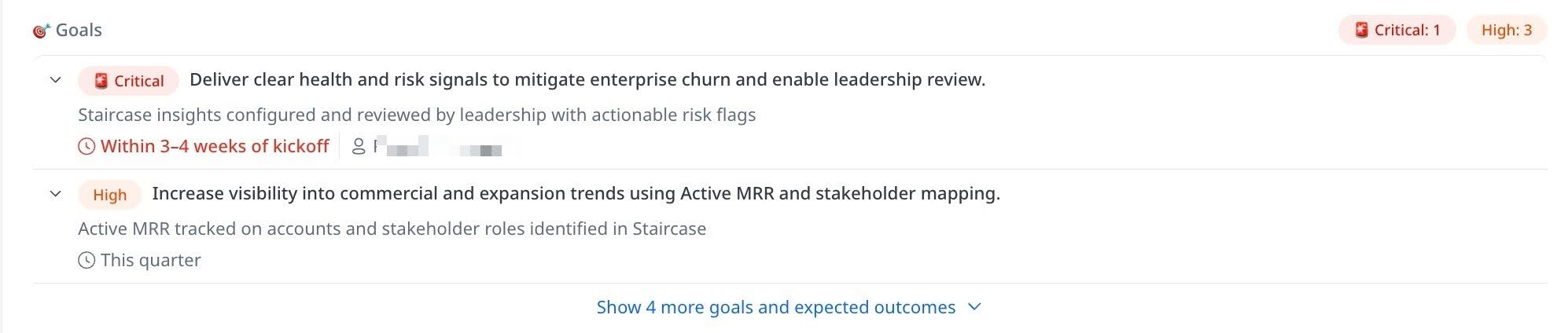 |
| Open Concerns | Issues raised during the sales process, sorted by status. Open items appear first, followed by partially resolved items, then fully resolved items. |
| Commitments Made | Specific promises your sales team made during the sales cycle. Each commitment shows what was promised, the due date, who made the commitment, and who on the customer side received it. Commitments are sorted by timeline. |
| Purchase Context | Two related views: why the customer bought (business, financial, or technical pain points) and why they chose your product (competitive differentiators, decision makers involved). |
| Onboarding Readiness | Everything your team needs to know about the implementation ahead, including timeline pressures, information gaps, integration status, change management approach, and technical environment details. |
Use the Right Panel
The right panel surfaces two high-priority views that help you act quickly.
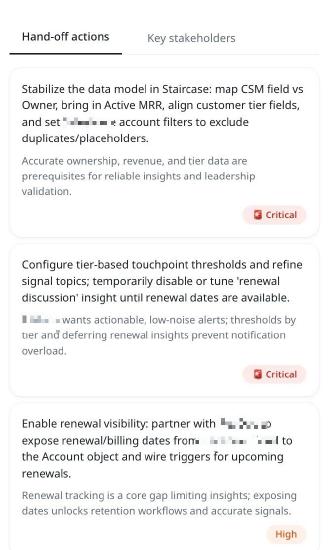
Hand-off Actions
Hand-off Actions is a prioritized list of what your team should do, generated from the full analysis. Each action card shows the action to take, its priority (Critical, High, or Medium), and a rationale explaining why it matters for this specific account. Address Critical items before or during your first customer call.
Key Stakeholders
Key Stakeholders shows cards for the people who matter most on the customer side. The executive buyer or primary decision maker appears at the top. Each card shows the person's name and title, their role in the deal, their key concerns, and their stated priorities.

Additional Options in Summary Tab
The following options are available in the Summary tab:
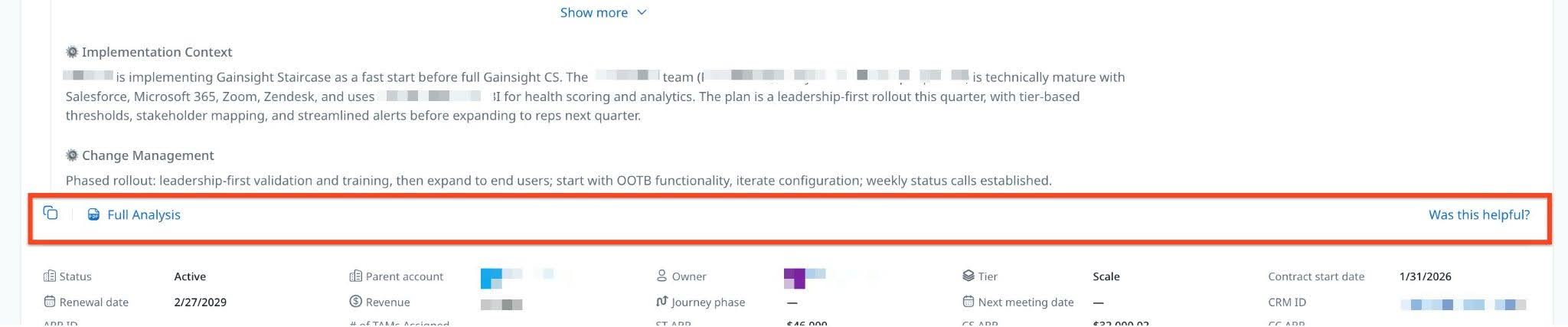
- Full Analysis: Export hand-off analysis as a formatted PDF report. Select Full Analysis and download to keep and share the report with stakeholders outside of Gainsight without requiring them to access the platform.
- Copy to Clipboard: Select Copy to clipboard to copy content to your clipboard and paste it elsewhere using Ctrl + V (Windows) or Cmd + V (Mac).
- AI Response Feedback: Use the Was this helpful? option available on AI-generated summaries and Ask Me Anything responses. Select the thumbs up or thumbs down icon to rate a response. You can also add comments to provide detailed feedback. Feedback is routed to the data science team for model evaluation.
Limitations
- Staircase AI does not detect deal close timing automatically. The contract start date field must be mapped in Staircase AI; without it, a hand-off analysis is not generated.
- An account must have at least 8 pre-close emails and at least three pre-close meetings within the 6 months look-back window, ensuring enough conversational data is available to populate the hand-off model. Accounts below these thresholds do not receive a hand-off analysis.
- Only accounts with a contract start date within the last six months are eligible for a hand-off analysis.
Note: In the Pulse Q2 2026 release, only new accounts are eligible. Support for cross-sell wins of existing customers is planned for a future release. - If sales team mailboxes are not connected to Staircase AI, those emails are excluded and the resulting playbook may be incomplete.
- If a meeting source such as Gong or Zoom is not connected, meeting data is excluded and the analysis may not reflect the full pre-sale conversation.
- The analysis regenerates every 24 hours or when significant new communication data is detected. Minor additions may not initiate a regeneration.