
Configure Amazon S3 Outbound Integration
This article helps admins configure AWS S3 as an outbound destination for scheduled report exports in Staircase AI.
Overview
Staircase AI supports exporting scheduled report data directly to an AWS S3 bucket in CSV format. In addition to email delivery, you can configure an S3 bucket as a destination for your scheduled reports, giving you more flexibility in how you store and access report data. This is particularly useful if your team uses a data lake such as Snowflake or Databricks. You can route Staircase AI customer data directly into your existing data pipeline without any manual extraction.
A key capability of report uploads is the inclusion of a timestamp in the file name, ensuring that new reports do not overwrite existing ones.
Prerequisites
Before configuring the integration in Staircase AI, you need:
- An AWS account with permissions to create S3 buckets and IAM policies.
- An Amazon S3 bucket created and set to private. Note the bucket name, you will need it during configuration.
- Access credentials of an IAM role.
Configure Amazon S3 the Integration in Staircase AI
Once your S3 bucket is set up and access is granted, configure the integration in Staircase AI.
To configure:
- Log in to Staircase.ai
- Navigate to Settings > Integrations and select the Amazon S3 card. The right pane displays details about the Amazon S3 integration.
- Select any one of the two following ways to connect your Amazon S3 with Staircase AI.
- Grant access to AWS role: The role used to establish the connection on the AWS side is automatically generated. Make sure to copy the role before you click Connect.
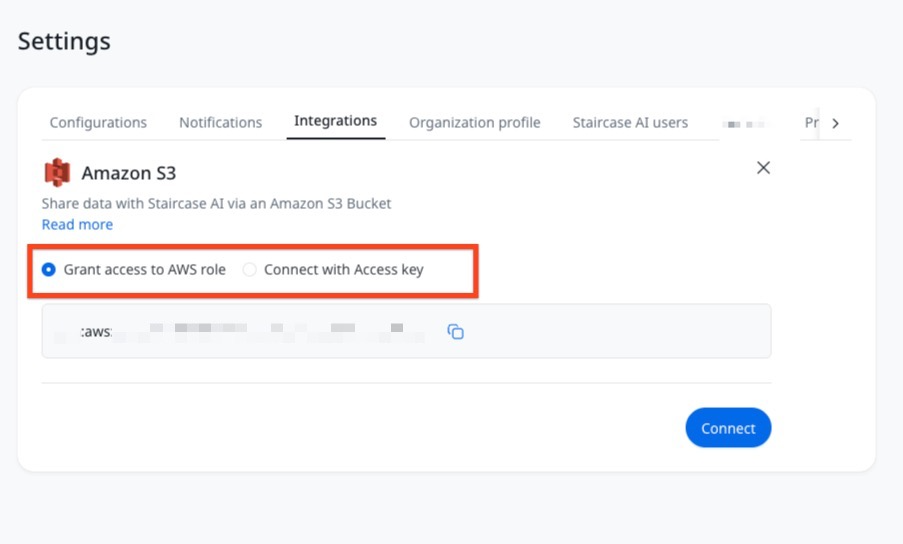
- Connect with Access key: Enter the Access key ID and the Secret access key.

- Grant access to AWS role: The role used to establish the connection on the AWS side is automatically generated. Make sure to copy the role before you click Connect.
- Click Connect.
Configure the Amazon S3 Outbound Integration in Staircase AI
Once the Amazon S3 connection is established you can configure the inbound and outbound flows.
- Log in to Staircase.ai
- Navigate to Settings > Integrations and select the Amazon S3 card. The right pane displays details about the Amazon S3 integration.
- In the Outbound tab, enter the Bucket name. This maps the correct bucket to which reports are sent.
Note: This step is particularly useful if your team uses a data lake such as Snowflake or Databricks.

- Click Save to complete the configuration. Once configured, AWS S3 Setting appears as a destination option in your scheduled reports.
- (Optional) In the File path field, enter the path within the S3 bucket where you want to export the report. If you do not specify a path, the report is exported to the root level of the bucket. The file path follows this format:
[file_path/]{report_name}_{yyyyMMdd_HHmmss}.csv
For example:exports/weekly/Customer_Health_20260412_143022.csv
