
Zendesk: Integrating Skilljar with Zendesk
IMPORTANT
The functionality described in this article is not applicable to the Skilljar Starter package.
Zendesk's customer service and engagement platform allows you to track, prioritize, and solve customer support tickets. With Skilljar's Zendesk app, a conveniently located sidebar show which courses your customer has enrolled in and completed within Skilljar alongside to their Zendesk support ticket.


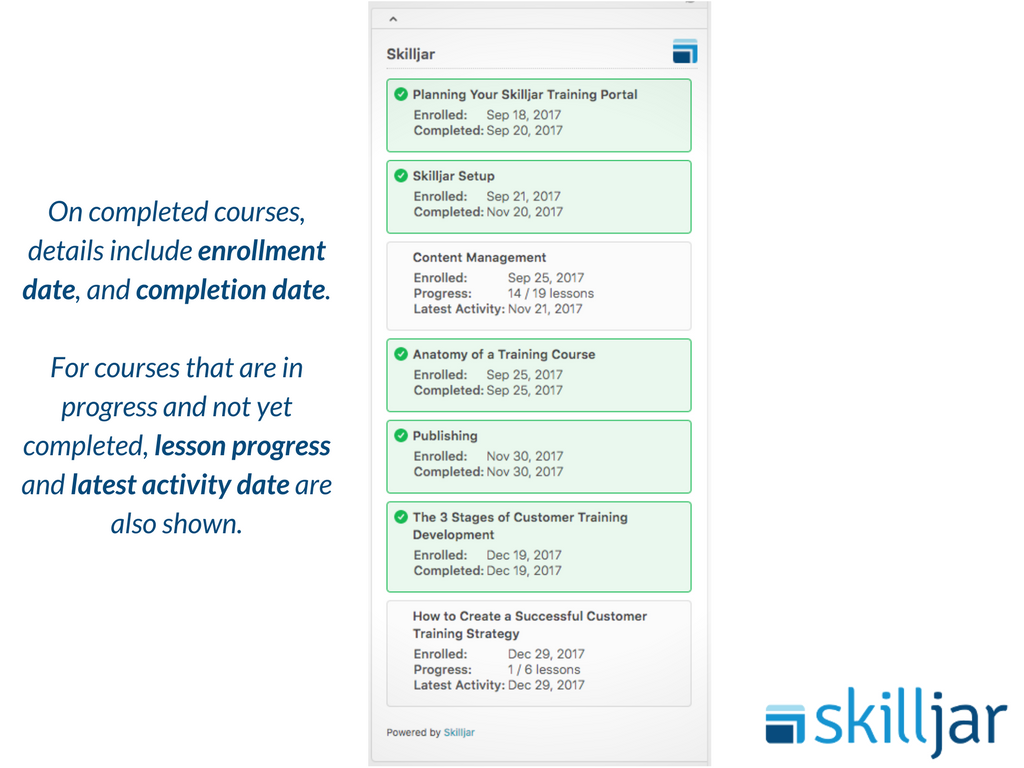
Skilljar's Zendesk App empowers support teams to:
- Quickly view customer training activity in Skilljar right on the Zendesk ticket sidebar
- Resolve issues faster by providing relevant and targeted training content to customers
- Improve customer experience with informed content recommendations based on prior customer training activity in Skilljar
- Reduce ticket volume through an integrated educational approach
How to add Skilljar's App to Zendesk
- Sign in to Zendesk, then select the Admin icon in the sidebar.
- Select Apps and then Browse. F
- Find the Skilljar app and select the tile.
- On the Skilljar app page, select Install app in the upper-right corner.
- Enter the following required information, then select Install:
skilljar_api_key: An API key for your Skilljar account. To generate a Skilljar API Key, please follow the instructions in Getting started with the Skilljar API.
If you encounter any issues with agent authentication after you've integrated with Skilljar, have your Zendesk admin disable the Skilljar app in Tags (within Zendesk).