Gainsight NXT
This article explains admins about the Company object.
Overview
The Company object is one of the core objects in Gainsight and is used to store information about your customers, including individual customer records. You can access the Company object from Administration > Company.
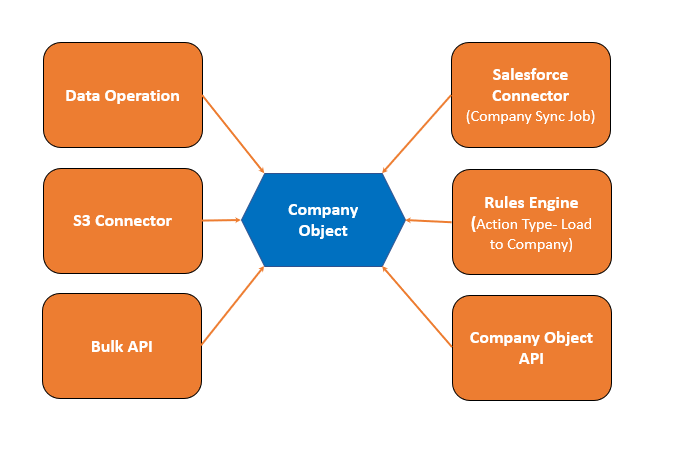
Load data to the object’s standard fields or to custom fields you have added. You can load data into the object from multiple channels to make important customer information accessible and manageable within Gainsight.
Note: Fields displayed in the Company object can also be accessed at Administration > Data Management. For more information, refer to the Gainsight Objects article.
Fields in Company Object
Company object has the following set of standard fields. Understanding the fields of the Company object helps you format data before ingesting from a channel.
System Fields - These fields are system generated. You can neither edit the system fields nor ingest data into them through any data ingestion channel. You cannot see the system fields in the field mappings of any connector.
Standard Fields - these fields are provided by Gainsight by default. You cannot edit the standard fields. You can ingest data into these fields through the ingestion channels mentioned under the Channels to Ingest Data to Company Object section in this article. .
Custom Fields - You can create custom fields at Administration > Company and also ingest data to these fields.
Field Name | Datatype | Description |
|---|---|---|
System Fields | ||
Created Date | DateTime | The date of creation of Company record |
Created By | GS ID | Person who created the company record. |
Managed As | Drop-down list | Displays if a Company record is currently a customer or not. Contains four values: Ex-customer, Customer, Partner, and Prospect. It is not possible to add or delete any value to this field. By default, this will be set to Customer. |
Modified By | GS ID | Name of the user who modified the Company record. This field has a lookup to User object and is populated with a GSID of a record in the User object. |
Modified Date | Date Time | The date on which the company record is modified. This field is updated during update of a company record. |
Previous Score | GS ID | Previous Health Score of a Customer |
Scorecard Id | GS ID | Fields from the Scorecard Master like Name, entity type, modified by, etc. can be fetched into this object through this unique Id. This field mentions from which scorecard the score is being fetched. This is the active scorecard id for the respective company, there can be multiple scorecards in the system, but only one can be active at a given point of time. |
Current Score | GS ID | Health score of a customer. This is overall health score of the current scorecard for a company. |
GS ID | GS ID | Gainsight ID. This is generated automatically. Gainsight objects are tied back to the Company GSID. Not only it is automatically generated but its used as a identifier for Gainsight framework like Account numbers/ids. |
Standard Fields | ||
ARR | Currency | Used to store the average recurring revenue (ARR) of the customer. |
Billing Address | Rich Text Area | Used to store the billing address of the customer |
Company Type | Drop-down list | Used to store the type of company. |
CSM | GS ID | CSM information of the Company record. This field has a lookup to the User object. Values in this field are populated using derived mappings in the data ingestion channel. |
Customer Lifetime in Months | Number | The number of months from the original contract date. |
Industry | String | Stores information about the Customer's industry |
Lifecycle in weeks | Number | Lifetime of a customer in weeks |
MRR | Currency | Current Monthly Recurring Revenue (MRR) of the Customer, net of all transactions to-date. |
Name | String | Used to store the name of the company. |
NPS® | Number | Used to store the Net Promoter Score® (NPS®) of the Customer. This field cannot be editable. |
Original Contract Date | Date | Original Contract Date of the customer (Customer acquisition date based on the first transaction (New Business)) |
Parent Company | GS ID | Parent company of the customer. This field has a lookup to self object Company. This field is populated using derived mappings in the data ingestion channel. |
Renewal Date | Date | Next Renewal Date of the customer |
Stage | Drop-down list | Stage of the Customer. Customer Stage is a configurable attribute that provides additional information on the customer journey / status. The default values of this field include New Customer, Kicked Off, Launched, Adopting, Will Churn, Churn. |
Status | Drop-down list | Describes if the customer is Active or Inactive. The default values for this field include Active, Inactive, and Churn. |
Summary | Rich text area | Used to store a short description of the customer. |
Tags | Multi select dropdown list | Used to store the tags of a customer. Tags can be used to tag a customer with some functional relevance. |
Ticker Symbol | String | Stock market number in general where a company is associated with. |
Trend | String | Trend of a score. Up / Down / Same. This field is not editable and shows the difference between previous score and current score. |
Users | Number | Number of licensed users of the customer |
Channels to Ingest Data to Company Object
Prerequisite: Before data ingestion, ensure that you format the standard fields in the way Company object is modeled.
Bulk API
Bulk API is one of the ingestion channels to load data to Company object. For more information on using this connector, refer to the Gainsight Bulk API article.
S3 Connector (initial steps and link to the S3 connector)
This connector helps you to fetch data in a CSV file from Amazon S3 into the Company object. For more information on using this connector, click S3 Connector.
Bionic Rule: S3 as source/Load to Company
You can create a dataset from a CSV file in the S3 Bucket. For more information, refer to the S3 Dataset Task in Rules Engine article.
You can use action type Load to Company to load data into the Company object from the created dataset. For more information, refer to the Load to Company article.
Company object API
For more information, refer to the Company API Documentation article.
Data Operation
From Administration > Data operation, page you can add new records to the Company object. You can also view and edit the existing records in the Company object. For more information, refer to the Data Operations article.
Salesforce Connector
You can sync company records from SFDC Account object to the Company object through Salesforce Connector. For more information, refer to the Salesforce Connector article.
Net Promoter®, NPS®, NPS Prism®, and the NPS-related emoticons are registered trademarks of Bain & Company, Inc., NICE Systems, Inc., and Fred Reichheld. Net Promoter ScoreSM and Net Promoter SystemSM are service marks of Bain & Company, Inc., NICE Systems, Inc., and Fred Reichheld.
Additional Resources
For more information on managing data in Gainsight, refer to the following articles: