
Product Usage Score
This article explains how the Product Usage Score works, its data sources and configuration options, and how to manage its impact on account health scoring.
Overview
The Product Usage Score provides visibility into customer usage based on product interaction data.
It is recommended to bring in a Product Usage Score, a single numeric metric, from your product analytics tool into Staircase AI. While this score can be included in health scores, it is best used for low-touch tiers. For other segments, Gainsight recommends viewing it alongside the Staircase AI health score rather than incorporating it directly.
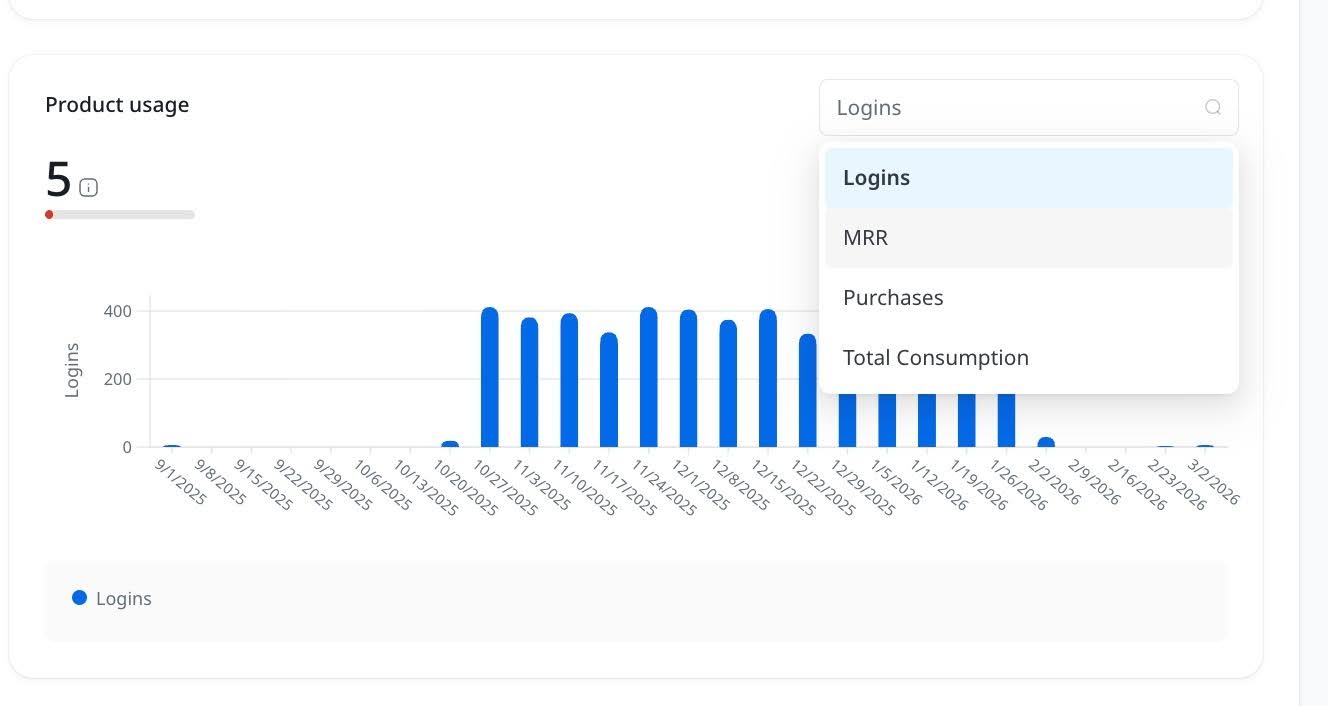
The Product usage dashboard on the Account page displays any numerical value added to custom fields in Staircase AI.
The data available as a viewable option in the Product usage dashboard includes any customer Number Field that is synced to Staircase AI.
Staircase AI recommends syncing fields such as a composite score or aggregate metric that represents a product adoption score. If customers do not have a clearly defined composite score, metrics such as HAU (Healthy Active Users) or WAU (Weekly Active Users) are recommended alternatives.

This widget helps teams:
- Monitor customer adoption trends
- Assess product engagement levels
Use the Product Usage Score alongside the Staircase AI health score, except for low-touch tiers where limited customer communication data reduces the effectiveness of Staircase AI's human-analytics-based health scoring.
Data Sources
Product usage data is ingested from external systems through the following supported integrations:
- APIs: Direct API-based integrations with product systems
- S3 Connections: Commonly used for ingestion from analytics platforms such as Looker
- Custom Data Connectors: Configured to map CRM account IDs with usage statistics.
Staircase AI uses these integrations to generate dedicated product usage scores.
The product usage score follows the same relative framework used for engagement, open items, and response time. Additionally, the configurable aspect is the weighting within the health score; the Product Usage Score calculation itself is not configurable.
A Relative Score compares a customer's behavior to the average behavior of their peers within the same segment. This score helps identify how a customer is performing in the context of a broader group by account tier.
This is in contrast to an Absolute Score, which measures a customer's behavior in isolation, compared only to their own historical activity.
The Usage score is calculated based on the numerical custom fields you map to it, and is visible in the product usage widget on the account page.
If any integration is not configured, the Product Usage widget displays zero impact by default and does not affect the overall health score.
Hide or Remove the Product Usage Widget
If product usage data is not in use, you can:
- Remove from Dashboard View: Use dashboard customization (drag and drop configuration) and remove the Product Usage widget from the Accounts page (as per user setting).

- Exclude from Health Score Calculation: Adjust Health Score configuration to remove the Product Usage component and set its weight to zero or exclude it entirely. Even if visible, the widget has no scoring impact unless configured.
- Product Usage is not included in health scoring by default. It must be manually configured and weighted.
- Data appears only if an integration is properly set up.