
Course Families
IMPORTANT
The functionality described in this article is not applicable to the Skilljar Starter package.
This article helps admins to create and manage course families.
Overview
Course Families help you manage and report on related course variants, such as translations or audience-specific versions, from a single location. Instead of maintaining separate course entries or using label-based workarounds, you can group related courses and access related courses from a single place. Quickly locate the right variant by searching using family names and exporting course lists.
Create Course Families
Perform the following steps to create a Course Family:
- Open your Skilljar dashboard.
- Expand the Course Management header on the left, and select Courses.
- In the Courses page, click the Course Families tab.
- Click New Course Family.

- Specify a Name for the Course Family, and click Save Name.

- Click Add Existing Courses. The Select and Order Courses panel appears.

- Select the courses from the Available courses section to add them to the Family. The selected courses move to the Courses in family section.
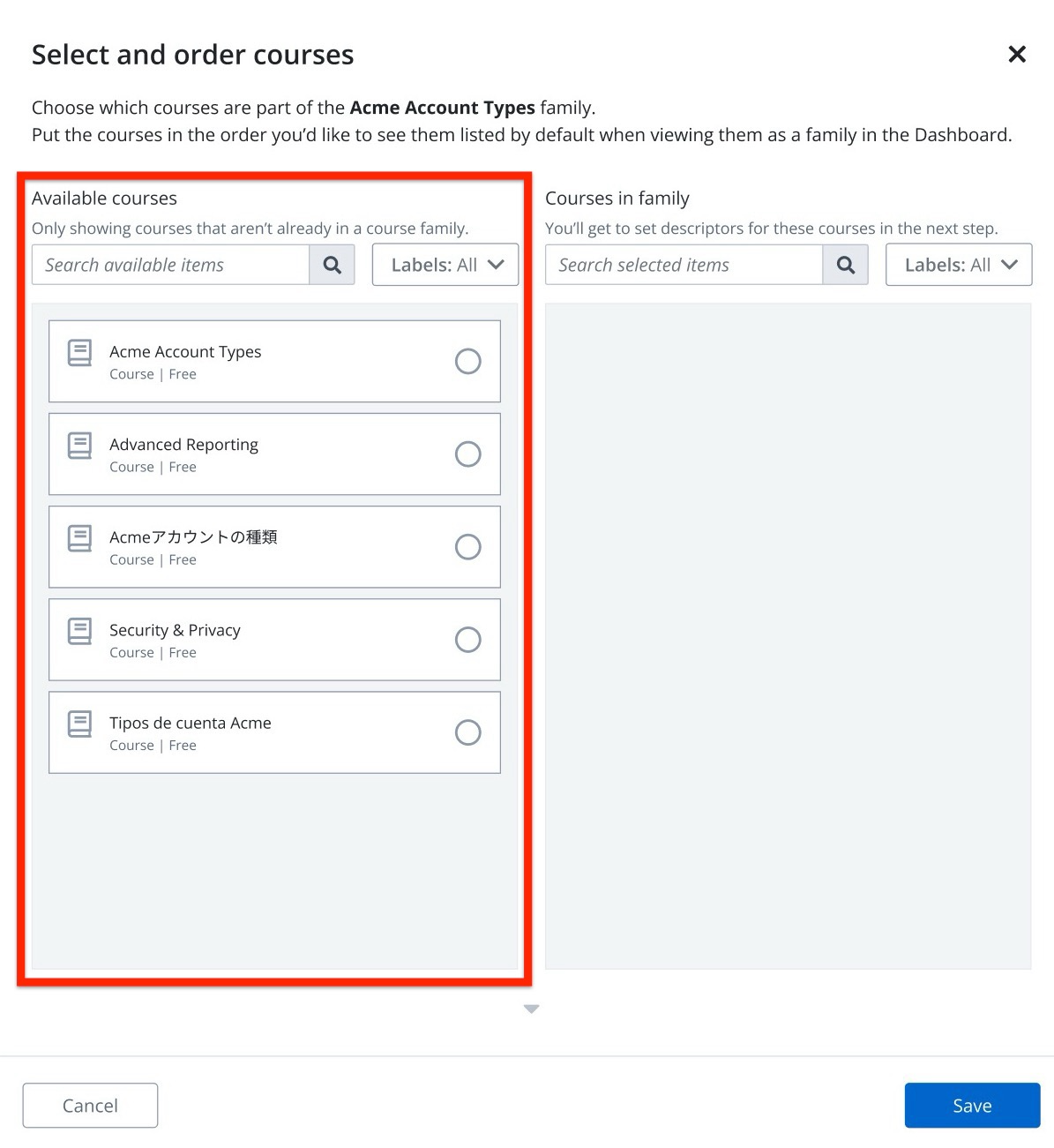
Note: A course cannot be assigned to multiple Course Families simultaneously; it can belong to only one Course Family at a time. - After selecting all the required courses, click Next: Set Descriptors. The Set course descriptors page appears.
- In the Internal descriptor, specify a description for the courses to help you identify them and click Save. The Family Details page appears.

Note:- The Internal descriptor fields appear only for admins and are not visible to students.
- Admins can also search by course family name or descriptors.
The newly added courses are updated under the Courses section of the Family Details page.
Manage Course Families
Perform the following steps to add and edit courses in a course family:
- In the Courses page, click the Course Families tab.
- Select the Course Family to edit.

- Click Manage Courses.

- In the Select and order courses page, click the courses from the Available courses section to add to the family, or click the X icon from the Courses in family section to remove existing courses from the family.

Note: In addition to adding and removing courses, you can drag and drop the courses in the Courses in family section to add them in the required order. - Click Next: Set Descriptors.
- Add descriptors to the newly added courses. You can also update the descriptors of the existing courses.
- After updating the descriptors, click Save. The Course Family is created.
To view enrollment details of students for the courses with families. Navigate to Course Management > Courses > select a course family > Enrollments tab. The following details are displayed:
- Course
- Student Name
- % Completed
- Total Session time
- Registered
- Completed
- Latest Activity
- Rating

For more information on course family analytics, refer to the Course Analytics and Enrollments Analytics article.
Delete a Course Family
Perform the following steps to delete a Course Family:
- In the Courses page, click the Course Families tab.
- Select the Course Family.
- In the Family Details page, click Delete Course Family.

- On the Delete Course Family pop-up, provide final confirmation. The Course Family is deleted.