---
title: "Use Videos For User Onboarding"
slug: "use-videos-for-user-onboarding"
updated: 2026-11-23T12:30:11Z
published: 2026-11-23T12:30:11Z
canonical: "support.gainsight.com/use-videos-for-user-onboarding"
---
> ## Documentation Index
> Fetch the complete documentation index at: https://support.gainsight.com/llms.txt
> Use this file to discover all available pages before exploring further.
# Use Videos For User Onboarding
Using videos is an effective way to onboard users as part a signup process or when onboarding them to your latest release.
## Embed Videos
Perform the following steps to add videos to your engagement:
1. Create a new in-app engagement
A video can be embedded in any type of in-app engagement - Dialog, slider, or a guide. Embedding the video using the universal editor - select a template (blank) and go to the edit step. Gainsight PX supports videos of any format.
2. Click on the video icon and insert the video link or embed code. Refer to the sections below to learn more about getting embed codes from various video channels. 
3. Adjust the video to the size and location you'd like, you can drag it from one of the corners to cover the entire dialog step 
4. Background color: In case the video is covering the entire surface of the dialog set the background to darker than white so the X button will show up.
5. Preview: You can now preview your video by first saving and then clicking on the 'eye' preview icon on the top right and selecting a target URL in your app.
## Tips & Tricks
You can adjust the position of the dialog or play with overlay settings by selecting the **Settings** tab.

**TIP:** When using Youtube videos you might want to disable video recommendations by clicking share, select code and uncheck the "Show suggested videos when the video finishes" option.
## Embed Vimeo Videos
This section explains how to embed videos from Vimeo into Gainsight PX Engagements. There are two methods to embed a video into Gainsight PX.
### Use the Video Code
To embed videos from Vimeo using the shared link:
1. Navigate to [*vimeo.com*](https://vimeo.com/)*.*
2. Navigate to the required section.
3. Click **Share**.
4. Copy the code in the **Link** section.

5. Copy the video share link.
6. Navigate to Gainsight PX engagement and click the Video icon.
7. Click the embed section and paste the code.
8. Click **Insert**.
### Use the Embed Code
To embed videos from Vimeo using the embed code:
1. Navigate to [*vimeo.com*](https://vimeo.com/)
2. Navigate to the required section.
3. Click **Share**.
4. Copy the code in the **Embed** section.

5. Copy the video embed link.
6. Navigate to Gainsight PX engagement and click the Video icon.
7. Click the embed section and paste the code.
8. Click **Insert**.

## Embed Youtube Videos
This section explains how to embed videos from Youtube into Gainsight PX Engagements. There are two methods to embed a video into Gainsight PX.
### Use Copy Link
To embed videos from Youtube using the copy link:
1. Navigate to *youtube.com*
2. Select the required video.
3. Click the **Share** tab.
4. Click **COPY**.

5. Navigate to Gainsight PX.
6. Click the Insert video icon.
7. Click the **Link** section.
8. Paste the code and click **Insert**.
### Use Embed Code
To embed videos from Youtube using the copy link:
1. Navigate to *youtube.com*
2. Select the required video.
3. Click the **Share** tab.
4. Click **Embed**.
5. Click **COPY**.
6. Copy the video embed link.
7. Navigate to Gainsight PX engagement and click the Video icon.
8. Click the embed section and paste the code.
9. Click **Insert**.

## Embed Adobe TV Videos
You can also embed videos from Adobe TV. You must copy the video link of your video from Adobe TV. Once you copy the code. you can create an engagement and navigate to embed section, as shown in the above section. In the Insert Video icon, click the embedded code tab and use the following code to embed the video. You must replace the URL after the "src" with URL of your Adobe TV video.
```plaintext
```
## Insert MP4 Videos in Engagements
Apart from embedding videos from other video sites, you can also insert MP4 format videos into an engagement. To insert videos into an engagement, click the **Code View** option on the **Editor** tab of the engagement as highlighted in the following image.
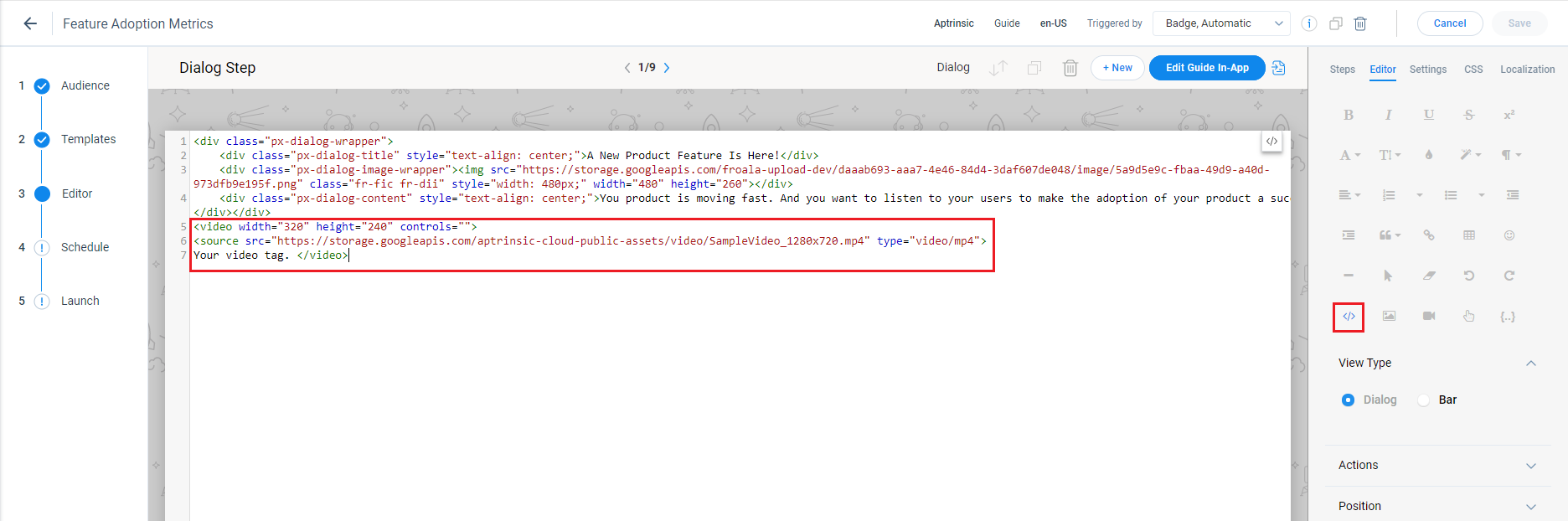
Add the following code in the code section of the engagement. Replace the value in the **source src** tag with the URL of the required video. You can modify the values in the *width* and *height* parameters to set the size of the video.
```plaintext
```