---
title: "Sending Data to Segment"
slug: "sending-data-to-segment"
updated: 2026-11-23T12:33:07Z
published: 2026-11-23T12:33:07Z
canonical: "support.gainsight.com/sending-data-to-segment"
---
> ## Documentation Index
> Fetch the complete documentation index at: https://support.gainsight.com/llms.txt
> Use this file to discover all available pages before exploring further.
# Sending Data to Segment
IMPORTANT
**The functionality described in this article is not applicable to the Skilljar Starter package.**
With Skilljar, you can send student registration, student activity, and training activity data directly to Segment. The benefits include:
- Automatically capturing student lead data, such as first name, last name, email address, job title, and more
- Adding training activity (such as registrations and completions) and a 360-degree view of your lead (training plus other data).
*(Learn more about marketing your training in our eBook:* [*How to Market Customer Training*](https://blog.skilljar.com/using-email-to-drive-course-completions)*)*
The easiest way to send data to Segment is via our Javascript-based events available in the [Theming](/v1/docs/adding-web-analytics-conversion-tracking) area of your dashboard. We call Segment's [Analytics.js](https://segment.com/docs/sources/website/analytics.js/) library to add leads and training data. This can be done without any developer involvement.
You will need:
- Your Segment project’s **Write Key**, which you can find in your Segment project setup guide or settings.
## Installing Segment Analytics.js
In the **Analytics Tracking Code Snippet** field, add the general Segment Analytics.js code snippet to load their tracking library. The code within the Analytics Tracking Code Snippet loads on every page.
Before adding the snippet below, you’ll need to replace YOUR_WRITE_KEY with your Segment project’s Write Key, which you can find in your project setup guide or settings.
```plaintext
```
Note: This tag also starts to track course catalog page views with the analytics.page call.
## Identifying and Tracking Skilljar Students
This code snippet would be added directly below the above code snippet to add functionality that calls the Analytics.identify endpoint to create users in Segment when they are created in Skilljar. Once Skilljar makes a call to identify a user in Segment, further calls can be made to track user activity down the line.
In the **Global Code Snippet**, paste the following code to start identifying users:
```plaintext
```
If applicable, you can add any custom sign up field information you are capturing about your Skilljar users to the Analytics.identify call, attaching the information to the Segment user as well. To do this, replace SIGN-UP-FIELD in the code below with your exact custom sign up field names.
```plaintext
```
If you have multiple sign-up fields, you can add them in the same format, separated by a comma.
## Sending Course Enrollment Events
In the **Conversion Code Snippet**, paste the following code to start tracking the Course Enrollment event using the Published Course ID. The code within the Conversion Code Snippet only loads upon the enrollment or purchase of a course.
```plaintext
```
Alternatively, the Course ID can be used as well to track the Course Enrollment event.
```plaintext
```
## Sending Course Completion Events
In the **Completion Code Snippet**, paste the following code to start tracking the Course Completion event using the Published Course ID. The Completion Code Snippet only loads upon the completion of a course.
```plaintext
```
Alternatively, the Course ID can be used as well to track the Course Completion event.
```plaintext
```
## Sending Lesson Completion to Segment
In the **Global Code Snippet**, paste the following code using the Published Course ID to start tracking lesson progress:
```plaintext
```
Alternatively, the Course ID can be used as well to track the Lesson Completion event.
```plaintext
```
## Using Skilljar Data in Segment
Once you are successfully passing Skilljar data to Segment, you will be able to send this information along to your Destinations which you have set up in Segment
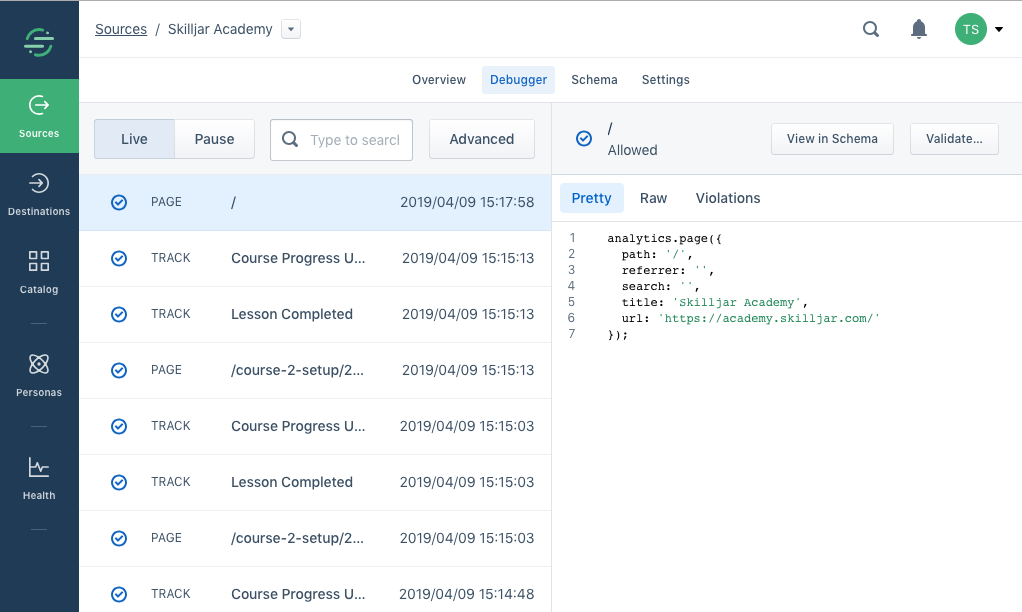
You can confirm that Skilljar Events are passing through your Segment instance by viewing the Debugger and completing some actions as a student on a domain that has your tracking enabled: